

What Does Google AI Control Do for Search Generative AI?
Quick Answer: The Google AI control is a Search Console setting that Google documents for managing a site’s inclusion in generative AI features on Google Search, including AI Overviews and AI Mode. It is not the same as robots.txt, noindex, crawling, indexing, ranking, or ordinary Search Console reporting. Before changing it, site owners should review current AI-feature visibility, page-level controls, business goals, analytics coverage, and the exact current wording in Search Console.
For owners, healthcare practices, law firms, and agencies, this is a strategic visibility decision, not a simple technical toggle. As of 2026, Google’s documentation says AI experiences in Search use existing Search controls, and Google provides separate reporting for generative AI visibility. No agency, consultant, or platform can promise that opting in or opting out will produce rankings, leads, revenue, or AI citations.
What the Google AI control is
This Search Console setting is a practical shorthand for Google’s Search generative AI control. In plain English, it is a site-wide control in Search Console for deciding whether a site is included in Google Search generative AI features. Google’s own guide for generative AI features says site owners can control how their content appears in Google Search’s AI experiences, including AI Overviews and AI Mode, using Search controls Google’s guide to optimizing for generative AI features.
That matters because many teams hear “AI control” and assume it is a crawler block, ranking switch, content licensing setting, or analytics filter. It is not useful to treat it that way. The setting belongs in the same conversation as search visibility, content presentation, and site-wide participation in generative Search experiences, but it should not be mixed up with every other SEO control.
In this article, “generative AI control” means the Search Console control Google documents for Google Search generative AI features. The exact label, availability, property scope, and restoration flow can change, so a site owner or agency should confirm the live Search Console interface before acting.
How the generative AI control differs from ordinary SEO controls
The generative AI control affects a different layer of the Search process than many familiar technical SEO settings. Crawling asks whether Google can access a URL. Indexing asks whether Google can include a page in its index. Ranking asks whether Search systems select and order pages for a query. Generative feature inclusion asks whether content can appear as part of an AI experience in Search.
Those layers can interact, but they are not interchangeable. A page can be crawlable and indexed while the site owner changes a site-wide generative feature setting. A page can be blocked from indexing with a valid noindex directive while the site remains otherwise crawlable. A page can be eligible for ordinary Search without being surfaced in a specific AI experience. That is why an AI search opt out decision needs a documented baseline.
Google’s AI features documentation explains that AI Overviews and AI Mode are part of Google Search, and that site owners can manage preview controls for how content may appear in Search’s AI formats Google Search Central’s AI features documentation. The word “Search” is important. This is about documented Google Search features, not every AI system on the internet.
Which features the setting is documented to affect
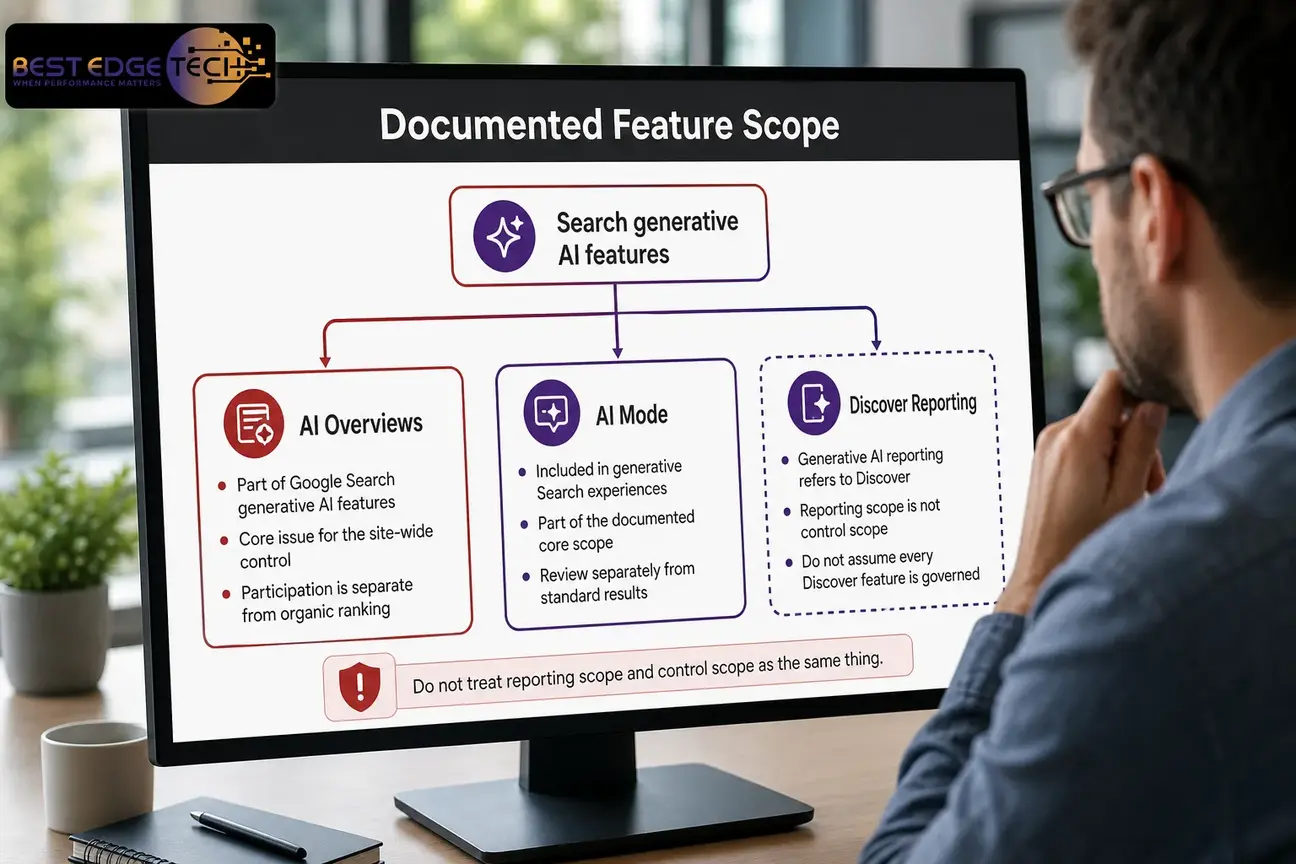
As of 2026, the documented scope you should treat as the core issue is Google Search generative AI features. That includes AI Overviews and AI Mode. Google also documents generative AI reporting for Search and Discover, but reporting scope and control scope are not the same thing.
AI Overviews control and search-result presentation
AI Overviews appear within Google Search as a generative format. An AI Overviews control question is really a participation question: should this site be included in the generative Search experience where Google may show AI-generated responses and supporting links? That is different from asking whether a service page can rank in ordinary organic results.
For many businesses, AI Overviews control decisions are tied to content strategy. Informational resources, comparison pages, service explainers, local trust pages, and educational healthcare or legal-marketing content may be more likely to raise internal questions about content reuse and brand presentation. Still, no one should assume that changing the setting will improve or harm ordinary rankings in a predictable way.
Use AI Overviews control analysis to decide whether the business wants that kind of visibility, how it will be measured, and which pages are currently appearing. If the concern is only that a short passage should not be shown, a page-level snippet control may be more precise than a site-wide AI search opt out.
AI Mode settings and query exploration
AI Mode settings belong in the same review because Google identifies AI Mode as a generative Search experience. AI Mode may involve longer query exploration and follow-up behavior than a standard results page, so teams should avoid assuming that its presentation, user behavior, and reporting will match AI Overviews exactly.
When reviewing AI Mode settings, separate what Google documents from what your team observes. Google documents the existence of the feature and the role of Search controls, but it does not provide a simple business formula that says a given site will receive a specific level of visibility, clicks, or leads. Treat AI Mode settings as part of a search visibility governance process, not as a shortcut to a predictable outcome.
Best Edge Tech’s AI SEO and GEO services page explains the broader service category around AI search visibility, answer engine optimization, and generative engine optimization. The decision to opt in or opt out still depends on the site’s goals, industry, content, and risk tolerance.
Discover generative AI features and reporting limits
Google’s Search Console documentation for generative AI performance reporting refers to visibility in generative AI features on Search and Discover. The report can show impressions, pages, and date-based trends for those experiences Google Search Console’s Generative AI performance report.
That does not automatically prove that the same site-wide Search generative AI control directly governs every Discover generative AI feature. The safer interpretation is this: Google documents Search and Discover reporting, and Google documents Search generative AI controls, but a site owner should verify the current control wording before assuming Discover is included. This distinction is especially important for publishers, healthcare organizations, law firms, and agencies managing client approvals.
What the control does not do
The setting is not a universal AI switch for the internet, and it is not a replacement for technical SEO maintenance. The easiest way to avoid mistakes is to define the boundaries before changing anything in Search Console.
| Common assumption | More accurate interpretation | Why it matters |
|---|---|---|
| It is the same as robots.txt | robots.txt is a crawl-access instruction, while the generative AI control concerns participation in Google Search generative AI features. | Blocking crawling can create diagnosis problems and does not equal a site-wide AI-feature decision. |
| It is the same as noindex | noindex is an indexing instruction for pages Google can access and process. | Using noindex for an AI search opt out can remove pages from ordinary Search if that is not the intended goal. |
| It is a ranking switch | Google’s documentation does not support treating the setting as a ranking improvement or ranking loss lever. | Ranking changes should be evaluated separately from AI-feature inclusion. |
| It replaces Search Console reporting | Reports measure observed visibility; controls change permissions or participation. | A report can inform the decision, but it is not the decision itself. |
| It controls non-Google AI platforms | The documented control concerns Google Search generative AI features. | Other AI products have their own crawling, retrieval, or content-use systems. |
Google AI control vs. robots.txt, noindex, and ranking
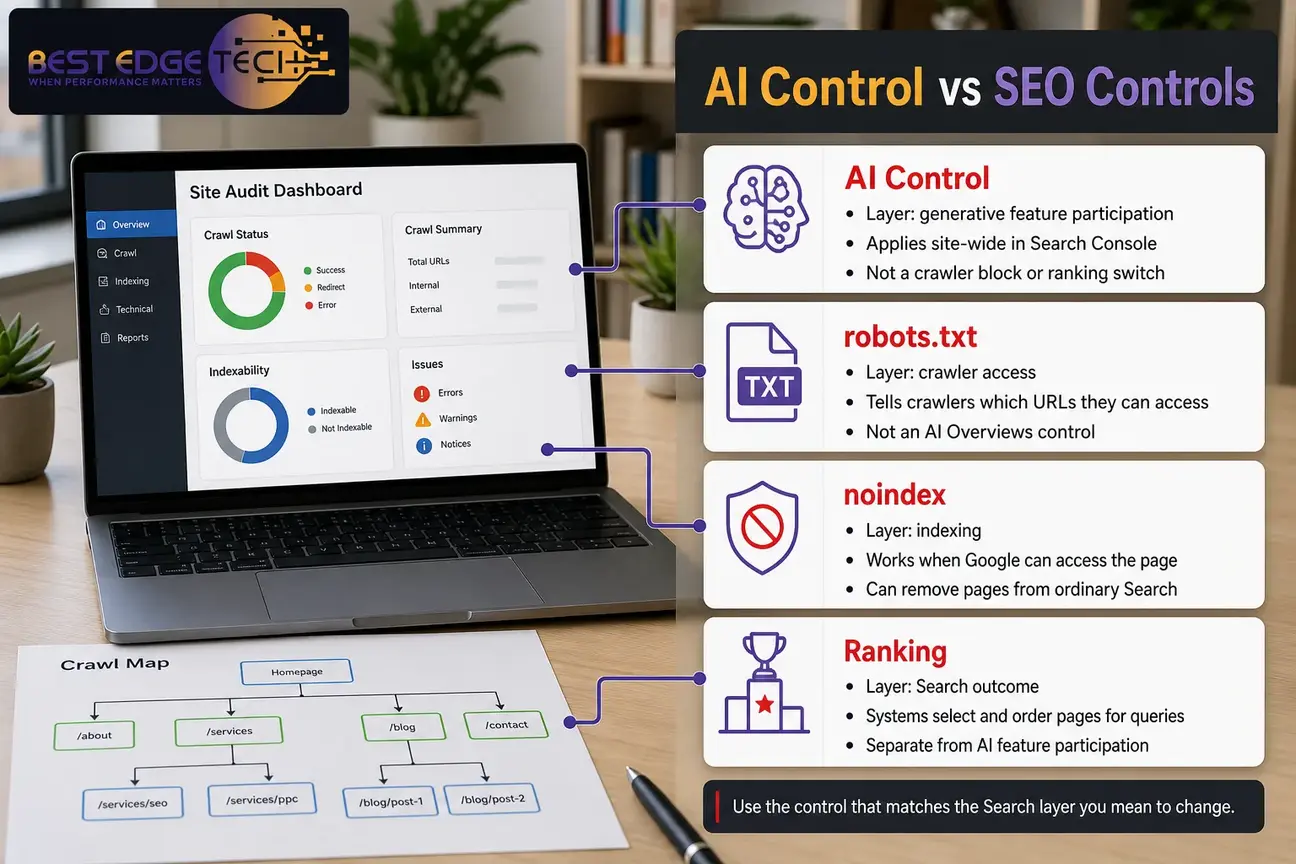
Site owners often ask whether they can solve this with robots.txt. That question is understandable, but it mixes two different layers. robots.txt is associated with crawler access. The generative AI control is associated with Search generative feature participation. A crawler-access file is not the same as an AI Overviews control, and it should not be used casually on important templates.
Google’s robots.txt documentation says the file tells search engine crawlers which URLs on a site the crawler can access, primarily to avoid overloading a site with requests Google Search Central’s introduction to robots.txt. That behavior is useful for crawl management, but it is not the same as a decision about whether Search can include a site in generative AI features.
Noindex is different again. Google’s noindex documentation says that to prevent a page from appearing in Google Search, Google must be able to crawl the page and see the noindex rule; if the page is blocked by robots.txt, Google may not see the noindex directive Google’s documentation on blocking Search indexing with noindex. That requirement is important because some teams try to combine robots.txt and noindex in ways that work against their own goal.
Ranking and retrieval are also distinct. A page may be indexed but not rank well for a query. A page may rank for a query but not appear as a supporting link in an AI answer. A page may be useful for one query type and irrelevant for another. The available public documentation does not support a simple formula that turns the setting into a predictable ranking outcome.
Page-level controls that still matter
Even if the site-wide generative AI control is the main question, page-level controls still deserve review. Google describes existing Search controls for AI formats, including snippet-related controls and indexing controls. Those controls are more precise than a site-wide setting when the issue is limited to a page, template, or passage.
The most common page-level controls to discuss with a developer or SEO team are:
- nosnippet: tells Google not to show a text snippet or video preview for a page in Search results.
- data-nosnippet: identifies parts of a page that should not be used as a snippet.
- max-snippet: limits the length of a text snippet that may be shown.
- noindex: requests that a page not be indexed, which is a much broader decision than display limitation.
These controls are not interchangeable. If the goal is to keep an entire page out of ordinary Google Search, noindex may be relevant. If the goal is to limit displayed excerpts, snippet controls may be relevant. If the goal is a site-wide generative AI control decision, those page-level tools may not be enough on their own.
This is where an AI search readiness audit helps. A readiness review can separate crawlability, indexability, structured data, internal linking, content quality, and AI-feature visibility before a site owner changes anything site-wide.
How measurement changes after an AI search opt out
An AI search opt out can change what you are able to observe in generative AI reporting. If the affected feature scope no longer includes the site, impressions for those generative AI experiences may decline or disappear. That does not automatically mean ordinary organic rankings fell. It means the site’s participation in a specific feature set changed.
Search Console reporting should be compared with other data sources. For example, a business may look at organic landing pages, form submissions, phone calls, qualified lead notes, and CRM records. Those systems are outside Google’s documentation, so they should be used carefully and consistently. Search Console measures Search visibility; it does not prove lead quality, revenue, or final customer value by itself.
If your team is already tracking AI visibility, compare the Generative AI performance report with your internal baseline. Best Edge Tech’s guide to AI search visibility tracking is a useful next step for teams that need a practical reporting process without assuming that every AI impression produces a click.
Use the SCOPE framework before changing the setting
A site-wide generative AI control deserves a deliberate review. Best Edge Tech recommends using a simple SCOPE framework: Scope, Commercial value, Observed visibility, Page controls, and Evaluation plan. This is not a recommendation to opt in or opt out. It is a way to make the decision traceable.
S — Scope of the generative AI control
Start by confirming what the current Search Console interface says. Which verified property is affected? Is the setting shown for the property you manage? Does the current wording mention Search only, or does it mention other surfaces? Are AI Overviews control and AI Mode settings clearly included? Do not rely on memory, screenshots from another property, or assumptions from a different account.
C — Commercial value of AI visibility
Ask whether generative Search visibility helps the business reach qualified prospects. A medical practice, law firm, local service business, or agency may value educational visibility differently. Some pages support early research. Some pages support direct service inquiries. Some pages contain sensitive positioning or regulated-topic language that requires internal review.
Commercial value does not mean an assured lead path. It means the team can explain why inclusion or exclusion supports the business strategy. If the business depends on educational discovery, an AI search opt out may have different implications than it would for a site with mostly private client portals or thin public content.
O — Observed visibility before AI Mode settings change
Record what is happening before changing AI Mode settings or any broader control. Export or document generative AI impressions, appearing pages, dates, and overall Search performance. Also note recent site changes, content launches, migrations, technical fixes, and tracking updates. Without that context, post-change analysis becomes guesswork.
P — Page controls, policies, and precision
Review page-level controls before choosing a site-wide generative AI control. If the concern is one article, one service page, or one section of a page, the answer may be a more precise content or snippet setting. If the concern is the whole site’s participation in Google Search AI experiences, the site-wide setting may be the relevant control to evaluate.
E — Evaluation plan after the AI search opt out

Define how the decision will be evaluated. Which reports will be checked? Who records the change date? Which business metrics matter? Who can restore or revise the setting? Avoid choosing an arbitrary waiting period unless your team has a reason. The right evaluation window depends on query demand, crawl patterns, content volume, market activity, and how much data accumulates.
Implementation review steps for owners and agencies
Use this checklist before changing a site-wide Search setting. It is especially useful for agencies managing client sites, healthcare practices, law firms, and businesses where marketing, compliance, and technical teams all have a stake in the decision.
- Confirm the verified Search Console property. Make sure the person making the change is working in the correct property and has appropriate authorization.
- Record the current setting. Capture the current status, date, property, and person responsible for the change. Do not rely on memory.
- Document current generative AI visibility. Review impressions, appearing pages, and date trends in the Generative AI performance report where available.
- Separate AI-feature data from ordinary Search data. Do not interpret every Search Console movement as a result of the AI search opt out.
- Review high-value pages. Include service pages, location pages, informational guides, healthcare-marketing pages, legal-marketing pages, and agency fulfillment pages where relevant.
- Check robots.txt separately. Confirm crawler-access rules are not accidentally blocking important templates or resources.
- Review noindex and snippet controls. Make sure page-level directives match the actual goal.
- Check crawlability and internal links. A technical issue can make AI-feature analysis misleading. If needed, compare this with an internal linking audit.
- Confirm analytics coverage. Make sure the team can compare Search Console trends with organic landing pages, leads, calls, or forms without claiming unsupported causation.
- Coordinate with stakeholders. Agencies should document the client’s instruction and scope before making a site-wide change.
- Change one relevant control at a time where practical. If multiple settings are changed together, analysis becomes harder.
- Record the implementation date. Add notes about the expected scope, affected property, and reason for the change.
- Review after data accumulates. Compare the baseline with later reports before restoring, revising, or expanding the decision.
If your team needs help separating crawlability, indexing, Search Console reporting, and AI visibility, Best Edge Tech offers SEO analysis for businesses that want a documented review before acting.
Questions to ask before opting out
Before choosing an AI search opt out, ask questions that force the team to define the real problem. A vague concern about “AI using our content” is not specific enough to guide a technical decision.
- What business problem is the opt-out intended to solve?
- Is the concern content reuse, brand presentation, privacy, intellectual property, regulated information, or measurement?
- Which Google features are definitely covered by the current setting?
- Does the business still want ordinary organic Search visibility?
- Are high-value pages currently appearing in AI features?
- Are AI-feature impressions associated with measurable visits or assisted inquiries?
- Would page-level controls be more precise than a site-wide generative AI control?
- Could AI Overviews control changes affect discovery for educational, local, healthcare, or legal-service queries?
- Who has authority to restore or revise the setting?
- Has the live Google documentation been checked before the change?
For healthcare, legal, and regulated-topic organizations, this article is educational marketing guidance only. It is not legal, medical, HIPAA, privacy, or compliance advice. Confirm advertising, privacy, content-use, and professional rules with your own counsel or compliance team before changing a setting for policy reasons.
When a site should not rush the decision
Do not rush the decision when the team cannot explain what the setting affects, when no one has checked Search Console reporting, or when recent site changes make the data noisy. A redesign, migration, content cleanup, canonical change, robots.txt update, or analytics change can all complicate interpretation.
Also pause when the concern is limited to a single page or template. A site-wide AI search opt out may be broader than necessary. Page-level snippet or indexing controls may solve a narrower problem with less impact on the rest of the site’s search visibility.
Agencies should be especially careful. Document the client’s instruction, the property affected, the reason for the change, the baseline, and the restoration path. This is not just an SEO issue; it is also a communication and governance issue.
How Best Edge Tech approaches this kind of AI search decision
Best Edge Tech treats AI search visibility as a technical SEO, content, and measurement problem—not as a promise of AI citations. A sound review starts with crawlability, indexability, structured data, helpful content, internal links, trust signals, and current Search Console reporting. Then the team can discuss AI Overviews control, AI Mode settings, and broader generative AI control choices in context.
For many small and mid-sized businesses, the practical question is not “Should we use AI?” It is: “Which search experiences support qualified discovery, and what controls do we need to manage risk?” That is a better question because it allows different answers for service pages, educational guides, local content, and regulated-topic content.
If you want help reviewing the decision, you can contact Best Edge Tech or call 252-303-0074. Share your website URL, goals, markets served, recent site changes, Search Console access status, and whether you are considering AI SEO and GEO services or a technical SEO audit.
Bottom line on Google AI control
The Google AI control governs a documented participation choice for Google Search generative AI features. robots.txt governs crawler access. noindex governs indexing when Google can access and process the directive. Search Console reports measure observed visibility. Ranking is a separate Search outcome.
The safest process is to document the baseline, verify the current interface, review page-level alternatives, and connect the decision to business goals. An AI search opt out may be appropriate for some situations and unnecessary or too broad for others. The right answer depends on your site, content, market, risk concerns, and measurement plan.
Search engines and AI products change often. Check current platform documentation before acting, and treat any result as dependent on your site, market and competition.
Frequently Asked Questions
Is the Google AI control the same as robots.txt?
No. The Search generative AI control concerns participation in Google Search generative AI features. robots.txt is a crawler-access file. Treating them as the same can create technical SEO problems and measurement confusion.
Does an AI search opt out remove a website from Google Search?
Not based on the documented purpose of the control. The setting is about generative AI feature participation, while ordinary Search removal is handled through other methods such as noindex or access restrictions when appropriate.
Does the setting affect AI Overviews and AI Mode?
Google’s documentation identifies AI Overviews and AI Mode as Google Search generative AI features. Site owners should still verify the current Search Console interface and documented scope before changing a setting.
Does the control apply to Google Discover generative AI features?
Google documents generative AI reporting for Search and Discover, but reporting scope and control scope should not be treated as identical without verification. Check the current Google documentation and interface before assuming Discover is directly controlled.
Will changing AI Mode settings improve ordinary rankings?
No ranking improvement should be assumed. AI Mode settings relate to generative Search participation, while rankings depend on separate Search systems, page relevance, quality, competition, and other factors.
How should a business measure the effect of a generative AI control change?
Start with a recorded baseline. Review generative AI impressions, appearing pages, dates, and ordinary Search performance, then compare those observations with analytics, calls, form submissions, and lead records where available.
Should a business use noindex instead?
Only if the actual goal is to keep a page out of Google Search. noindex is a broader indexing decision and should not be used as a casual substitute for AI Overviews control or a site-wide generative AI control.
Sources
- Google Search Central: Google’s Guide to Optimizing for Generative AI Features on Google Search
- Google Search Central: AI Features and Your Website
- Google Search Console Help: Generative AI Performance Report
- Google Search Central: Introduction to robots.txt
- Google Search Central: Block Search Indexing with noindex