
Google AI controls: What Site Owners Can Manage
Google AI controls are not one switch. Site owners can manage several separate outcomes in Google Search: whether Google can crawl a URL, whether a page can appear in Google Search, whether Google may show text snippets or selected passages, and whether a site is included in Google’s documented generative AI features. As of the current Google documentation, the main mistake is treating Search generative AI, nosnippet, data-nosnippet, max-snippet, noindex, and crawler access as interchangeable. They are not. Some preserve search visibility while limiting display. Others can remove a page from Google Search. None of the controls discussed here should be treated as a promise of ranking, traffic, AI citations, or control over non-Google AI systems.
Quick answer for busy site owners
Use the control that matches the business goal. If the page should stay in Google Search but one passage should not appear in snippets, evaluate data-nosnippet. If the whole page should avoid text snippets and direct use as input in specified Google AI features, evaluate nosnippet control. If the page should stay eligible but with a shorter text extract, evaluate max-snippet. If the page should not appear in Google Search at all, evaluate noindex. If the goal is site-wide inclusion in Google’s generative AI features, evaluate the Search generative AI control in Search Console.
For healthcare practices, law firms, local businesses, and agencies, the practical trade-off is simple: more restriction usually means less content available for search-result context. That can be appropriate for sensitive text, gated material, or pages that should not be indexed. It can also suppress useful information that helps qualified leads understand your services. Before applying a directive, decide whether you are protecting privacy, shaping display, or removing a page from Google Search.
What Google AI controls mean in practice

In plain SEO language, Google AI controls are the settings and directives that affect Google Search crawling, indexing, snippets, and documented AI features such as AI Overviews and Google AI Mode. The phrase can be confusing because people use it to mean everything from robots.txt to Search Console settings. A better way to think about the topic is by outcome.
There are four different layers:
- Crawl access: whether Googlebot can retrieve a URL or resource.
- Index inclusion: whether a page can appear in Google Search results.
- Snippet and content display: whether Google may show page-derived text or selected sections in search presentations.
- Generative AI feature inclusion: whether a site is included in Google’s documented generative AI features on Google Search.
Those layers overlap in business impact, but they are not the same technical control. A page can be crawlable and indexed while having snippets limited. A page can be excluded from Google Search with noindex. A site can be managed through the Search generative AI setting without treating that setting as a crawler block.
Google’s own documentation says that site owners can use controls such as nosnippet, data-nosnippet, max-snippet, or noindex to limit information shown from pages in Search, and it discusses AI features separately from ordinary search-result display on the Google Search Central AI features documentation. That distinction matters when you are trying to keep search visibility while reducing how much content Google may show.
For businesses that depend on search visibility, the safest workflow is not “block AI.” It is “define the exact outcome, then pick the least restrictive control that accomplishes it.” That is especially important for service pages, practice-area pages, location pages, and educational content that may influence qualified leads before they contact you.
Search generative AI control for site-wide inclusion
As of the current Search Console documentation, the Search generative AI control is a site-wide Search Console control for managing inclusion in Google’s generative AI features on Google Search. Google describes it as a way to manage a site’s inclusion in generative AI features on Google Search, including AI Overviews and Google AI Mode, in the Google Search Console documentation on controlling content shared on Search.
That makes Search generative AI different from robots.txt, noindex, nosnippet control, data-nosnippet, and max-snippet. It is not documented as a general crawler-access block. It is not the same as removing a page from Google Search. It is not a control for Bing, ChatGPT, social platforms, or any non-Google AI product.
For a business owner, the key question is not simply “Do we want AI?” The better question is: “Do we want this site managed differently for Google’s generative AI features while preserving other Google Search considerations?” That is a strategic question, not just a checkbox.
Implementation details may change in Search Console. Before you change the Search generative AI setting, confirm the current Google documentation, who has permission to adjust the property, whether the setting applies to the intended property, and how the change fits your search visibility goals. Do not assume that a setting change will produce an immediate or measurable traffic change by itself.
Googlebot access is a separate technical layer
Googlebot access determines whether Google can retrieve a URL or resource. That is different from whether a page can be indexed, whether Google can show a snippet, and whether the site is included in a specific Google Search AI feature. Conflating these layers is how sites accidentally create bigger SEO problems than they intended to solve.
If Google cannot reliably access a page, Google may not be able to evaluate the content normally for indexing and presentation. If Google cannot see a page-level directive, it may not process that directive as expected. That is why crawler-access decisions should be handled carefully, especially on large sites, healthcare sites, law firm sites, ecommerce sites, and agency-managed websites with multiple templates.
Do not use crawler blocking as a casual substitute for noindex, nosnippet control, or data-nosnippet. A crawl block is about retrieval. A noindex directive is about Google Search inclusion. Snippet directives are about display and permitted use under Google’s documented rules. The Search generative AI setting is about documented Google generative AI feature inclusion.
If you are unsure which layer is involved, an AI search readiness audit can help separate crawlability, indexability, structured data, internal linking, and content-display issues before you make broad changes.
AI Overviews control and ordinary snippets
AI Overviews control is often discussed as if it were one universal on/off switch. In practice, the controls that matter depend on whether you want to manage site-wide feature inclusion, page-level text display, selected passages, or index eligibility. As of the current Google documentation, Google connects several snippet controls to AI Overviews and Google AI Mode, but each control has a different scope.
AI Overviews are Google Search features. That means a site owner should evaluate Google’s own Search documentation rather than applying assumptions from other AI tools. For example, a rule that limits Google Search snippets should not be described as controlling every AI system on the web. Likewise, the Search generative AI setting should not be described as a replacement for access control, authentication, or noindex.
When clients ask about AI Overviews control, the first useful question is: “Are we trying to keep content out of a Google AI feature, keep a page out of Google Search, hide one sensitive section, or simply reduce how much text can appear?” Those are different goals. They require different implementation choices.
AI Overviews control also has a measurement problem. As of 2026, Search Console can help you monitor Google Search performance, but site owners should not expect perfect reporting for every AI answer, every source selection, or every user interaction. Treat Search Console as a key evidence source, not a complete map of every AI presentation.
nosnippet control for page-level display limits
nosnippet control is a page-level directive that tells Google not to show a text snippet or video preview for the page. Google’s Search Console documentation explains that nosnippet can affect what is shown from pages in Google Search and in documented Google AI features, including AI Overviews and Google AI Mode.
Google’s robots meta tag, data-nosnippet, and X-Robots-Tag documentation is the core source for the nosnippet, data-nosnippet, and max-snippet rules discussed in this article. As of the current documentation, when max-snippet and nosnippet are both present, nosnippet applies.
That is a strong display restriction, but it is not the same as noindex. nosnippet control does not, by itself, say that the page should be removed from Google’s index. It addresses what Google may show or use as a direct input under the documented rule. A page may still be eligible to appear in Google Search, but with less page-derived context available in the result.
The trade-off is important. A search result without a useful text snippet may be less informative to a potential customer. For a medical practice, a law firm, or a service business, the snippet often helps the searcher decide whether the page matches their need. Removing that context may be appropriate for some pages, but it should not be applied across a site without a clear reason.
nosnippet control may be useful when a page contains content you do not want excerpted in Google result presentations. It is less precise than data-nosnippet because it applies at the page level. If only one section creates concern, a section-level approach may preserve more useful search visibility.
data-nosnippet for selected text sections
data-nosnippet is the more precise option when the goal is to exclude specific text from appearing in snippets while leaving the rest of the page available. Google documents data-nosnippet as an HTML attribute for excluding certain sections of content from appearing in search-result snippets.
Implementation detail matters: Google documents data-nosnippet for use on span, div, and section elements. That does not mean every template should use all three. It means the attribute should be applied to the appropriate element that wraps the exact text you want excluded, without accidentally wrapping useful copy that should remain available for snippets.
That makes data-nosnippet useful when a page has one passage that should not be reused in a snippet, but the page still needs normal search visibility. Examples might include a short disclaimer, a pricing caveat, a client-specific note, a gated teaser, or text that could be misleading if pulled out of context. For healthcare, legal, and professional-service sites, this can be more appropriate than suppressing all page snippets.
data-nosnippet is not a privacy boundary. If information is confidential, it should not be publicly available in the first place. Use authentication, permissions, removal, or security controls for genuinely private content. A snippet directive can influence Google Search display; it should not be treated as access control.
Implementation precision matters. The attribute needs to wrap the exact content that should be excluded. If templates generate repeated sections, the implementation should be checked on representative URLs. If JavaScript changes the page after load, test what Google can actually see. If multiple directives exist, audit them together before assuming data-nosnippet will be the active rule.
Search generative AI decisions versus snippet directives
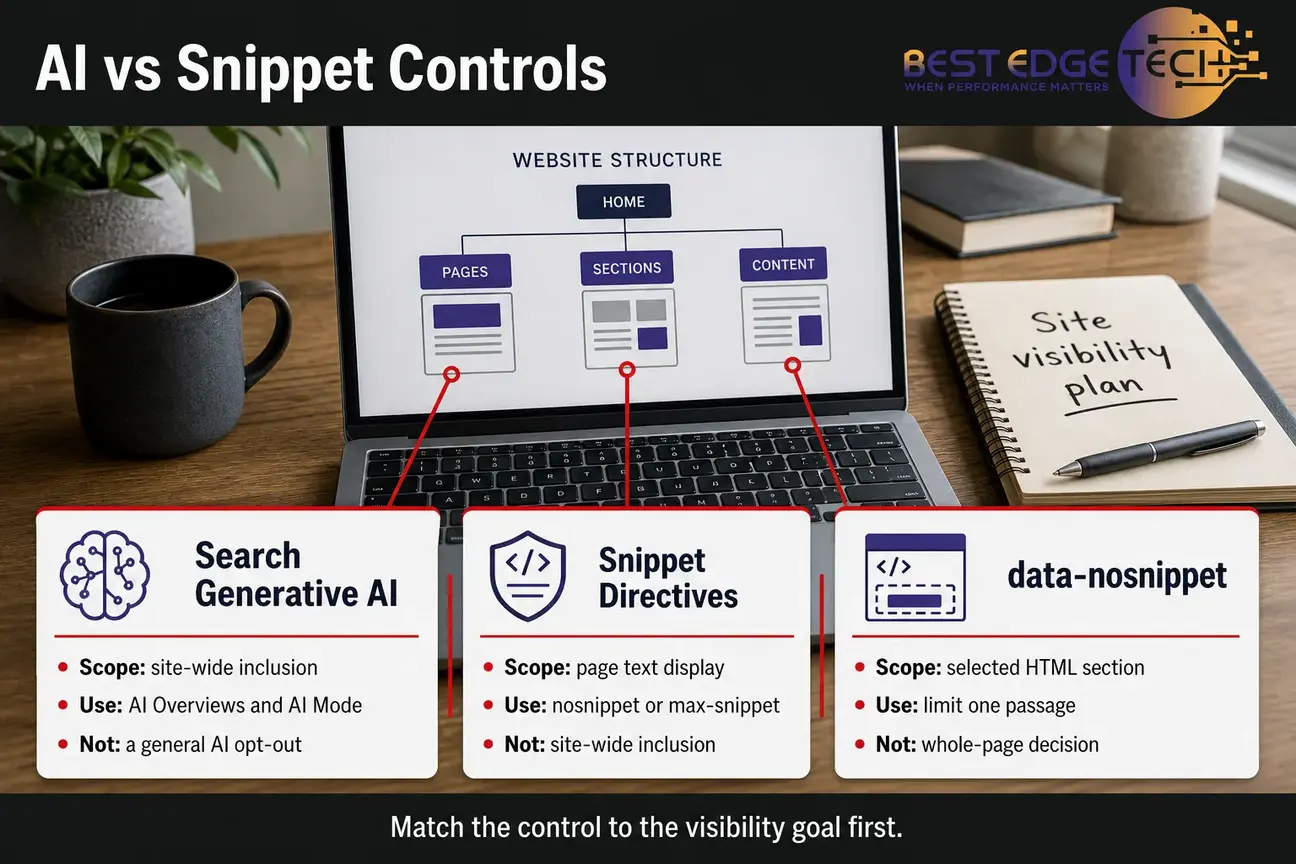
Search generative AI decisions happen at a different level from snippet directives. The Search generative AI setting concerns inclusion in Google’s generative AI features on Google Search. Snippet directives such as nosnippet control, data-nosnippet, and max-snippet concern what Google may show or use from pages under documented display rules.
This distinction helps avoid overcorrection. A business may want ordinary Google Search visibility and rich snippets of service content, while limiting one sensitive passage. That is a data-nosnippet problem, not necessarily a site-wide Search generative AI decision. Another business may want to manage the site’s inclusion in Google AI features broadly. That points toward the Search Console setting, but it still should be considered alongside SEO impact.
Search generative AI should also be separated from content quality. Using a control does not replace helpful content, clear entity signals, crawlable pages, or technical SEO. Google’s broader search systems still evaluate pages based on many signals and policies. Controls help manage inclusion and display; they do not create trust, expertise, or relevance by themselves.
If your site is evaluating AI search strategy beyond one directive, Best Edge Tech offers AI SEO and GEO services focused on practical technical SEO, structured data, entity clarity, helpful content, and AI-search visibility. No agency can promise rankings or AI citations, so the work should be framed around improving the inputs you can control.
max-snippet for shorter text extracts
max-snippet sets a maximum character length for a textual search-result snippet. It is not a promise that Google will show exactly that many characters. It is a maximum limit. As of the current Google documentation, max-snippet can limit how much text may be shown or used in documented Google Search features, including AI Overviews and Google AI Mode.
This makes max-snippet a middle-ground control. It is less restrictive than nosnippet control because it can still allow a shorter text extract. It is broader than data-nosnippet when the concern is not one passage but the overall length of text Google may use or show.
The main trade-off is context. A very short maximum may reduce the usefulness of your search result. A longer maximum may preserve more context while still limiting how much text Google may use under the directive. The right number depends on the page type, risk tolerance, and business goal.
max-snippet does not remove a page from Google Search. It also does not affect image or video previews in the same way as textual snippets. If your goal is to prevent a page from appearing in Google Search, noindex is the more relevant control. If your goal is to exclude one specific section, data-nosnippet is more precise.
Precedence matters here. When max-snippet and nosnippet are both present, nosnippet applies. In practical terms, do not expect a max-snippet value to preserve a short text extract if the same page or response also carries nosnippet.
Google AI Mode and what noindex changes
Google AI Mode is one of the Google Search AI features named in Google’s documentation as of 2026. The same caution applies here: do not treat Google AI Mode as proof that every AI product follows the same rules. This article is about Google Search controls, not a universal AI web standard.
noindex is different from snippet directives because it tells Google not to index content or let it appear in Google Search results. Google states this in its Search Console documentation on controlling content shared on Search. That makes noindex the strongest visibility-limiting option among the controls discussed here for Google Search inclusion.
noindex is appropriate when a page should not appear in Google Search at all. Examples might include thin internal utility pages, duplicate pages that should not be indexed, expired campaign pages, or pages that are public but not intended for search discovery. It is not simply an AI Overviews control or Google AI Mode control. It affects Google Search inclusion more broadly.
noindex is not authentication. A noindexed URL may still be accessed directly, linked from another page, or visited by someone who has the URL. If the information is confidential, remove it from public access and use proper access controls. For medical, legal, or regulated businesses, coordinate with your own compliance or legal team where needed; this article is marketing and SEO guidance, not legal, medical, HIPAA, or regulatory advice.
How the six controls compare
The easiest way to avoid mistakes is to compare controls by scope. The table below uses the practical SEO question a site owner is usually asking: what does this control affect, and what does it not affect?
| Control | Main scope | Removes page from Google Search? | Limits snippets? | Applies to documented Google AI features? |
|---|---|---|---|---|
| Search generative AI control | Site-wide Google generative AI inclusion | Not documented as a general noindex rule | Not primarily a snippet control | Yes, for AI Overviews and Google AI Mode as documented |
| nosnippet control | Page-level display and direct AI input | No, based on the documented rule | Yes, broadly | Yes, under Google’s documented snippet rules |
| data-nosnippet | Selected HTML sections | No | Yes, selected content | Use within documented Google snippet scope |
| max-snippet | Maximum text length | No | Limits text length | Yes, as documented for specified Google features |
| noindex | Page indexing | Yes | Ordinary snippets become unavailable through Google Search inclusion | Prevents normal Google Search inclusion; do not describe it as AI-only |
| Crawler-access rule | Retrieval access | Not itself an indexing directive | Not itself a snippet directive | Not itself a Google AI-feature control |
Precedence also matters. As of the current Google robots meta documentation, when max-snippet and nosnippet are both present, nosnippet applies. Audit existing meta robots tags, X-Robots-Tag headers, template settings, and plugins before adding another rule.
Which control fits each business goal?
Start with the goal, not the tool. Many sites create unnecessary risk by copying a directive from a forum, a plugin setting, or a competitor’s page without defining the outcome. For search-dependent businesses, the cost of an overbroad directive can be reduced visibility, weaker search-result context, or accidental deindexing.
Goal: keep search visibility but exclude one passage
Evaluate data-nosnippet. This fits selected text, not the whole page. Use it when a specific section should not appear in snippets, while the rest of the page can still help searchers understand the page. Check the live rendered HTML and representative templates.
Goal: suppress page text and direct AI input under Google’s rule
Evaluate nosnippet control. This is broader than data-nosnippet and may reduce the usefulness of your Google Search result. It can be appropriate when the whole page should avoid text snippets or video previews under Google’s documented rule.
Goal: limit how much text may appear or be used
Evaluate max-snippet. This can preserve some context while limiting text length. It is usually a better fit than nosnippet when the business still wants a search-result description but wants a shorter permitted extract.
Goal: keep a page out of Google Search
Evaluate noindex. This is a search-inclusion decision. Do not use it if you want the page to keep earning organic search visibility. Use it only when the page should not appear in Google Search results.
Goal: manage Google generative AI feature inclusion site-wide
Evaluate the Search generative AI control in Search Console. Confirm current Google instructions before changing it. Treat it as a Google Search feature-inclusion control, not a general AI opt-out and not a replacement for page-level directives.
Goal: stop Googlebot from retrieving a resource
Investigate crawler-access controls separately. Be careful: blocking retrieval can affect Google’s ability to evaluate content and directives. This is usually a technical SEO decision that should be tested before broad rollout.
Implementation checklist before changing directives
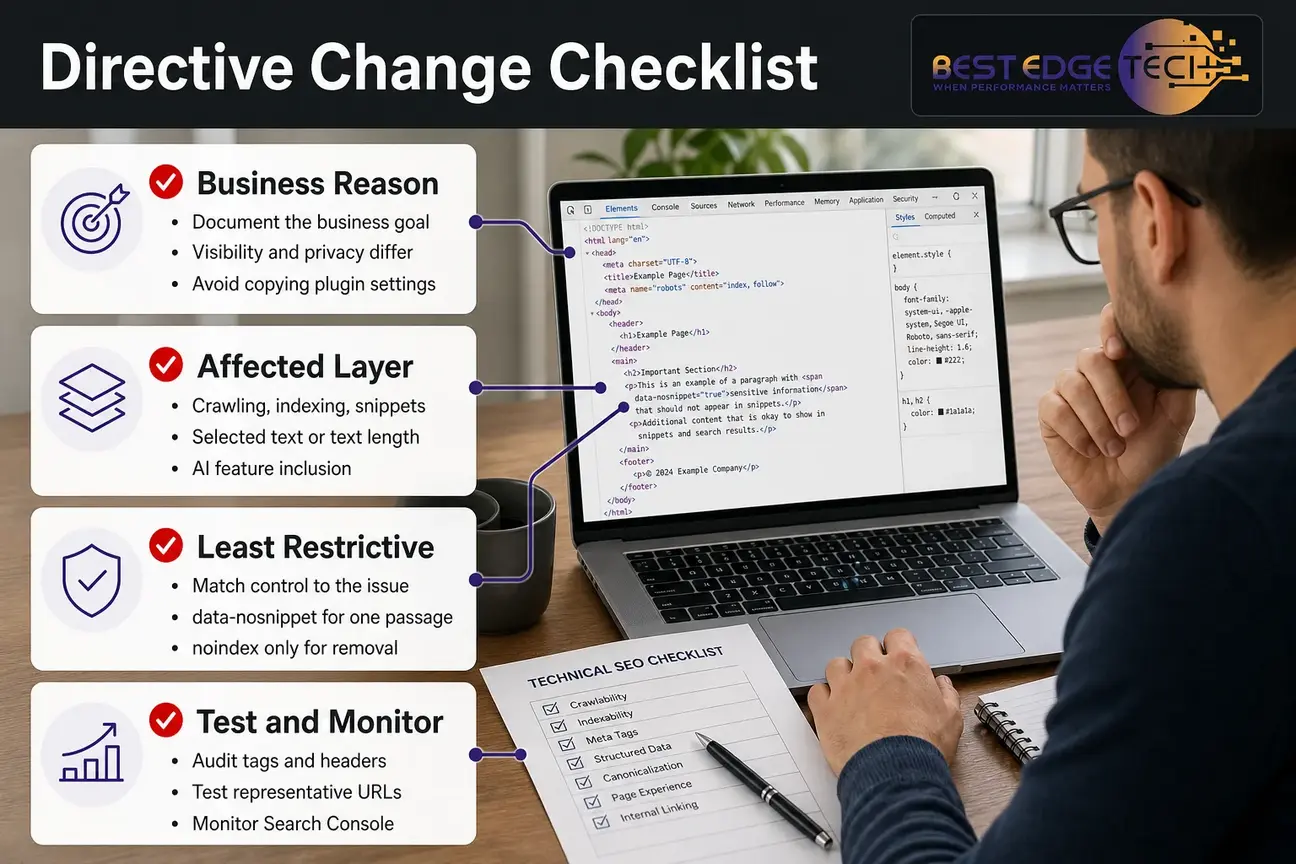
Use this checklist before adding or changing Search generative AI, nosnippet control, data-nosnippet, max-snippet, noindex, or crawler-access rules.
- Write the business reason first. Visibility, privacy, content-display preference, duplicate control, and AI-feature inclusion are different reasons.
- Identify the affected layer. Decide whether the issue is crawling, indexing, snippets, selected text, text length, or Google generative AI feature inclusion.
- Choose the least restrictive control that fits. Do not use noindex if max-snippet or data-nosnippet solves the actual issue.
- Audit existing directives. Check meta robots tags, X-Robots-Tag headers, CMS settings, SEO plugins, canonical tags, and template-level defaults.
- Check directive conflicts. Remember the exact precedence rule: when max-snippet and nosnippet are both present, nosnippet applies.
- Confirm the canonical URL. Apply and test directives on the URL Google is intended to index, not only on a duplicate or parameter version.
- Test representative pages. For large sites, test templates, categories, service pages, blog posts, and any special landing pages.
- Document the change. Record what changed, why it changed, when it changed, and who approved it.
- Monitor Search Console. Give Google time to process changes, then compare indexing, performance, and visibility patterns carefully.
- Recheck Google documentation. Search features and controls change, so current platform documentation should guide implementation.
If you want help separating indexing issues from AI-search display questions, Best Edge Tech’s SEO analysis service can assess technical SEO, crawlability, structured data, content issues, and search visibility risks before changes are deployed.
Decision checklist: visibility, privacy, or content display?
Use these questions before your developer, SEO team, or agency changes a live site:
- Should the page appear in Google Search at all? If not, noindex may be relevant. If yes, avoid controls that remove the page from Google Search.
- Should only selected text be excluded from snippets? If yes, data-nosnippet may fit better than page-level nosnippet control.
- Should all text snippets be suppressed? If yes, evaluate nosnippet, but understand the visibility and click-context trade-off.
- Should Google be allowed to use a shorter text extract? If yes, evaluate max-snippet rather than a complete snippet suppression.
- Is the desired change limited to AI Overviews and Google AI Mode? If the issue is site-wide inclusion in Google generative AI features, evaluate the Search generative AI setting.
- Is the information actually confidential? If yes, do not rely on snippet directives. Remove it from public access or use proper permissions.
- Could the directive suppress lead-generating content? Service descriptions, qualifications, FAQs, and local trust signals may help searchers decide to contact you.
- Has the implementation been tested on the correct canonical URL? A directive on the wrong URL may not accomplish the intended result.
- Are you measuring the outcome without assuming perfect AI reporting? As of 2026, Search Console is useful, but it should not be treated as a complete record of every AI answer or citation.
This is where technical SEO and content strategy meet. If a directive protects one concern but removes the content that makes a page useful, the business may trade away visibility without solving the real problem.
How to measure the effect in Search Console
Measurement should be cautious. As of the current Google documentation, Google states that sites appearing in AI features such as AI Overviews and Google AI Mode are included in overall Search Console traffic and are reported in the Performance report within the Web search type on the Google Search Central AI features page. Google’s AI optimization documentation also discusses measuring performance in generative AI features, but Search Console terminology and interface details can change.
Do not expect a dashboard to prove every effect from one directive. Search visibility can change because of crawl timing, ranking changes, seasonality, content updates, competitor activity, query mix, and interface changes. Treat the directive change as one variable and document the surrounding context.
A practical measurement workflow looks like this:
- Record the exact URLs, templates, and controls changed.
- Capture baseline Search Console performance for relevant pages and queries.
- Check indexing status and crawl signals after Google has time to process changes.
- Compare impressions, clicks, average position, and query mix without assuming causation from one metric.
- Assess whether the pages still support the business goal, such as qualified leads, informational visibility, or reduced snippet exposure.
For broader AI-search measurement, use AI search visibility tracking alongside Search Console. Tracking should be used to spot patterns and risks, not to promise AI citations or fixed visibility outcomes.
Common mistakes to avoid
Mistake one: using noindex when you only wanted less snippet text. noindex can remove a page from Google Search. If the page is important for leads, evaluate max-snippet or data-nosnippet first.
Mistake two: using nosnippet control across an entire site without a page-level reason. Suppressing snippets everywhere may reduce search-result context for valuable pages. Apply it only when the trade-off is justified.
Mistake three: treating data-nosnippet as security. data-nosnippet can manage selected snippet display in Google Search. It does not protect confidential information from users who can access the page.
Mistake four: assuming Search generative AI controls other platforms. The Search generative AI setting is documented for Google Search generative AI features. It should not be described as controlling non-Google AI systems.
Mistake five: changing directives without checking templates. Many SEO problems happen because a setting applies more broadly than expected. A template-level directive can affect hundreds or thousands of pages.
Mistake six: skipping internal communication. Content, compliance, development, and marketing teams may have different goals. A law firm may want visibility for a practice page but caution around one passage. A clinic may need marketing guidance checked by its own compliance process. Define ownership before implementation.
Where this fits in AI SEO strategy
Controls are only one part of AI search optimization. They help you manage inclusion and display, but they do not replace the fundamentals: crawlable pages, accurate content, clear entities, structured data where appropriate, internal links, useful service information, and trust signals that match the real business.
If your site is trying to earn visibility in AI answers, the first step is usually not adding more restrictions. It is making sure Google can crawl and understand the right content, that your pages answer real questions, and that your entity information is consistent. If you are evaluating structured data as part of that work, a schema markup audit can help identify whether markup supports the page content without exaggerating claims.
For North Carolina businesses and agencies working remotely across the United States, the right decision often depends on market risk. A small service business may need its pages to remain as visible and descriptive as possible. A healthcare or legal site may need more caution around selected language. An agency managing client sites may need a documented approval process before changing index or snippet directives.
Search engines and AI products change often. Check current platform documentation before acting, and treat any result as dependent on your site, market and competition.
Final guidance on Google AI controls
Google AI controls are useful when they are matched to a clear goal. Use the Search generative AI control for documented Google generative AI feature inclusion decisions. Use nosnippet control when the whole page should avoid text snippets and direct input use under Google’s rule. Use data-nosnippet for selected passages. Use max-snippet when a shorter text extract is enough. Use noindex only when the page should not appear in Google Search. Treat Googlebot access as a separate technical layer.
If you are planning changes across a live site, start with an audit, document the business reason, test representative URLs, and monitor Search Console after Google processes the changes. For help assessing the SEO impact before implementation, you can contact Best Edge Tech or call 252-303-0074. Share your website URL, goals, markets served, current Search Console access if available, recent site changes, and the service you are considering.
Frequently Asked Questions
Does the Search generative AI control block Googlebot?
No. Treat it as a Google Search feature-inclusion control, not a Googlebot block. Google documents it for managing site inclusion in generative AI features on Google Search, including AI Overviews and Google AI Mode. Crawler access is a separate technical layer.
Does nosnippet remove a page from Google Search?
No. nosnippet control affects text snippets, video previews, and documented direct input use for specified Google AI features. It is not the same as noindex. If the goal is to keep a page out of Google Search results, evaluate noindex instead.
When should I use data-nosnippet instead of nosnippet?
Use data-nosnippet when only selected text should be excluded from snippets. Use nosnippet when the whole page should avoid text snippets or video previews. data-nosnippet is usually more precise and can preserve more search-result context.
Does max-snippet set the exact snippet length Google will show?
No. max-snippet sets a maximum character length for textual snippets. It does not require Google to show that exact number of characters, and it does not remove the page from Google Search. When max-snippet and nosnippet are both present, nosnippet applies.
Can these controls manage ChatGPT, Bing, or other AI systems?
This guide is limited to Google Search controls. The Search generative AI setting and Google snippet directives should not be described as controlling non-Google AI platforms. Other systems have their own documentation and crawler behavior.
Is noindex a good way to protect confidential content?
No. noindex is an indexing control, not security. A noindexed URL may still be accessed directly or through links. Confidential information should be removed from public access or protected with proper authentication and permissions.
How should a business decide which control to use?
Start with the goal. If you want search visibility with one passage excluded, consider data-nosnippet. If you want shorter text, consider max-snippet. If you want no snippets, consider nosnippet. If the page should not appear in Google Search, consider noindex. If the concern is Google generative AI feature inclusion, check the Search generative AI setting.