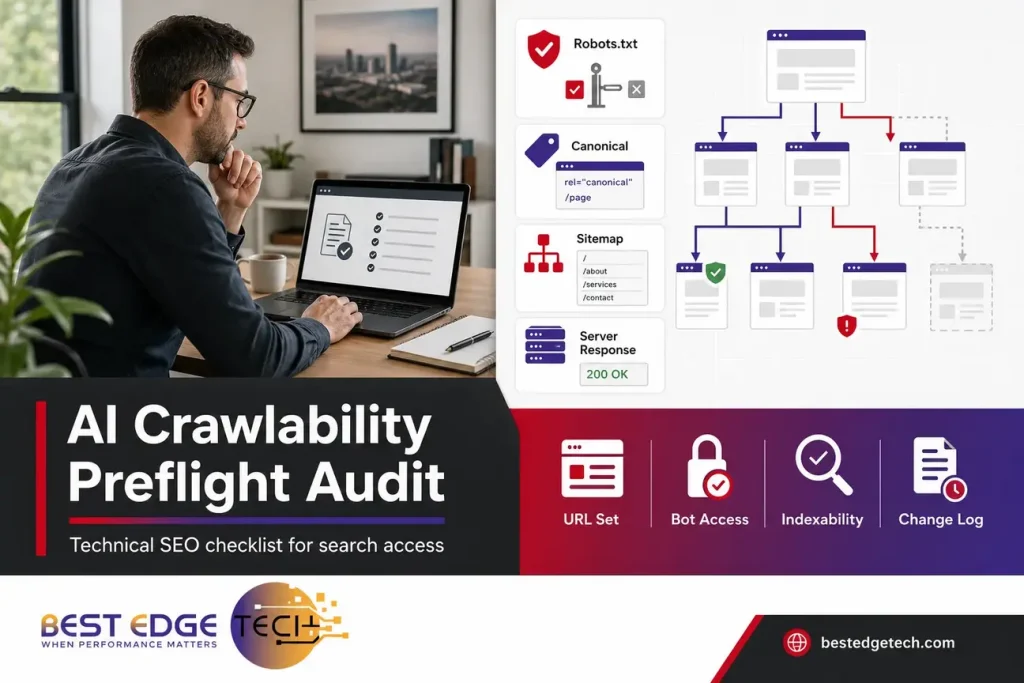
AI Search Crawlability Audit: A Practical Preflight Checklist
An AI search crawlability audit checks whether Google, OpenAI crawlers, and other relevant search systems can reach the right URLs, see the right directives, and avoid accidental blocks before you judge visibility. Start with access, then inspect indexing and snippet controls, canonicals, server responses, blocked resources, sitemaps, and release documentation. Crawl access is a prerequisite for evaluation, not a promise of indexing, AI citations, recommendations, traffic, or leads.
Quick Answer: Run a crawlability preflight before investing in broader AI search optimization. Confirm robots.txt and infrastructure access, review OAI-SearchBot and GPTBot rules separately, inspect noindex and snippet directives in HTML and HTTP headers, validate canonicals and sitemaps, and document every change before deployment.
Why crawlability comes before AI visibility work
Many teams want to know whether they can appear in AI answers, AI Overviews, ChatGPT search results, or other search experiences. That is a reasonable business question, but it is the wrong first diagnostic question. The first question is simpler: can the systems you care about access the pages you want them to consider?
For owners, marketing leads, healthcare practices, law firms, and agencies, this matters because visibility analysis becomes misleading when the technical foundation is broken. A page can be well written, authoritative, and useful, yet still be unavailable to a crawler because of robots rules, CDN settings, authentication, headers, canonicals, or server behavior.
As of 2026, Google’s own guidance for generative AI features points back to ordinary Search fundamentals: make content accessible to Google, use relevant controls when you do not want content displayed, and understand that meeting technical requirements does not promise crawling, indexing, serving, or AI feature inclusion. Google’s guidance on optimizing for generative AI features is the right starting point for Google-specific AI search eligibility.
This guide treats crawlability as a technical preflight, not a general AI readiness overview. If you need the broader strategy layer after the access checks, Best Edge Tech’s AI search readiness audit is the next natural step.
What this AI search crawlability audit preflight tests
An AI search crawlability audit separates four stages that are often mixed together in marketing discussions. Keeping them separate prevents bad decisions, such as blocking a page in robots.txt while expecting Google to see its noindex directive, or allowing an AI crawler while assuming that access leads to a citation.
| Stage | Audit question | What you control | What you do not control |
|---|---|---|---|
| Access | Can the crawler request the URL? | Robots.txt, server availability, CDN rules, firewall settings, authentication, user-agent handling | Whether a crawler chooses to visit immediately or frequently |
| Controls | Can the crawler see indexing, snippet, and canonical directives? | HTML robots meta tags, X-Robots-Tag headers, canonical tags, response headers | How every platform interprets every control outside its documentation |
| Indexability | Is the page technically eligible for indexing or search presentation? | Noindex status, canonical consistency, sitemap inclusion, internal links, renderable content | Whether a platform ultimately indexes or serves the page |
| Visibility | Will the system display, cite, or recommend the page? | Helpful content, entity clarity, technical quality, internal links, structured data where appropriate | Rankings, AI citations, recommendations, traffic, leads, or timing |
The audit’s job is to establish evidence. It does not prove that a platform will use a page. It tells your team whether obvious technical barriers should be corrected before you evaluate content quality, entity strength, authority, or AI search visibility.
Keep AI crawler access, the robots.txt audit, AI page indexability, and search bot controls as separate evidence columns in the workpaper. AI crawler access answers whether the right bots can request the URL. The robots.txt audit explains why a crawler can or cannot request a path. AI page indexability records whether the URL is technically eligible for search presentation. Search bot controls document directives that affect crawling, indexing, snippets, and consolidation.
Preflight check 1: Build the URL set before testing search bot controls
Do not begin by opening robots.txt and guessing. Start with a controlled URL set. Otherwise, you may fix unimportant pages while missing the pages that generate qualified leads, support brand trust, or explain your services.
For a practical preflight, group URLs into four buckets:
- Priority commercial pages: service pages, practice-area pages, location pages when relevant, product pages, and contact paths.
- Trust and entity pages: about pages, team pages when public, policy pages, credentials or licensing pages when appropriate, and educational resources.
- Content assets: guides, blog posts, FAQs, comparison pages, glossary entries, and resources that answer search questions.
- Non-public or low-value paths: staging URLs, internal search results, cart paths, login pages, thin filtered pages, and temporary campaign URLs.
This inventory keeps search bot controls tied to intent. Some URLs should be crawlable and indexable. Some should be crawlable but noindexed. Some should be blocked or protected. Some should be consolidated with canonicals. Treating every URL the same is how crawlability audits create risk.
Agencies doing white-label SEO or GEO fulfillment should add a fifth bucket: client-approved test URLs. Before changing robots rules, headers, or other search bot controls, confirm which URLs the client expects to appear in search and which URLs must stay out of public search. That is especially important for law firms, healthcare practices, and medical marketing teams, where advertising, privacy, and professional rules may apply. This article is marketing and search guidance, not legal, medical, HIPAA, or compliance advice; confirm those requirements with your own counsel or compliance team.
Preflight check 2: AI crawler access and platform-specific user agents
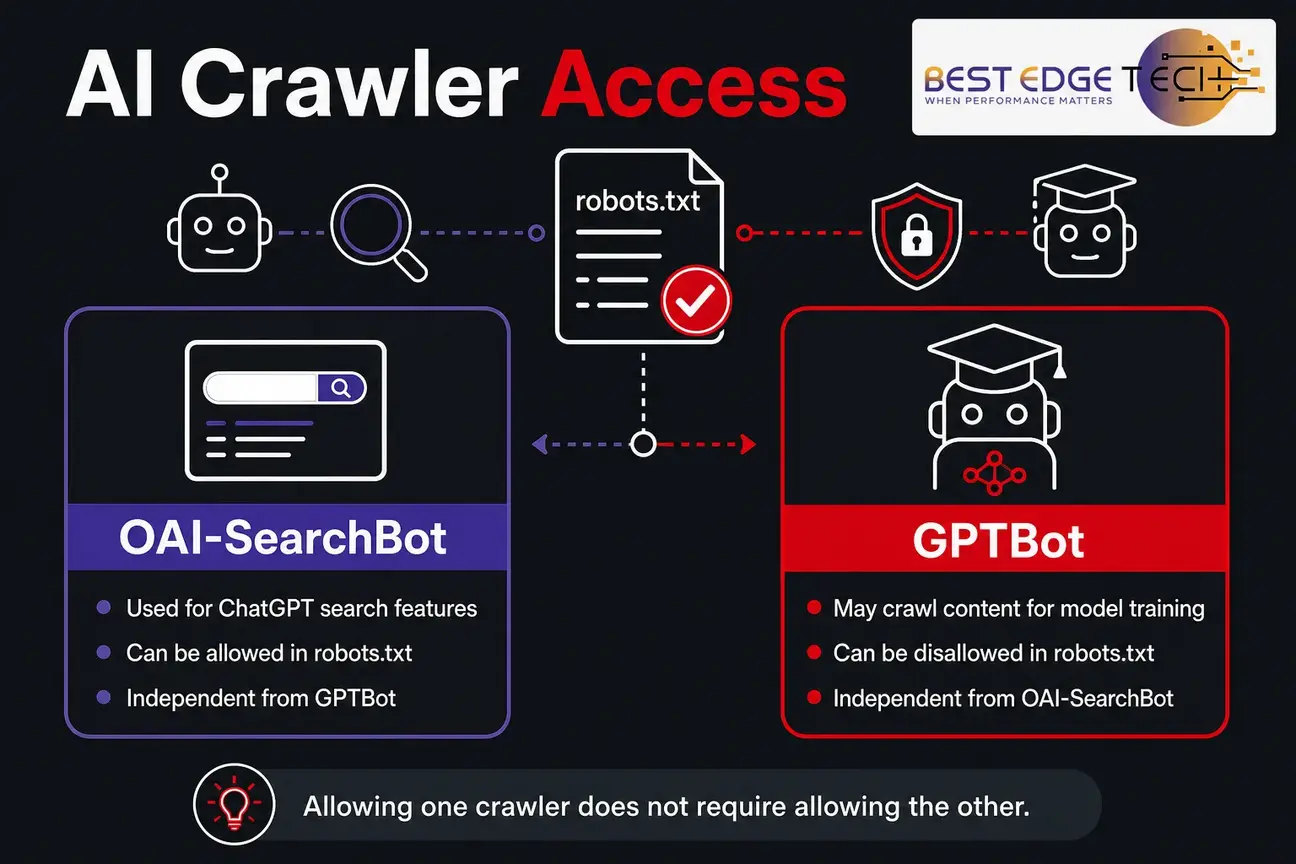
AI crawler access is not one setting. Different crawlers can have different purposes, and robots.txt rules can allow one crawler while blocking another. That distinction matters for businesses evaluating ChatGPT search visibility, training opt-outs, and ordinary search engine crawling.
As of 2026, OpenAI’s crawler documentation distinguishes OAI-SearchBot from GPTBot. OpenAI says OAI-SearchBot is used to surface websites in search results in ChatGPT’s search features, while GPTBot is used to crawl content that may be used in training OpenAI’s generative AI foundation models. OpenAI also states that these settings are independent, so a site can allow OAI-SearchBot while disallowing GPTBot. See OpenAI’s official crawler documentation for the current user-agent names and IP guidance.
A practical AI crawler access review should record each user-agent group that affects your priority URLs. Do not look only for explicit OAI-SearchBot or GPTBot groups. A wildcard group can still apply when a specific group is absent. A late rule in a CMS plugin, CDN dashboard, or deployment pipeline can also overwrite what the marketing team thinks is live.
For each priority URL pattern, answer these questions:
- Is Googlebot allowed to request the URL and the resources needed to render it?
- Is OAI-SearchBot allowed or disallowed, and is that choice intentional?
- Is GPTBot allowed or disallowed, and is that choice intentional?
- Are there other AI or search crawlers the business has made a documented decision about?
- Do firewall, CDN, WAF, hosting, or bot-management rules contradict robots.txt?
- Does production match staging, and has the deployed robots.txt file been tested directly?
Allowing AI crawler access does not mean a platform will cite, recommend, or send visitors to the page. It means you have removed one access barrier. That is valuable, but it is only the first gate.
Document AI crawler access in plain language that nontechnical stakeholders can approve. A useful note might say, “OAI-SearchBot is allowed for public service and resource URLs; GPTBot is disallowed; staging, login, and internal search paths remain blocked.” The point is not to copy another site’s AI crawler access policy. The point is to make the decision intentional, reviewable, and consistent with business goals.
Preflight check 3: Run a robots.txt audit without confusing crawling and indexing
A robots.txt audit should identify what crawlers may request, not what pages are certain to stay out of search. Robots.txt is a crawl-access tool. It is useful for controlling crawler access to URL paths, but it is not the same as a page-level indexing directive.
Begin the robots.txt audit by pulling the live production file. Do not rely on a developer’s local copy, an old SEO export, or a staging version. Then review every user-agent group, including wildcard rules. Look for broad disallows that catch valuable folders, generated CMS paths, media directories, JavaScript resources, or old migration rules that were never removed.
Google’s robots.txt documentation explains robots.txt as a way to control which URLs crawlers may access. That distinction is central: robots.txt affects crawl access, while page-level directives such as noindex must be seen in a crawlable response to work as intended for supported systems.
Next, test examples from each rule. A pattern that looks harmless can block a meaningful URL because of folder structure, query parameters, or CMS-generated slugs. If a rule blocks a priority service page, educational resource, or location page, record the affected URL, the matching rule, and the intended business outcome before changing anything.
A robots.txt audit should also review the Sitemap lines. A sitemap declaration can help crawlers discover your XML sitemap, but it does not override a disallow rule, a noindex directive, a broken response, or a canonical conflict. If sitemap management is already a known concern, pair this check with an XML sitemap audit so discovery signals match the URLs you actually want evaluated.
Common robots.txt audit findings include:
- A temporary Disallow: / rule left over from staging or a redesign.
- Blocked JavaScript or CSS that changes how primary content renders.
- Old parameter rules blocking clean URLs unintentionally.
- Plugin-generated rules added without SEO review.
- Different robots.txt files served on www and non-www versions.
- CDN or firewall blocks that do not appear in robots.txt at all.
- AI crawler rules copied from a template without a business decision.
When the business goal is to prevent a page from appearing in Google Search, avoid using robots.txt as the only control. In many cases, the better technical decision is a noindex directive on a crawlable URL or authentication for content that should not be public. The exact choice depends on whether the content should be accessible to users, crawlers, neither, or only authorized visitors.
The robots.txt audit should end with a short risk label for every proposed change. Mark a change as low risk when it affects disposable crawl traps, medium risk when it affects templates or filtered paths, and high risk when it touches service pages, lead paths, migrated URLs, or directories that contain mixed public and private content.
Preflight check 4: Test AI page indexability beyond a browser load
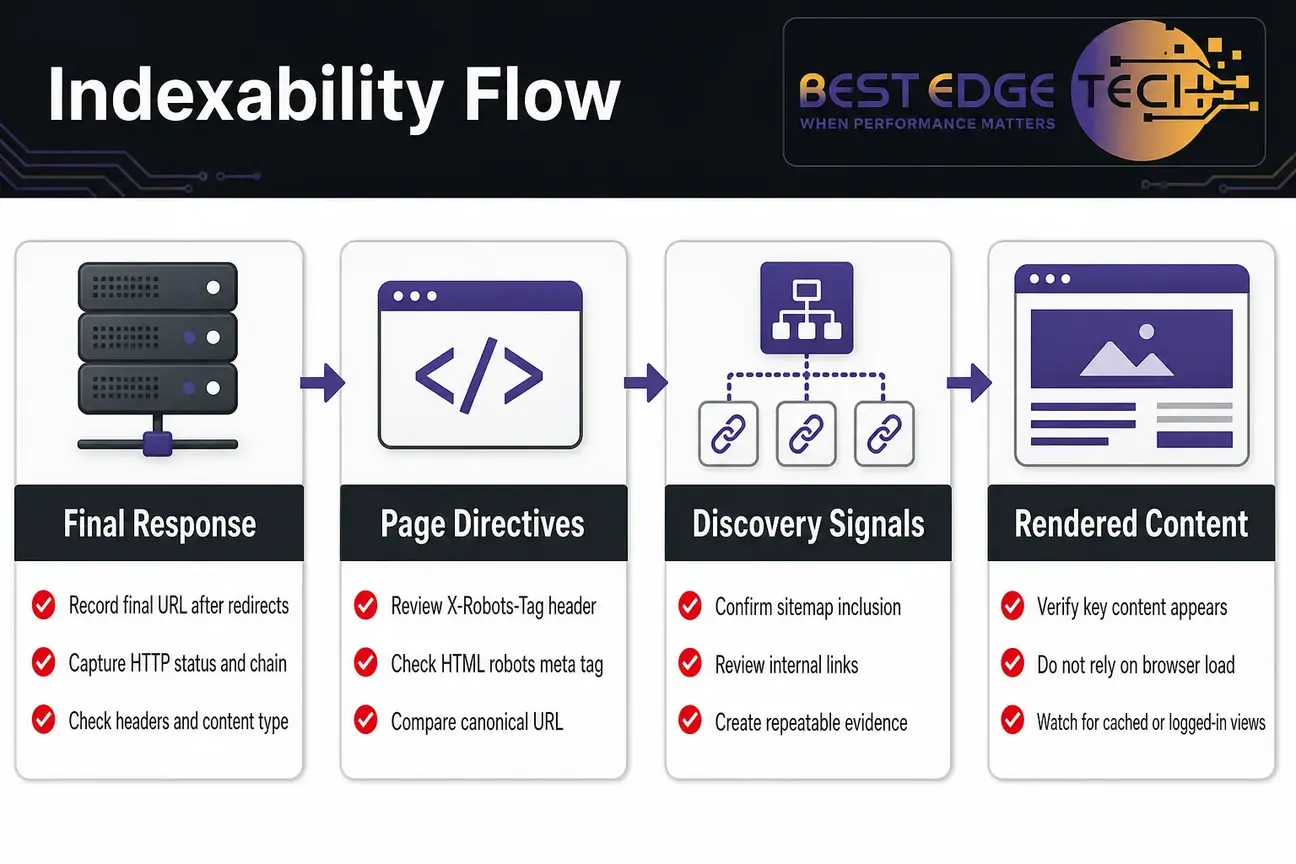
AI page indexability is not proven just because a page opens in your browser. A logged-in browser session, cached CDN response, or human-friendly page load can hide crawler-specific problems. Inspect the actual response, directives, rendered content, and discovery signals.
For each priority URL, record the final URL after redirects, HTTP status, redirect chain, response headers, content type, X-Robots-Tag header, HTML robots meta tag, canonical URL, sitemap inclusion, internal links, and whether key content appears in the rendered page. This gives you a repeatable evidence record rather than a vague “it loads for me” note.
AI page indexability also depends on whether the page is eligible for ordinary search presentation in the platform being evaluated. For Google AI features, Google’s generative AI guidance points back to Search fundamentals, including making content accessible and using supported preview controls when you do not want certain content displayed.
Use this page-level evidence checklist:
- HTTP response: Does the URL resolve consistently from an external environment?
- Redirect behavior: Does the URL end at the intended canonical destination without loops?
- Headers: Is there an X-Robots-Tag directive that conflicts with the intended outcome?
- HTML robots meta: Does the page allow indexing and snippets when that is the goal?
- Canonical: Does the declared canonical point to the URL you want evaluated?
- Rendered content: Does the primary content appear without requiring a blocked script or login?
- Internal discovery: Can crawlers find the page through crawlable links?
- Sitemap discovery: Is the intended URL included in the XML sitemap when appropriate?
For agencies and in-house teams, AI page indexability should be tested before reporting on visibility. If a priority page is noindexed, canonicalized elsewhere, hidden behind authentication, or missing from internal navigation, an AI visibility report can look worse than the content deserves. The problem may be access, not demand.
Treat AI page indexability as a page-by-page finding, not a sitewide assumption. A homepage can be indexable while a service directory is blocked. A blog article can be indexable while its images or supporting JavaScript are not accessible. A PDF can be crawlable while an X-Robots-Tag header removes it from supported search presentation.
Preflight check 5: Inspect noindex, nosnippet, max-snippet, and data-nosnippet
Snippet and indexing controls serve different purposes. Mixing them up can either expose content you wanted limited or remove a useful page from search entirely.
| Control | Practical meaning | Audit risk |
|---|---|---|
| noindex | Signals that the page or resource should not appear in search results for platforms that support and apply it. | Accidentally left on templates, staging copies, PDFs, or key service pages. |
| nosnippet | Prevents a text or video snippet from being shown in supported Google Search contexts. | Can limit ordinary search presentation and downstream eligibility where snippets are required. |
| max-snippet | Limits the maximum length of a text snippet. | Overly restrictive limits may reduce preview usefulness. |
| data-nosnippet | Marks specific text that should not be used in snippets. | Can be applied too broadly around useful answer content. |
| X-Robots-Tag | Applies robots directives through HTTP headers, including to non-HTML files. | Can be invisible to page editors and missed by CMS-only checks. |
Google’s robots meta tag and X-Robots-Tag documentation explains supported robots directives, including noindex and snippet controls. For this checklist, the practical point is to inspect both the HTML and HTTP header layer because important directives can live outside the page editor.
The key diagnostic rule is straightforward: if a crawler cannot fetch the response, it cannot reliably see page-level directives inside that response. That is why a crawlability audit should compare robots.txt access against robots meta tags and X-Robots-Tag headers, not review them in isolation.
For example, if the desired outcome is “allow Google to crawl this old PDF and see an X-Robots-Tag noindex header,” blocking the PDF path in robots.txt works against the diagnostic goal. If the desired outcome is “keep this private document away from public access,” authentication is usually a more appropriate control than relying on robots rules.
For healthcare, legal, and medical-tourism websites, do not make these decisions based only on SEO. Search controls affect discoverability and presentation; they are not a substitute for privacy, advertising, or professional compliance review.
Search bot controls should also be reviewed at the template level. A single CMS template can apply noindex, nosnippet, or a header directive to hundreds of pages. If search bot controls are managed by more than one plugin, theme, server rule, or CDN setting, record which system is authoritative before changing production behavior.
Preflight check 6: Use canonicals for consolidation, not access control
Canonical tags help search engines identify the preferred URL among duplicate or substantially similar pages. They are not a robots.txt replacement, and they are not a private-content control.
In a crawlability preflight, compare six signals for each important URL:
- The canonical tag in the HTML.
- Any canonical Link header in the HTTP response.
- The URL included in the XML sitemap.
- The URL used in internal links.
- The final destination after redirects.
- The inspected or selected canonical in available search tools.
Problems appear when these signals disagree. A service page may canonicalize to an older URL. A location page may be listed in the sitemap but internally linked with tracking parameters. A blog post may redirect to one URL but declare a different canonical. A filtered page may be blocked in robots.txt when a canonical would be the cleaner consolidation signal.
Do not describe canonicals as absolute commands. They are consolidation signals, and platforms can choose differently. The audit goal is to make your intended representative URL consistent, crawlable, internally discoverable, and free from contradictory directives.
Canonicals also affect AI page indexability work because they help identify which URL should be evaluated. If your priority page declares another URL as canonical, your visibility analysis should focus on the canonical target unless the signal is corrected. That is why canonicals belong in the same evidence sheet as AI crawler access and robots.txt audit findings.
Preflight check 7: Confirm server responses, rendering, and blocked resources
Server and infrastructure checks are where many crawlability problems hide. The CMS may show a page as published, but the edge layer may block certain user agents. The browser may load because you are logged in, while an external crawler receives an unavailable, unauthorized, forbidden, or redirected response. A bot-management rule may challenge crawlers differently from human visitors.
Keep this part evidence-based. Record what happened during the test rather than overclaiming how every platform will interpret every response. The practical goal is to confirm that intended pages resolve consistently, redirect cleanly, and return the same meaningful content to crawlers and users.
Check these infrastructure points:
- Production, origin, CDN, and WAF rules agree on crawler access.
- Priority URLs do not require cookies, login, form submission, or human interaction to show primary content.
- Redirect chains do not loop or end on an unintended page.
- Key CSS and JavaScript are not blocked when they are needed to render primary content.
- Images that carry essential information are accessible and described appropriately in page content.
- API endpoints required for visible content are not blocked from crawlers that need rendered access.
- Rate limits do not block legitimate crawler tests during normal access patterns.
Not every blocked asset is a crisis. A decorative icon or third-party font may not change the meaning of the page. Prioritize blocked resources that affect content, navigation, layout comprehension, structured data rendering, or the user’s ability to understand the page.
This is also where search bot controls can be contradicted by infrastructure. A robots.txt file may allow a user agent, but a WAF may block it. A page may contain the correct meta robots tag, but a server may return a forbidden response. A sitemap may list a URL, but a redirect chain may send crawlers to a different template.
Preflight check 8: Review sitemaps after access and indexability checks
Sitemaps support discovery, but they do not override robots rules, noindex directives, server errors, authentication, or canonical conflicts. Google’s sitemap documentation describes sitemaps as a way to tell Google about pages and files on your site, but sitemap inclusion does not promise that a URL will be crawled, indexed, ranked, cited, or shown in an AI feature.
Review the XML sitemap after you have checked access and page-level directives. This order prevents false confidence. A URL can appear in the sitemap and still be blocked by robots.txt. Another URL can be indexable but missing from the sitemap and buried deep in internal navigation. A third can be listed in the sitemap while canonicalizing somewhere else.
For the sitemap portion of the audit, document:
- Whether priority URLs are present in the intended sitemap.
- Whether noindexed URLs are excluded unless there is a documented reason.
- Whether canonical URLs, not duplicate variants, are listed.
- Whether old redirected URLs remain after a redesign or migration.
- Whether robots.txt Sitemap lines point to the correct sitemap location.
- Whether sitemap changes are included in the release plan.
If the site recently changed design, CMS, URL structure, or domain patterns, sitemap review should be paired with redirects, canonicals, and internal links. A sitemap alone cannot repair a confused migration.
Use sitemap findings to support AI page indexability, not to replace it. A listed URL still needs the right response, directives, canonical target, internal discovery, and renderable content. If the sitemap and page-level evidence disagree, fix the disagreement before judging AI search visibility.
Preflight check 9: Validate structured data only after crawlability basics
Structured data can help search engines understand eligible pages, but it cannot rescue a URL that crawlers cannot access or a page that is intentionally noindexed. In this preflight, structured data belongs after access, directives, canonicals, responses, rendering, and sitemaps.
That order matters for AI search work. Some teams ask whether they need special AI schema, a new AI-specific file, or a content chunking format before they have confirmed basic indexability. For Google’s generative AI features, the documented guidance points back to Search fundamentals. Do not assume that special markup will create AI citations or recommendations.
Once the page is crawlable and technically eligible, check whether structured data is valid, visible-content aligned, and appropriate for the page type. If your site already has schema concerns, use a separate schema markup audit so markup quality does not get confused with crawler access.
Structured data review can also reveal mismatched search bot controls. For example, a page might carry valid Article or FAQ markup while the template also applies noindex. That is not a schema problem first; it is an indexability and directive problem that should be solved before markup tuning.
Preflight check 10: Document every robots.txt audit change before deployment
A crawlability fix can create new problems if it is not documented. A practical robots.txt audit should produce a change record, not just a list of recommendations. This is especially important when developers, SEO teams, agency partners, and compliance reviewers all touch the same release.
For every rule, directive, canonical, sitemap, or infrastructure change, record:
- The URL or pattern affected.
- The previous setting and the new setting.
- The intended outcome.
- The reason for the change.
- The risk if the change is wrong.
- The test URLs used before deployment.
- The owner responsible for approval.
- The deployment date or release window.
- The rollback method.
- The post-deployment verification steps.
This is not a platform requirement from Google or OpenAI. It is a release-control discipline. Without it, teams forget why rules were added, which pages were supposed to change, and how to reverse a bad deployment.
A strong change record also keeps AI crawler access decisions separate from general robots.txt audit cleanup. For example, “allow OAI-SearchBot on public resources” is a different decision from “remove a staging disallow rule from the service directory.” Both may live in robots.txt, but they have different reasons, risks, and approval paths.
If you need help turning this into a formal technical SEO review, Best Edge Tech provides SEO audit services for businesses and agencies. When you reach out, share the website URL, business goals, markets served, recent site changes, current Search Console access if available, and whether you are evaluating SEO, GEO, or both.
Preflight check 11: Confirm fixes after deployment
Deployment is not the finish line. Crawlability changes should be retested from production after caches clear and release rules are live. Use the same URL set and evidence fields you used before deployment so before-and-after comparisons are clean.
Post-deployment confirmation should include:
- Fetch the live robots.txt file and confirm the intended rules are present.
- Retest priority URLs with the relevant user agents where your tools allow it.
- Confirm status responses, redirects, canonical tags, headers, and rendered content.
- Check whether sitemap files reflect the intended canonical URLs.
- Confirm that key resources load without accidental crawler blocks.
- Inspect available Search Console reports over time for indexing observations.
- Log unresolved findings separately from completed fixes.
Retest AI crawler access separately from ordinary Googlebot access. Then retest AI page indexability for the same priority URL set. Finally, review search bot controls and robots.txt audit findings against the release notes to confirm that the deployed state matches the approved plan.
For measurement, stay honest about what the data can show. Search Console reports may help you observe indexing and Google AI feature performance where available, but no report proves that a technical change will produce rankings, AI citations, leads, or revenue. If you need to evaluate visibility after the crawlability layer is clean, pair technical evidence with AI search visibility tracking.
What this preflight does not prove
A clean crawlability audit does not prove that your content is helpful, trusted, competitive, or visible. It only proves that the obvious access and control barriers were checked. That is still important because it prevents teams from blaming content strategy when the real problem is a blocked path, conflicting directive, or infrastructure rule.
The same boundary applies to ChatGPT, AI Overviews, and other AI search surfaces. Allowing OAI-SearchBot can be the correct business decision for ChatGPT search access, but it does not promise a recommendation. Allowing Google to crawl and index a page can make it eligible for Search and downstream AI features where Google documents that relationship, but it does not promise display.
A practical next step is to move in order: access, controls, indexability, content quality, entity clarity, trust signals, internal links, structured data, and visibility measurement. Best Edge Tech’s AI SEO and GEO services focus on those broader layers when the technical base is ready.
Preflight summary for business owners and agencies
The safest way to run an AI search crawlability audit is to treat it as an evidence checklist. Build a priority URL set, verify AI crawler access, complete a robots.txt audit, inspect page-level directives, test AI page indexability, review search bot controls, compare canonicals, confirm server responses, check blocked resources, review sitemaps, validate structured data, and document deployment changes.
If your team is unsure whether the issue is technical access, content quality, or broader AI search strategy, you can contact Best Edge Tech or call 252-303-0074. Share the website URL, goals, markets served, recent site changes, current traffic or Search Console access if available, and the service you are considering. A request starts a conversation; outcomes depend on the site, market, competition, and execution.
Search engines and AI products change often. Check current platform documentation before acting, and treat any result as dependent on your site, market and competition.
Frequently Asked Questions
Does crawlability mean a page will receive AI citations or ChatGPT recommendations?
No. Crawlability only means a crawler can access a page or resource under the tested conditions. Indexing, search presentation, AI citations, recommendations, traffic, and leads depend on platform systems, content quality, competition, query context, and many factors outside a simple access check.
Should we allow OAI-SearchBot and block GPTBot?
That is a business decision. OpenAI documents OAI-SearchBot and GPTBot as separate user agents with different purposes, and their settings can be handled independently. Some sites may choose to allow search access while limiting training access, but that choice should be documented and checked against current OpenAI documentation.
Can robots.txt keep a page out of Google Search?
Robots.txt controls crawling access, but it should not be treated as the main removal method for pages you want kept out of search. If the goal is exclusion from search results, review noindex, authentication, and other access controls with the appropriate technical and compliance stakeholders.
What is the difference between noindex and nosnippet?
Noindex is used to prevent a page or resource from appearing in supported search results. Nosnippet limits search preview text or video snippets. A page can be indexable but have restricted snippets, or it can be noindexed and removed from eligible search presentation.
How often should a site run a crawlability preflight?
Run one before a redesign, migration, CMS change, robots.txt change, CDN or firewall change, major content launch, or AI search visibility review. Agencies should also run one before reporting that a client has an AI visibility problem, because the root issue may be access or indexability.
Should an XML sitemap include noindexed pages?
For most SEO workflows, the sitemap should emphasize canonical URLs that you want discovered and evaluated. If a URL is intentionally noindexed, including it in the sitemap can create confusing signals unless there is a documented reason. Review sitemaps alongside robots rules, canonicals, and page-level directives.
Do we need special AI schema for AI search crawlability?
No special AI schema is documented as a crawlability requirement for Google’s generative AI features. Start with ordinary technical SEO fundamentals: access, renderable content, indexability, canonicals, sitemaps, helpful content, and structured data that accurately matches visible page content where appropriate.
Sources
- Google Search Central: Optimizing your website for generative AI features
- OpenAI Developers: Overview of OpenAI crawlers
- Google Search Central: Introduction to robots.txt
- Google Search Central: Robots meta tag, data-nosnippet, and X-Robots-Tag specifications
- Google Search Central: Learn about sitemaps