

An internal linking audit evaluates whether important pages can be discovered through crawlable links, whether the links accurately explain page relationships, and whether visitors can reach the next useful step. It finds more than broken links. A complete audit identifies orphan candidates, buried priority pages, misleading anchor text, redirect-dependent paths, isolated topic clusters, and content that attracts attention but fails to connect readers with an appropriate service or action.
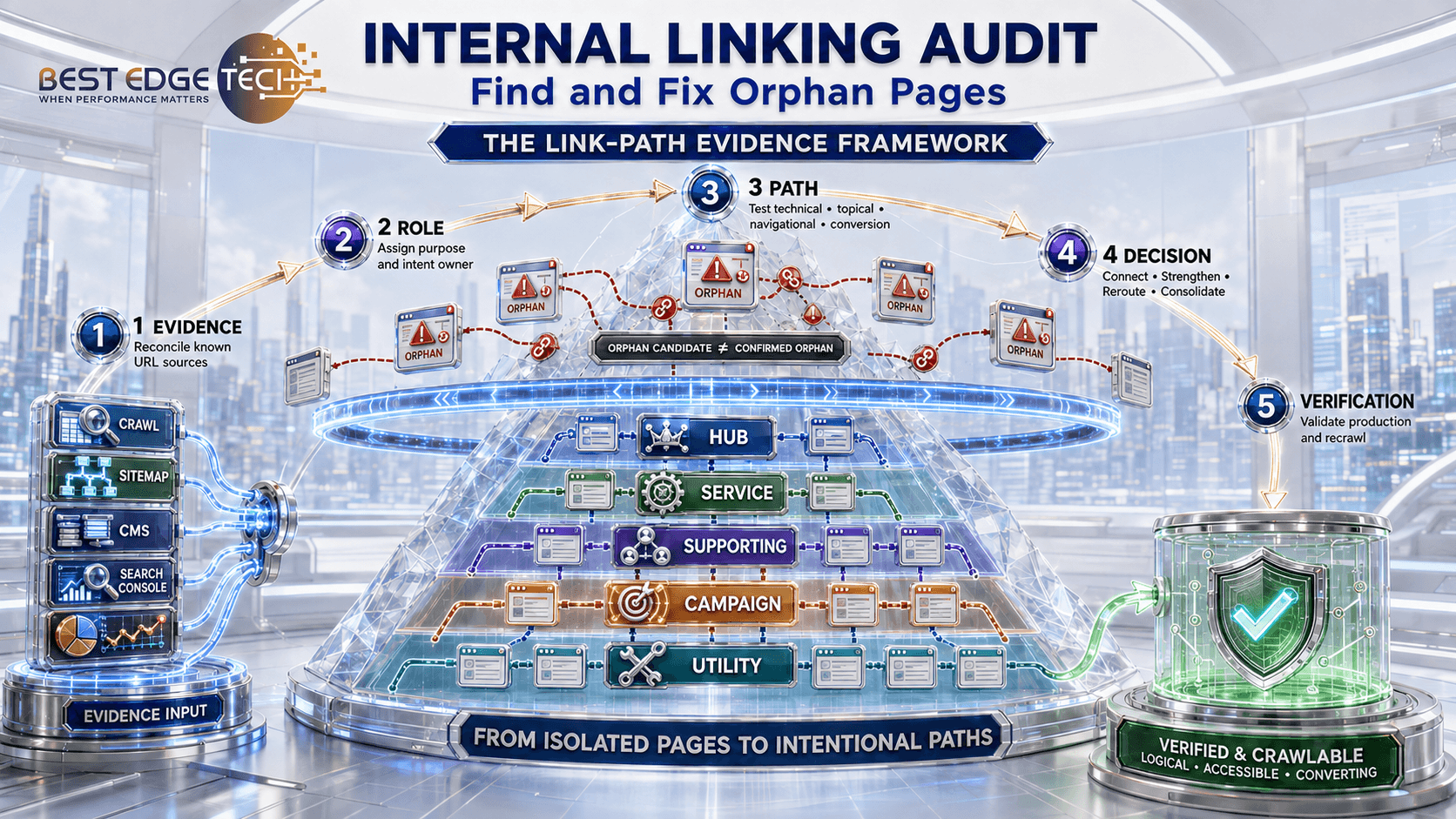
The safest process does not assume that every URL missing from a crawl is an orphan or that every page with many links is strategically strong. It reconciles several URL sources, confirms the intended role of each page, and records a specific decision: connect, strengthen, reroute, consolidate, retain as intentionally isolated, or retire through a separate content-governance process. The Best Edge Tech Link-Path Evidence Framework below organizes that work into five auditable layers: evidence, role, path, decision, and verification.
Internal Linking Audit: Key Takeaways
- A URL absent from a crawl is an orphan candidate, not a confirmed orphan, until other URL sources are compared.
- Internal links support discovery, navigation, page relationships, and relative importance; they are not merely containers for keywords.
- Technical, navigational, topical, and conversion isolation require different fixes.
- Important links should use crawlable
<a href>elements and lead directly to the intended canonical destination. - Anchor text should be concise, descriptive, natural, and useful in its surrounding sentence.
- Page priority comes from business and user purpose—not from a universal minimum number of links or maximum click depth.
- A successful audit ends with an approved decision register, implementation evidence, and a verification crawl.
- Google-supported principles and Best Edge Tech’s professional methodology should be labeled separately so readers can evaluate the evidence behind each recommendation.
- No internal-linking change can guarantee indexing, rankings, AI citations, traffic, or conversions.
What Is an Internal Linking Audit?
An internal linking audit is a structured review of how pages on the same website connect. It examines source pages, destination URLs, crawlability, status codes, canonical destinations, anchor text, surrounding context, page depth, topic relationships, and customer pathways. The output should be an actionable record of which links or page relationships need to change and why.
Google states that it uses links to find pages and as a signal when assessing relevance. Its current link best-practices documentation recommends crawlable anchors with an href attribute and descriptive, concise link text. Google also recommends a logical site structure and links to important pages from relevant pages in its sitelinks guidance.
Those principles explain why an audit cannot be reduced to “add three internal links to every post.” A link should help a person or crawler understand what comes next. Five irrelevant links from a sitewide widget do not necessarily solve the same problem as one well-placed contextual link from the correct hub or related guide.
What the Audit Should Produce
A useful audit produces five deliverables:
- A dated baseline documenting audit scope, crawler settings, included properties, and known limitations.
- A reconciled URL inventory showing where every known URL was found.
- A page-role map identifying priority services, hubs, supporting resources, utility pages, campaign pages, and intentional exclusions.
- A decision register assigning an action, reason, owner, and validation requirement to each problem.
- A verified post-change crawl confirming that approved links resolve and priority paths work as intended.
The Best Edge Tech Link-Path Evidence Framework
The Link-Path Evidence Framework is the editorial audit method developed for this guide. It is not an official Google framework, scoring system, or ranking formula. It converts published search guidance into a controlled website-review process without presenting professional judgment as a search-engine requirement.
| Layer | Question to answer | Required evidence | Output |
|---|---|---|---|
| 1. Evidence | Which URLs and links are actually known? | Rendered crawl plus sitemap, CMS, Search Console, analytics, referral, campaign, backlink, and relevant log sources. | Reconciled inventory with source labels and a dated baseline. |
| 2. Role | What job should each page perform? | Audience, primary task, search intent, canonical/index state, business value, and next useful step. | Page-role map and approved intent owner. |
| 3. Path | Can the right people and crawlers reach the page through a meaningful route? | Source page, destination, depth, link type, anchor, surrounding context, response code, and final URL. | Technical, navigational, topical, and conversion-path findings. |
| 4. Decision | What specific change is justified? | Finding severity, dependencies, proposed source and destination, owner, approval, and rollback need. | Decision register: connect, strengthen, reroute, consolidate, retain, or retire through the appropriate process. |
| 5. Verification | Did the approved change work in production? | Rendered HTML, response and canonical checks, accessibility tests, repeat crawl, and page-group monitoring. | Implementation evidence, exceptions, and unresolved risks. |
<a href> links, descriptive anchor text, logical site structure, and linking important pages from relevant pages. The five-layer framework, four isolation types, prioritization order, and decision register in this article are Best Edge Tech’s professional methodology for applying those principles. Google does not prescribe this framework or a universal internal-link score.Four Types of Page Isolation
“Orphan page” is often used as if it describes one condition. In practice, pages can be isolated in different ways, and each condition needs different evidence.
| Isolation type | Diagnostic signal | Likely consequence | Typical response |
|---|---|---|---|
| Technical isolation | The crawler cannot reach the URL through a standard internal link. | The page may be difficult to discover or recrawl through site navigation. | Add a crawlable path if the page should be discoverable; otherwise confirm the isolation is intentional. |
| Navigational isolation | A crawler finds the page, but ordinary visitors are unlikely to reach it through expected menus, hubs, categories, or contextual paths. | The page exists without fitting the customer journey. | Connect it from the most relevant navigation or hub layer. |
| Topical isolation | The page has links, but not from the pages that establish its subject, audience, or relationship to a cluster. | The site communicates a weak or misleading topical relationship. | Add contextual links from the correct hub and closely related pages; remove irrelevant links. |
| Conversion isolation | The page attracts readers but provides no appropriate route to a service, contact option, tool, next guide, or other useful action. | Attention reaches a dead end even when the information is valuable. | Add a proportionate next step aligned with the reader’s intent and funnel stage. |
Build the URL Evidence Set Before Calling a Page an Orphan
A crawler discovers URLs by following the paths it can access from its starting point. It cannot prove that an undiscovered URL does not exist. The audit should therefore compare the crawl with other systems that know about pages for different reasons.
| Source | What it contributes | What it can miss or misrepresent |
|---|---|---|
| Rendered website crawl | Reachable URLs, source-to-destination links, depth, anchors, response codes, canonicals, and rendered navigation. | Orphans, protected areas, uncrawled JavaScript states, and URLs excluded by configuration. |
| XML sitemap | URLs the site has explicitly submitted or exposed for discovery. | Pages accidentally omitted, stale URLs, and whether a page has a normal internal path. Google describes sitemap submission as a hint, not a guarantee. |
| CMS or database export | Published, draft, scheduled, private, and legacy records known to the platform. | Externally hosted files, old systems, and whether a URL is indexable or reachable. |
| Google Search Console | Known landing pages, indexing information, and sampled internal-link data. | A complete link graph. Google states that the Links report is a sample and may omit URLs. |
| Analytics and conversion systems | Pages receiving visits, events, leads, sales, or assisted conversions. | Pages with no traffic, broken tracking, blocked measurement, and nonconsenting sessions. |
| Backlink, campaign, email, and referral records | URLs that still receive authority, visitors, or operational traffic from outside the normal site path. | Every historical or private source. |
| Server logs, when appropriate | Requested URLs and crawler activity observed by the server. | Unrequested pages and reliable business purpose without other context. |
Google’s Links report documentation explicitly says the report is not comprehensive. Likewise, an XML sitemap can help discovery, but Google’s sitemap guidance does not treat it as a replacement for coherent site navigation. Use the sources together.
Normalize Before Comparing
Normalize URL evidence carefully so harmless variations do not create false findings. Review protocol and hostname variants, trailing slashes, uppercase and lowercase paths, fragments, tracking parameters, printable versions, pagination, faceted URLs, and redirects. Preserve meaningful parameters and regional or language variants when they represent distinct pages. The purpose is to compare equivalent URLs—not erase legitimate distinctions.
How to Run an Internal Linking Audit in Eight Steps
These eight steps operationalize the Link-Path Evidence Framework. The sequence matters: evidence and page purpose come before link recommendations, while verification comes after approved production changes.
1. Define Scope, Goals, and Stop Conditions
State what the audit covers: the full domain, one subdomain, a content cluster, a newly acquired site, or a group affected by a redesign. Define the business goal, such as reconnecting service pages, repairing a topic hub, reducing redirect-dependent links, or finding published pages missing from normal navigation.
Also define changes that require separate approval. Removing a page, merging content, changing navigation templates, or altering a high-value conversion path may exceed the authority of a routine link cleanup.
2. Create the Page-Role Map
Assign each known URL a role before judging its link count. Useful roles include homepage, service, location, product, category or hub, supporting guide, comparison, case study, author or reviewer profile, contact or conversion page, policy, utility, campaign, and intentional exclusion. Record the audience, primary task, topic or intent owner, and next useful step.
This prevents a misleading comparison between unlike pages. A privacy policy, a flagship service page, and a narrow support article should not receive the same internal-link target.
3. Crawl the Rendered Site
Crawl from the canonical homepage using settings that reflect the production site. If important navigation or content depends on JavaScript, compare HTML and rendered output where appropriate. Capture at least:
- source URL and destination URL;
- link location or page element;
- anchor text or linked-image alternative text;
- response code and final destination;
- canonical URL and index directive;
- crawl depth and number of unique incoming links;
- whether the link is contextual, navigational, breadcrumb, footer, or template-wide.
Google’s documentation says links are generally crawlable when they use an <a> element with an href attribute. Buttons, spans, or script-only events that merely behave like links may not provide the same reliable path.
4. Reconcile the Crawl With Other URL Sources
Join the crawl with the sitemap, CMS, Search Console, analytics, backlink, campaign, and relevant log data. Label every URL by source. A URL found outside the crawl becomes an orphan candidate. Then inspect it manually to determine whether it is:
- a valuable page missing an internal path;
- a page reachable only through an interaction the crawler did not reproduce;
- a redirected, canonicalized, duplicate, parameterized, or stale URL;
- an intentional private, campaign, utility, or operational page;
- content that needs a separate keep, update, merge, or retire decision.
5. Test Priority Paths, Not Just Sitewide Averages
Review whether priority pages are reachable from the appropriate entry points. Google explains in its site-structure guidance that page linkages and the number of links needed to reach a page can help it infer relative importance. The principle is useful beyond ecommerce, but there is no universal rule that every important page must be exactly three clicks from the homepage.
Test realistic paths instead:
- homepage or primary navigation → service hub → individual service;
- pillar guide → supporting article → relevant commercial option;
- location hub → legitimate local page → contact or scheduling step;
- comparison article → decision guide → appropriate service page;
- case study → service used → contact or consultation path.
6. Review Link Meaning and Destination Quality
For each proposed link, ask four questions:
- Does the reader benefit from this destination at this point?
- Does the anchor accurately set the expectation for the destination?
- Does the link point directly to the final canonical URL without an unnecessary redirect?
- Does the relationship reinforce the approved page role rather than confuse intent ownership?
A technically valid link can still be strategically wrong. Linking every mention of “SEO” to one service page may interrupt reading, overconcentrate anchors, and ignore more precise destinations.
7. Assign a Decision and Owner
Every issue should become a reviewable action. Record the affected URL, page role, evidence, risk, proposed source page, proposed destination, anchor or placement, owner, approval status, and validation method. Do not leave the deliverable as a list of problems without implementation responsibility.
8. Implement, Recrawl, and Compare
After approved changes are published, recrawl the same scope with the same relevant settings. Confirm that links exist in rendered HTML, resolve successfully, point to the intended canonical page, and do not create new loops, chains, or broken destinations. Then inspect priority URLs in Search Console and monitor page-group performance over a meaningful period.
Worked Example: From Orphan Candidate to Verified Path
The following example is hypothetical. It demonstrates the audit logic without representing a Best Edge Tech client, performance result, or ranking claim.
Assume a professional-services website has a useful “Technical SEO Migration Checklist” page. The URL appears in the CMS, XML sitemap, Search Console, and analytics, but it does not appear in a crawl started from the homepage. The page received qualified visits from an old email campaign, returns a successful response, is self-canonical, and still supports the current website-redesign service.
| Framework layer | Observed evidence | Audit interpretation |
|---|---|---|
| Evidence | Found in four non-crawl sources; absent from the rendered crawl. | Orphan candidate, not yet a confirmed error. |
| Role | Current supporting guide for teams planning a redesign; approved indexable canonical page. | The page has a distinct and useful purpose. |
| Path | No normal internal source; visitors reach it through campaign history or direct access. | Technical and navigational isolation are confirmed. A relevant conversion path is also missing. |
| Decision | The redesign guide and migration section of the service hub are relevant source pages. | Add contextual links from those sources, using anchors that describe the checklist; add a proportionate next step to the related service. |
| Verification | Production crawl finds the new links; destinations return the intended status and canonical; mobile and keyboard tests pass. | Implementation passes. Search and conversion outcomes remain monitoring questions, not promised results. |
Example Decision-Register Record
| Field | Example entry |
|---|---|
| Affected page | Technical SEO Migration Checklist — supporting guide |
| Finding | Confirmed technical and navigational isolation |
| Evidence | CMS, sitemap, Search Console, analytics, rendered crawl, manual page review |
| Approved action | Add two relevant contextual paths; retain URL and index state |
| Source and destination | Approved redesign guide/service-hub sections → checklist canonical URL |
| Owner and approval | Content owner implements; SEO owner validates; service owner approves commercial placement |
| Pass condition | Rendered links exist, resolve directly, use accurate anchors, and pass mobile and keyboard checks |
| Monitoring question | Do relevant users reach the checklist and next step more often after implementation? |
This example shows why the audit does not begin with “add more links.” The decision depends on whether the page deserves to remain, which page owns the intent, where the link helps the reader, and how the production change will be validated.
Internal-Link Decision Matrix
| Finding | Evidence required | Preferred action | Avoid |
|---|---|---|---|
| Valuable orphan candidate | Valid purpose, approved canonical/index state, useful content, and no normal internal path | Add contextual or hub links from pages where the destination helps the reader. | Dropping a random link into the footer solely to change an audit score. |
| Under-supported priority page | High business/user importance but weak links from relevant pages | Strengthen links from authoritative hubs, related guides, navigation, or case evidence. | Adding the same exact-match anchor sitewide. |
| Link points through a redirect | Internal source links to an old URL that redirects to the approved destination | Update the internal link to the final URL while keeping the redirect if it still serves external or historical traffic. | Removing a useful external-facing redirect merely because internal links were updated. |
| Broken internal destination | Source page points to a 4xx/5xx response or invalid target | Correct, replace, or remove the link according to user need and page history. | Redirecting every broken page to the homepage. |
| Wrong topical relationship | The link is crawlable but irrelevant, misleading, or points to the wrong intent owner | Choose the precise destination or remove the link. | Keeping it only because “more internal links are better.” |
| Duplicate or obsolete page | Separate content and cannibalization review confirms no independent role | Use the approved consolidation or retirement process, then update all internal references. | Deleting or noindexing based only on low inlink count. |
| Intentional isolation | Documented privacy, campaign, utility, legal, or workflow reason | Retain the required controls and record the exception. | Forcing the page into public navigation. |
Audit Anchor Text, Context, and Placement
Good anchor text helps a reader predict the destination. Google recommends wording that is descriptive, reasonably concise, relevant to both pages, and natural in context. It also advises against forcing every related keyword into the link text.
| Weak pattern | Why it fails | Stronger approach |
|---|---|---|
| “Click here” or “read more” without context | The destination is unclear when the anchor is read on its own. | Name the resource or decision: “website redesign SEO checklist.” |
| A full sentence linked unnecessarily | The link becomes harder to scan and may obscure the intended topic. | Link the concise phrase that identifies the destination. |
| Repeated exact-match anchors on many pages | The language can become unnatural and may oversimplify different contexts. | Use accurate variations that reflect the surrounding sentence and destination. |
| Several adjacent links with little surrounding text | Readers cannot easily distinguish the choices or understand their relationships. | Space links within explanatory sentences, lists, or a purposeful resource block. |
| Linked image with empty alternative text | The link may lack a useful accessible name and descriptive context. | Use accurate alt text when the image functions as a link; keep decorative images unlinked where appropriate. |
Placement matters too. A contextual link in the sentence where a question arises serves a different purpose from a header navigation link, breadcrumb, related-post module, or footer. Record link type so large template-wide counts do not hide the absence of meaningful contextual paths.
Prioritize Internal-Link Fixes by Dependency and Value
Do not prioritize solely by the largest number of errors. A single broken link in a primary booking path may matter more than hundreds of low-impact links in an archived template. Use this order as a starting point:
- Customer and operational harm: broken contact, booking, checkout, safety, policy, or required-support paths.
- Priority-page discovery: approved canonical service, product, location, or decision pages without reliable internal paths.
- Systemic template defects: navigation, breadcrumb, related-content, pagination, or component errors affecting many pages.
- Intent and topic clarity: links that point to the wrong page owner or leave important clusters disconnected.
- Redirect and broken-link cleanup: internal references that add hops or reach dead destinations.
- Anchor and placement refinement: unclear, repetitive, empty, or misleading link text.
Use a Decision Register, Not a Vague Score
| Field | Purpose |
|---|---|
| Affected page and role | Identifies what the page is supposed to do. |
| Finding and evidence sources | Shows how the problem was confirmed. |
| Baseline date and audit scope | Makes before-and-after comparisons reproducible. |
| User/search/business impact | Explains why the change deserves priority. |
| Approved source and destination | Defines the relationship to implement. |
| Anchor or component | Specifies the exact placement or template affected. |
| Owner and approval | Prevents unassigned recommendations. |
| Validation evidence | Defines what must pass after implementation. |
How to Verify an Internal Linking Audit
A change is not complete when a link is added in the editor. Verify the production result.
- Recrawl the same scope and compare the before-and-after link graph.
- Confirm the link appears in the rendered HTML as a crawlable anchor.
- Check that the destination returns the intended successful response.
- Confirm the link points directly to the approved canonical URL.
- Test keyboard access, focus visibility, linked-image alternatives, and mobile interaction.
- Recheck orphan candidates against all evidence sources, not just the new crawl.
- Inspect critical pages with Search Console’s URL Inspection tool where useful.
- Monitor affected page groups, search demand, user paths, and meaningful conversions separately.
Search Console can help confirm known links and indexing status, but its internal-links report is sampled. A missing row does not prove that a link is absent from the live website, and a visible row does not prove that the current page still contains the link. Verify the page itself.
There is no universal time at which rankings must improve after an internal-link change. Search systems need to recrawl and reassess pages, and performance also depends on content quality, relevance, competition, technical eligibility, external authority, and many other factors. Judge implementation immediately; judge search outcomes over an appropriate observation window.
Common Internal Linking Audit Mistakes
Calling Every Sitemap-Only URL an Orphan
Sitemap-only is a diagnostic state. The page may be intentionally isolated, accessible through an interaction the crawler missed, redirected, noncanonical, obsolete, or incorrectly included in the sitemap. Investigate before adding links.
Using One Link-Count Threshold for Every Page
There is no universal number of incoming links that makes every page healthy. Page role, site size, navigation templates, topic relationships, and customer importance determine what is appropriate.
Confusing a Sitemap With Site Architecture
A sitemap can help search engines discover URLs. It does not create a normal path for visitors, explain page relationships through context, or replace navigation.
Adding Links Without Confirming URL Ownership
If two pages compete for the same intent, linking to both indiscriminately can reinforce ambiguity. Resolve ownership through a keyword cannibalization audit before scaling internal references.
Automating Links Without Editorial Controls
Automation can find candidate phrases or deploy approved rules, but it can also create irrelevant links, repeated anchors, excessive density, broken destinations, or links inside unsuitable components. Require page-role rules, exclusions, sampling, rollback, and post-deployment validation.
Reporting Activity Instead of Outcomes
“Added 500 links” is an implementation count, not proof of improvement. Report whether priority pages gained appropriate paths, orphan candidates were resolved, redirect-dependent links decreased, broken paths were corrected, and readers can reach the next useful step.
Frequently Asked Questions About Internal Linking Audits
What is an internal linking audit?
An internal linking audit evaluates how pages on the same website connect. It identifies crawlability problems, orphan candidates, weak priority-page paths, broken or redirected destinations, unclear anchor text, disconnected topic clusters, and missing next steps, then assigns documented fixes and validation requirements.
How do I find orphan pages?
Crawl the rendered website, then compare the crawl with XML sitemaps, CMS records, Search Console, analytics, backlink data, campaigns, and other known URL sources. URLs found outside the crawl are orphan candidates. Inspect each candidate before deciding whether to connect, retain, consolidate, redirect, or retire it.
Is a page in the XML sitemap still an orphan?
It can be. A sitemap may expose a URL to search engines without providing a normal internal path for visitors or crawlers following site links. Treat “sitemap-only” as evidence requiring review, not as an automatic verdict.
How many internal links should a page have?
There is no universal number. The appropriate links depend on the page’s role, user need, site structure, topic relationships, and business importance. Prioritize relevant, crawlable paths over a fixed quota.
How deep should an important page be?
Important pages should be reachable through short, logical paths from appropriate entry points, but a universal click-depth rule does not fit every website. Evaluate realistic customer and crawler paths, page role, and site size rather than chasing one number.
Should internal links point through redirects?
Internal links should normally point directly to the final approved URL. Update redirect-dependent internal links while retaining useful redirects when they still serve external visitors, bookmarks, or historical URLs.
Can automated internal linking replace a manual audit?
No. Automation can surface opportunities and implement controlled rules, but page purpose, intent ownership, context, accessibility, conversion relevance, and exceptions require review. Validate automated changes with sampling and a production crawl.
Can internal linking guarantee higher rankings or AI citations?
No. Better internal paths can improve discovery, navigation, page relationships, and site clarity, but no link pattern can guarantee crawling, indexing, rankings, AI citations, traffic, leads, or revenue.
Build Paths That Reflect Real Page Purpose
An internal linking audit should leave the website easier to navigate and easier to explain. Important pages gain meaningful paths, outdated references stop sending users through unnecessary redirects, supporting content connects to the correct topic owner, and useful information leads to an appropriate next step.
For organizations that need a broader review of crawlability, indexing, content, architecture, performance, and authority, ask Best Edge Tech about a website audit and remediation plan. Businesses preparing for both traditional and AI-assisted discovery can also review our AI SEO and Generative Engine Optimization services.
Need a Clearer Website Path?
Best Edge Tech can help identify disconnected priority pages, misleading internal paths, crawlability issues, and opportunities to connect useful content with the right customer journey. Contact Best Edge Tech to discuss an SEO audit and practical remediation plan.
Sources and Further Reading
Editorial transparency: source-backed statements are linked near the relevant claims. The Link-Path Evidence Framework, isolation taxonomy, priority order, decision register, and hypothetical example are original editorial methods presented for practical application; they are not official Google systems. No example in this article should be interpreted as a client result or performance guarantee.

Strategic Content Review
Strategically Reviewed by Christopher A. Whitfield
Founder & CEO, Best Edge Tech | SEO, AI Search & GEO Strategy
Christopher strategically reviewed this guide for the accuracy and practical application of its internal-linking audit methodology, including URL-source reconciliation, orphan-page verification, page-role mapping, anchor-text evaluation, and implementation checks. His review also confirmed that the article separates published search-engine guidance from Best Edge Tech’s professional methodology and avoids unsupported performance guarantees.
This strategic review considered:
- Internal-link audit accuracy
- SEO, AEO, and GEO alignment
- Search-intent and page ownership
- Evidence and source boundaries
- Implementation and verification
- Practical value for site owners
Strategic review covers digital marketing quality, SEO, AI search optimization, and content strategy. It does not replace legal, financial, medical, or other specialized professional review when separate subject-matter expertise is required.