How to Read Google’s Generative AI Report
Quick Answer: The generative ai report in Google Search Console is a measurement view for impressions from Google’s generative AI features. As of 2026, Google documents a Generative AI performance report for Search that covers AI Overviews and AI Mode, plus a separate Generative AI performance report for Discover. Treat the data as an AI-feature visibility layer, not a rankings, clicks, leads, or revenue report.
For a business owner or marketing lead, the practical question is not “Did this report prove AI search is working?” It is “Which pages are being shown in AI features, where, on what devices, and during which date ranges?” Google’s Search report shows data about how your site performs in generative AI features on Google Search, while Google’s Discover report shows important data about generative AI features in Google Discover. The safest way to use the report is to compare page, country, device, and date patterns with your regular Search Console performance data.
What the report is meant to measure
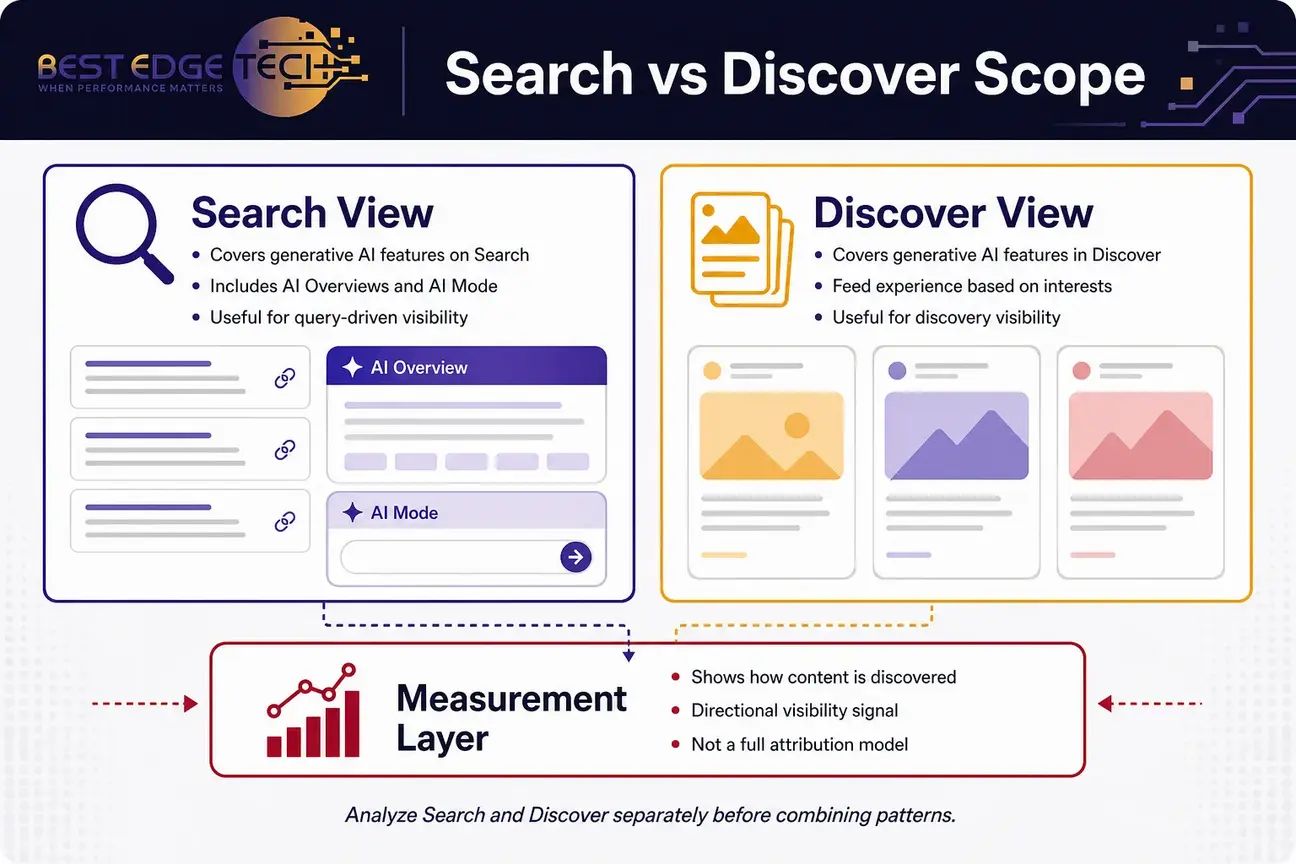
Google’s reporting is built around visibility in generative AI features, not full-funnel marketing performance. Google’s AI optimization guide says to “use the Generative AI performance report” to measure how content is performing in generative AI features on Google Search and Discover, and that it “can help you get an idea of how people are discovering your content.” That wording matters. It gives you a directional measurement layer for discovery, not a complete attribution model.
The reporting separates two surfaces that behave differently from a marketer’s point of view:
- Search: generative AI features on Google Search, including AI Overviews and AI Mode.
- Discover: generative AI features in Google Discover.
Google’s guide to optimizing for generative AI features also places the report inside a broader measurement approach: make useful, accessible content, follow Search fundamentals, and use Search Console to understand visibility. It does not say that this report proves rankings, conversions, or AI answer inclusion on every query.
That distinction is important for service businesses, healthcare practices, law firms, and agencies. You can use the data to decide which content deserves a closer review, which markets are seeing visibility, and whether AI-feature impressions line up with pages you already consider strategically important. You should not use the report by itself to claim that a campaign produced traffic, consultations, cases, appointments, or revenue.
Why Search Console impressions are only a starting point
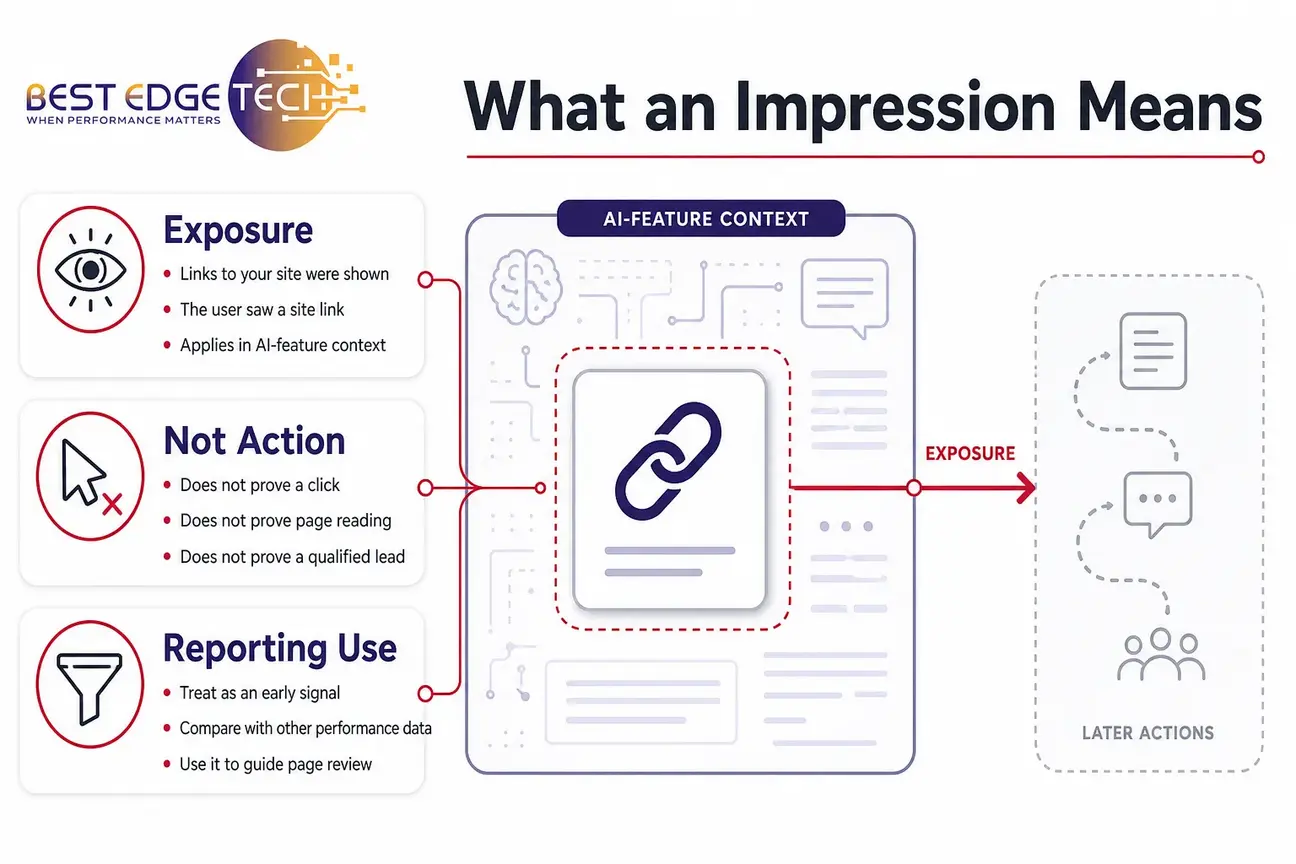
The core metric is impressions. In Google’s Search documentation, “Impressions are how many times links to your site were shown to a user” in a generative AI feature. In Google’s Discover documentation, impressions are described as how many links to your site a user saw. That means the report starts with exposure, not the action after exposure.
This is why search console impressions are useful but limited. They tell you that Google displayed links to your site in an AI-feature context. They do not, by themselves, tell you whether the user clicked, read the page, became a qualified lead, or chose your business. For practical reporting, treat these impressions as an early visibility signal that needs to be interpreted alongside other Search Console views, analytics data, and business context.
Use impression movement as a triage signal. When exposure increases, the next step is to identify the page, surface, country, device, and date range before deciding whether content or technical work is needed.
For example, if a healthcare practice sees impressions for a patient education page, the next question is not “Did AI search create appointments?” The next question is “Is this the kind of page we want visible for this topic, and does the page clearly help the user while staying within our advertising and privacy rules?” For legal and healthcare marketing, confirm advertising and privacy obligations with your own counsel or compliance team.
For agencies managing reports for clients, search console impressions can help frame AI visibility without overpromising. A good client note might say: “This page was shown in generative AI features during the selected period. We are reviewing the page topic, country, device mix, and related Web performance before recommending changes.” That is more accurate than claiming the page “ranked in AI.”
How the Search view works for AI features
The Search view is the place to look when you want to understand generative AI visibility inside Google Search. As of 2026, Google’s Search report covers AI Overviews and AI Mode. This makes it the first report to open when the question is about visibility in Google’s search experience rather than content appearing in Discover.
Google’s AI features documentation states that if a site appears in generative AI features, it is included in the overall search traffic in Search Console, within the Performance report under the Web search type. The practical interpretation is that the dedicated AI reporting layer helps isolate AI-feature impressions, while the broader Web performance report remains part of the overall Search Console picture. Google’s wording still leaves room for careful interpretation, so avoid treating the two views as perfectly interchangeable or as a complete explanation of how every impression relates to broader Web data.
That creates a useful reporting workflow:
- Start with the Search generative AI view to see which pages received AI-feature impressions.
- Compare those pages with the regular Web performance report for broader search visibility.
- Look for mismatches between pages that matter to the business and pages that are actually appearing.
- Use page-level review to decide whether a content, technical SEO, or internal-linking change is justified.
The Search view should not be read as a direct replacement for your regular Web report. It is a narrower lens. Use it when you specifically need to understand Search-side AI visibility, then step back into normal search performance reporting to understand the larger pattern.
Do not describe Google Search Console as having one official AI Overviews product report and a separate official AI Mode product report unless Google documents that structure. For now, the safer language is that the Search Generative AI performance report covers AI Overviews and AI Mode.
When someone asks for an ai overviews report
If a stakeholder asks for an ai overviews report, treat that phrase as shorthand for analyzing AI Overviews within Google’s Search-side generative AI reporting. The value is not that it proves a ranking position. The value is that it can identify pages that Google has surfaced in an AI-feature context during the selected period.
A practical way to read AI Overview visibility is to start with page intent. If a page shown in that context answers a common informational question, that may be expected. If a high-value service page appears, review whether the page is clear, crawlable, and helpful enough for the topic. If an outdated or weak page appears, consider whether it needs a content refresh or whether a stronger page should be built around the same user need.
For a small business, the request for an ai overviews report can also help keep internal conversations grounded. Instead of asking whether the brand is “winning AI,” ask which pages are visible, which topics those pages likely support, and whether those pages help a real customer make a decision. No agency can guarantee AI citations, and this report should not be used to imply that future inclusion is assured.
When AI Overview visibility repeats for the same page, document the date range and compare the page with the regular Web report. That comparison keeps the analysis tied to documented visibility instead of assumptions about every AI answer.
When someone asks for an ai mode report
If a stakeholder asks for an ai mode report, use the same cautious framing. AI Mode is part of Google’s search experience, and the Search Generative AI performance report gives visibility into impressions from that generative AI context. It does not provide a complete explanation of why a page was selected or what every user saw before or after the impression.
Use AI Mode visibility to identify patterns, not to declare causation. If the same pages keep appearing, review whether they are already strong organic search assets. Are they indexed? Are they accessible to crawlers? Do they answer a clear question? Do they have helpful internal links from related pages? Do they align with the audience and market you actually serve?
The request for an ai mode report can be especially useful for agencies and marketing teams that manage multiple content types. A service page, guide, glossary article, local landing page, or comparison-style resource may all deserve different interpretation. A page with AI Mode impressions may need a content-quality review; a page with no impressions may simply not be relevant to the selected date range, country, or user demand.
When AI Overviews and AI Mode point to the same pages inside the Search report, treat that overlap as a reason to review those pages more carefully. It is still not a promise that the pages will appear again.
How to interpret a discover ai report request
The Discover view is separate because Discover is not the same user behavior as Search. Search starts with a user’s query. Discover is a feed experience where Google may surface content based on user interests and context. That means a discover ai report request should be evaluated with a different mindset than a Search-side AI visibility request.
The Discover report is not primarily about whether someone typed a service-intent query. It is about whether links to your site were shown in generative AI features inside Google Discover. For publishers and content-heavy brands, that may surface informational or timely content. For service businesses, it may highlight educational pages, guides, or articles rather than direct conversion pages.
A local business, law firm, or clinic should be careful not to treat Discover visibility as the same thing as bottom-of-funnel demand. The discover ai report may show that a page was seen, but it does not prove that a user was ready to call, schedule, or request a quote. It is useful for content visibility, topic resonance, and page discovery, especially when combined with normal Discover and Web performance reporting.
Because the Discover report is tied to a feed-style surface, compare it with content goals rather than only service-page goals. A guide that performs well in that view may deserve freshness checks, clearer sourcing, and better internal links to related resources.
For content planning, Discover-side AI visibility can help answer questions like:
- Which educational pages are being surfaced outside traditional query-driven Search?
- Are certain topics appearing more often in one country or device type?
- Does visibility cluster around timely articles, evergreen explainers, or brand resources?
- Are the surfaced pages current, accurate, and aligned with your business goals?
Reading pages, countries, devices, and dates
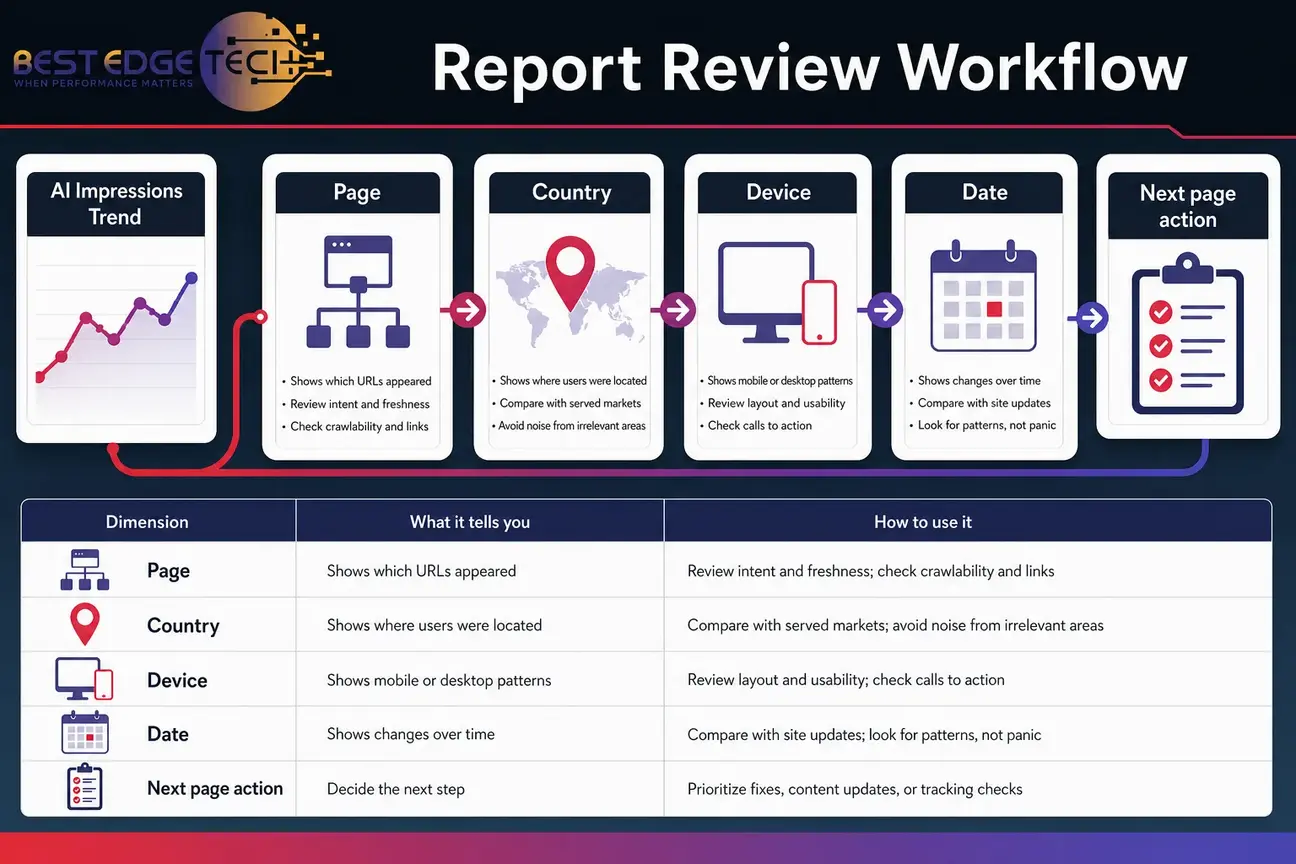
The report dimensions are where the work becomes practical. Page, country, device, and date breakdowns help you move from “AI impressions went up or down” to “which parts of the site and market changed?” That is the difference between vanity reporting and useful analysis.
| Dimension | What it tells you | How to use it |
|---|---|---|
| Page | Which URLs were shown as links in generative AI features. | Review page intent, freshness, crawlability, internal links, and whether the page is the right answer for the topic. |
| Country | Where users were located when links were shown. | Compare visibility with the markets you serve and avoid overreacting to countries that are not commercially relevant. |
| Device | How visibility differs by device where the report provides that view. | Check whether mobile or desktop patterns suggest a need to review usability, layout, or content formatting. |
| Date | When impressions occurred during the selected period. | Compare changes with content updates, technical releases, seasonality, and broader Search Console trends. |
A simple report map can keep the analysis clear:
| Stakeholder wording | Best question to ask | Risk to avoid |
|---|---|---|
| ai overviews report | Which Search-side pages were shown in AI Overviews? | Calling impressions an assured AI citation or implying a standalone official product report. |
| ai mode report | Which pages were shown in AI Mode contexts? | Assuming the report explains every selection factor or exists as a separate official product report. |
| discover ai report | Which pages appeared in generative AI features in Discover? | Treating Discover exposure as service-intent demand. |
| search console impressions | Where did Google show links to the site? | Reporting exposure as traffic, leads, or revenue. |
This is why Search-side AI visibility, AI Mode visibility, and Discover-side reporting should not share one interpretation. When impressions move, the surface and page type matter before the team decides what to change.
Page analysis: find the URLs that deserve attention
Start by sorting pages by impressions, but do not stop there. A page with many impressions may be a priority because it is visible. A page with fewer impressions may still be important if it is a high-value service page, a location page, or a strategic guide. Page-level analysis should combine the report with business judgment.
Ask these questions for each important URL:
- Is the page indexable and eligible to appear in Google Search?
- Does the page answer a clear question or need?
- Is the page current enough for the topic?
- Does the page use plain language, specific examples, and helpful structure?
- Is the page internally linked from related resources?
- Does the page match the audience, market, and service you want to support?
If you need a more structured technical review, connect the page list from this report with an SEO analysis. That lets you check indexing, crawlability, internal links, content quality, and measurement setup before you change pages that may already be earning visibility.
Country analysis: separate useful markets from noise
Country data helps you avoid the most common reporting mistake: treating every impression as equally valuable. A business serving clients across the United States may care about national visibility. A local business may care more about impressions in its service market. An agency may need to separate client markets from incidental international exposure.
If country visibility does not match the markets you serve, do not jump to a conclusion. First check whether the page is broadly informational. A guide can attract visibility from countries that are not target markets. Then compare country patterns with your normal Web performance report. If the same pattern exists everywhere, it may reflect topic demand rather than a specific AI-feature issue.
For a North Carolina-based business that also serves clients remotely, the right interpretation depends on the business model. National informational visibility may be useful for a broad service page, while local service pages should be judged more carefully against the actual areas served.
Device analysis: connect visibility with usability
Device data can reveal whether AI-feature visibility is concentrated on mobile or desktop. Do not assume that a device split means Google prefers one version of your content. Instead, use device patterns as a prompt to review user experience, content layout, and page performance.
For mobile-heavy impressions, check whether the page is readable on a small screen. Are the main answers high on the page? Are tables usable? Are calls to action clear but not intrusive? For desktop-heavy impressions, review whether longer explanations, comparison tables, and technical documentation are easy to scan.
Device patterns are also useful when communicating with leadership. Instead of saying “AI visibility changed,” you can say, “Most impressions for these pages occurred on mobile during this period, so we are reviewing mobile readability and page structure before recommending content changes.” That is a more useful next step.
Date analysis: look for patterns, not panic
Date data helps you avoid overreacting to a single day. AI-feature visibility can fluctuate, and Google’s systems change often. Review changes across useful windows, then compare them with site updates, publishing dates, technical releases, content refreshes, and broader Search Console movement.
Google’s announcement about Search Console generative AI performance reports says the Search report can show hourly, daily, weekly, and monthly granularity, if that remains current at publication. Use that flexibility to match the date view to the business question: hourly or daily for recent troubleshooting, weekly for short-term movement, and monthly for broader trend review.
A date spike is not automatically a win. It may reflect a topic trend, an update, a temporary product behavior, or a page becoming more visible for a short period. A decline is not automatically a failure. It may reflect demand changes, page relevance, competition, or reporting changes. Keep the interpretation conservative unless you have supporting evidence from other reports.
If you are already tracking AI visibility more broadly, compare this report with your own measurement notes. Best Edge Tech’s guide to AI search visibility tracking can help teams separate platform-reported data, observed AI answers, and internal business outcomes without treating one metric as the whole story.
What the report does not tell you
The most useful part of this report may be the restraint it forces. Google’s documented reporting is impression-focused. It does not give you a complete explanation of selection, does not prove future inclusion, and should not be presented as a conversion report.
Do not use the report to claim:
- A page has a fixed AI ranking position.
- A page will continue appearing in AI Overviews, AI Mode, or Discover.
- AI-feature visibility caused a specific lead, appointment, case, sale, or revenue outcome.
- A competitor was displaced unless you have separate, reliable evidence.
- A content change directly caused AI-feature visibility unless the evidence supports that conclusion.
This is especially important for agencies preparing client reports. If you overstate the report, you create expectations the data cannot support. A safer framing is: “The report shows generative AI impressions for these pages during this date range. We are using the page, country, device, and date breakdowns to decide what to review next.”
Search-side AI visibility and Discover-side AI visibility can both be useful, but neither should be treated as a complete attribution system. The same caution applies to search console impressions across all surfaces.
For businesses that want help connecting AI-feature measurement with broader optimization, AI SEO and GEO services can support a more complete review of content, technical accessibility, entity clarity, and measurement. Scope depends on factors such as site size, competition, content volume, technical debt, markets served, and how much reporting access is available.
How to use regular Web performance data with this report
The dedicated report should be read with the regular Performance report, not apart from it. Google’s AI features documentation says that if a site appears in generative AI features, that activity is included in overall Search Console search traffic. That means a page can be part of the broader Web performance picture while also appearing in a dedicated AI-feature reporting view.
The relationship should still be handled carefully. The dedicated report is best understood as an AI-feature impressions layer. The broader Web report remains the place to understand normal Search performance, and Google’s documentation does not turn the AI-feature layer into a complete substitute for every other Search Console view.
Here is a practical workflow for marketing teams:
- Open the Search generative AI view and export or note the top pages by impressions.
- Open the regular Web performance report for the same date range.
- Compare the same pages for broader search visibility patterns.
- Review whether the pages support business-relevant topics.
- Check whether the page content is accurate, current, and useful.
- Document what you changed, when you changed it, and why.
- Recheck the same date windows after enough data accumulates, without promising a specific result.
This is where impressions become more actionable. A page that appears in the Search AI view and has strong Web visibility may already be an important asset. A page with AI-feature impressions but weak broader performance may need technical or content review. A page with strong Web performance but no AI-feature impressions may still be valuable; not every useful page will appear in every AI-feature context.
When AI-feature impressions and broader Web trends move together, document the overlap. When those signals move differently, treat that as a prompt for page-level investigation rather than a final answer.
If your team is early in this process, start with an AI search readiness audit. That type of review helps you check whether the site is crawlable, indexable, technically stable, and organized around clear entities and useful content before you chase individual AI-feature fluctuations.
A practical workflow for the generative ai report
Use this workflow when you need a repeatable monthly or campaign-level review. It keeps the conversation focused on measurement and next actions instead of speculation about how every AI answer was assembled.
Step 1: Choose the right view
Start by choosing Search or Discover. Use Search when the conversation is about AI Overviews, AI Mode, and query-driven visibility. Use Discover when the conversation is about Google Discover’s generative AI features. Mixing the two too early can hide the real pattern.
If your team is mainly focused on service demand, begin with Search. If your team publishes articles, guides, news-style content, or educational resources, include Discover as a separate analysis. A discover ai report request should have its own notes because user behavior is different from Search.
For Search, label stakeholder requests clearly. If someone uses phrases like ai overviews report or ai mode report, translate that into the documented Search Generative AI performance report rather than implying separate Google Search Console product reports.
Step 2: Set a date range that matches the business question
A short date range can help you investigate a recent launch, update, or technical change. A longer range can help you see whether visibility is sustained. The right range depends on the site, publishing cadence, and how much data appears in the report.
When comparing periods, write down what changed on the site. Did you publish a guide? Redesign a page? Change internal links? Update schema markup? Fix crawlability? Without a change log, date comparisons become guesswork. This is also where an SEO consulting conversation can help teams build a cleaner measurement process before making sitewide changes.
Step 3: Segment by page before judging performance
Do not average everything together. Segment by page type: service pages, educational guides, blog posts, location pages, product pages, attorney or provider pages, and brand pages. Each type has a different job.
AI Overviews may surface informational guides more often than direct sales pages. AI Mode visibility may show pages that answer specific multi-step questions. Discover-side AI visibility may lean toward content that fits a feed-style discovery experience. These are patterns to investigate, not rules to declare.
For each page type, record search console impressions, surface, date range, and next action. That keeps AI Overviews, AI Mode, and Discover analysis tied to decisions rather than abstract scores.
Step 4: Compare country and device data to actual strategy
Country and device data only matter when tied to strategy. A national brand may welcome broad country visibility. A local service business may need to know whether impressions come from relevant markets. A mobile-heavy pattern may require a mobile content review; a desktop-heavy pattern may require a different usability check.
At this stage, keep a simple note for each major page: relevant market, primary audience, business purpose, and next action. This prevents reporting meetings from turning into a list of impressions with no decision attached.
Step 5: Decide the next action
Every page should land in one of four buckets:
- Monitor: The page is relevant, current, and technically sound. Keep tracking it.
- Refresh: The page is relevant but needs clearer answers, fresher details, or stronger structure.
- Consolidate: Multiple pages overlap and may be confusing the topic focus.
- Investigate: The page appears unexpectedly, has technical issues, or does not match the intended audience.
This action bucket is more useful than a generic AI visibility score. It tells the team what to do next and gives leadership a practical interpretation of the data.
How this fits with AI search readiness
Measurement is only one part of AI search work. The broader question is whether your site is technically accessible, content-rich, clearly organized, and useful enough to be eligible for search features in the first place. Google’s guidance for generative AI features keeps the focus on the same fundamentals that matter in Search: accessible pages, helpful content, and eligibility for Google Search features.
Google’s documentation on generative AI features does not tell site owners to create a special AI-only version of the site, rely on a special AI schema type, or chase manufactured mentions. For most businesses, the better starting point is still technical SEO, useful content, clear entities, internal links, and accurate business information.
If your content team sees repeated visibility for certain guides, use that as a signal to improve the surrounding content cluster. A page that answers one question well may deserve supporting pages, clearer internal links, or updated examples. Best Edge Tech’s content marketing services can support that kind of planning when the issue is not just measurement, but the depth and usefulness of the content itself.
If your team is trying to understand citations and links in AI answers more broadly, read the guide to AI citation optimization. Just keep the expectations realistic: no one can guarantee AI citations, and the generative reporting data should be one input among several.
Short checklist: pages most likely to deserve review
This checklist does not predict or guarantee AI-feature visibility. It helps you decide which pages to review first after you open the report.
- Indexed, eligible pages: Start with pages that are already indexable and eligible for Google Search snippets.
- Clear answer pages: Review pages that answer a specific question in plain language.
- Strong educational guides: Look at guides that help users understand a topic before they contact a business.
- Service pages with useful context: Check pages that explain a service clearly without relying only on sales copy.
- Pages already visible in Search Console: Compare AI-feature impressions with broader Web performance.
- Technically accessible pages: Prioritize pages that load properly, are crawlable, and have clean internal links.
- Relevant market pages: For local or regional businesses, review whether visible pages match actual service areas and audience needs.
- Pages that need accuracy checks: For healthcare, legal, and other sensitive topics, confirm marketing claims and compliance language with the appropriate internal or outside advisors.
For most businesses, the winning move is not to rewrite every page because a new report appeared. Start with pages that already matter to your customers and your search strategy. Then use the report to decide whether those pages are being surfaced, whether the right pages deserve improvement, and whether your measurement process is strong enough to support decisions.
When to ask for help
If your team can access Search Console, identify the right views, and connect the data to page-level decisions, you may only need a light process. If the data is confusing, your site has technical debt, or leadership expects a clean explanation of Search, Discover, AI Overviews, and AI Mode, it may be time to bring in outside support.
Best Edge Tech is a North Carolina-based digital marketing agency focused on practical SEO, AI search optimization, technical analysis, and content strategy. To discuss measurement or AI search readiness, contact Best Edge Tech or call 252-303-0074. Share your website URL, goals, markets served, recent site changes, Search Console access status, and the service you are considering.
Final takeaways for practical reporting
The report is most useful when you treat it as an AI-feature visibility layer. The Search Generative AI performance report helps you understand Search-side impressions for AI Overviews and AI Mode. The Discover report helps you understand a separate Discover surface. Search console impressions give you the starting signal, but not the full business outcome.
Use the generative ai report to answer better questions: Which pages appeared? Which countries and devices matter? What changed over time? Which pages deserve monitoring, refreshing, consolidation, or investigation? Those questions lead to better decisions than trying to turn one report into a ranking or revenue dashboard.
Search engines and AI products change often. Check current platform documentation before acting, and treat any result as dependent on your site, market and competition.
Frequently Asked Questions
What does the Generative AI performance report measure in Search Console?
It measures impressions from Google’s generative AI features. In plain English, it shows when links to your site were shown to users in those AI-feature contexts. It is a visibility report, not a complete traffic, ranking, or conversion report.
Does the report show clicks or rankings?
Based on Google’s documented report descriptions, the report is focused on impressions. Do not treat it as a ranking report, lead report, or proof that AI visibility produced a specific business outcome.
What is the difference between the Search and Discover views?
The Search report covers generative AI features on Google Search, including AI Overviews and AI Mode. The Discover report covers generative AI features in Google Discover. Search is query-driven; Discover is a feed-style surface, so the data should be interpreted separately.
Are AI Overviews and AI Mode separate Search Console reports?
Google documents a Search Generative AI performance report that covers AI Overviews and AI Mode, plus a separate Discover report. Unless Google documents a different structure, describe AI Overviews and AI Mode as Search-side contexts within the report, not as separate official product reports.
What do page, country, device, and date mean in the report?
Page shows which URLs received impressions. Country shows where users were located. Device helps you compare visibility by device where available. Date shows when the impressions occurred, which helps you compare changes with content updates, technical releases, or broader search trends.
Why are AI-feature impressions also part of overall Search Console performance?
Google says that when a site appears in generative AI features, that activity is included in overall Search Console search traffic. The dedicated report gives you a more specific AI-feature impressions layer, while the regular Web performance report remains important for broader search analysis.
Can I use this report to tell whether AI Overviews are helping traffic?
You can use it to see whether links to your site were shown in AI Overviews, but you should not use it alone to prove traffic impact. Compare AI-feature impressions with regular Web performance, analytics data, and your own business outcomes before drawing conclusions.
Where should I look for broader AI search readiness guidance?
Use the report as one measurement layer, then review crawlability, indexing, content quality, internal links, structured data where appropriate, and entity clarity. Broader AI search readiness work should focus on making the site useful, accessible, and measurable rather than chasing one AI feature.
Sources
- Google Search Central Blog: Search Console generative AI performance reports
- Google Help: Generative AI performance report for Search
- Google Help: Generative AI performance report for Discover
- Google Search Central: Guide to optimizing for generative AI features
- Google Search Central: AI features and your website