

How to Audit JavaScript SEO Before Website Changes
A JavaScript SEO audit before a redesign, framework change, or template launch should prove four separate things: search engines can crawl the URL, render the page, evaluate indexing signals, and discover important links. A page that looks fine in a browser is not automatically safe for search because the browser view may depend on JavaScript, API responses, hydration, scroll events, or client-side routes. The practical goal is to compare the server response with the rendered page, document what changed, and fix gaps before launch. This reduces risk, but it does not guarantee indexing, rankings, traffic, leads, rich results, or AI citations. Results still depend on the site, market, competition, implementation quality, and how search systems process the page.
Quick answer for redesign teams
Start by selecting representative pages, not just the homepage. Include service pages, location pages, blog posts, landing pages, contact pages, listings, and any template that produces qualified leads for the business.
For each URL, capture the raw HTML, then capture the rendered HTML after JavaScript runs. Compare the main content, headings, internal links, title, meta description, robots directives, canonical URL, structured data, images, lazy-loaded sections, and conversion links.
Then test the same pages with Google Search Console’s URL Inspection workflow where available and a structured-data validation workflow. As of 2026, URL Inspection can show how Google currently processed a URL, but it cannot promise indexing or ranking. Use the evidence to guide fixes before the website change goes live.
What a JavaScript SEO audit must prove
The audit is not simply a pass-or-fail test for whether a page “uses JavaScript.” Many modern websites use JavaScript for menus, filters, forms, maps, personalization, animations, or entire page rendering. The question is whether important search content and signals remain accessible when search systems process the page.
Separate these four outcomes:
- Crawling: Can a search engine discover and fetch the URL and the resources needed to understand it?
- Rendering: Can the system process the page after JavaScript runs and see the content, links, metadata, and structured data you intended?
- Indexing: Is the page eligible to be stored in the search index, based on signals such as status code, robots directives, canonical signals, duplicates, and content quality?
- Ranking: If indexed, how does the page perform relative to other eligible pages for a query?
These are related, but they are not the same. A page can be crawlable but fail to render important content. A page can render but still be excluded because of a noindex directive or canonical conflict. A page can be indexed but not perform well because the content does not satisfy search intent, lacks trust signals, or competes with stronger pages.
For business owners and marketing leads, this distinction matters because redesign problems are often discovered too late. The site launches, the design looks good, and only later does the team realize that navigation, page titles, schema, or service content changed after hydration. A pre-change audit creates a baseline before developers, designers, and content teams move templates into production.
How Google processes JavaScript pages as of 2026
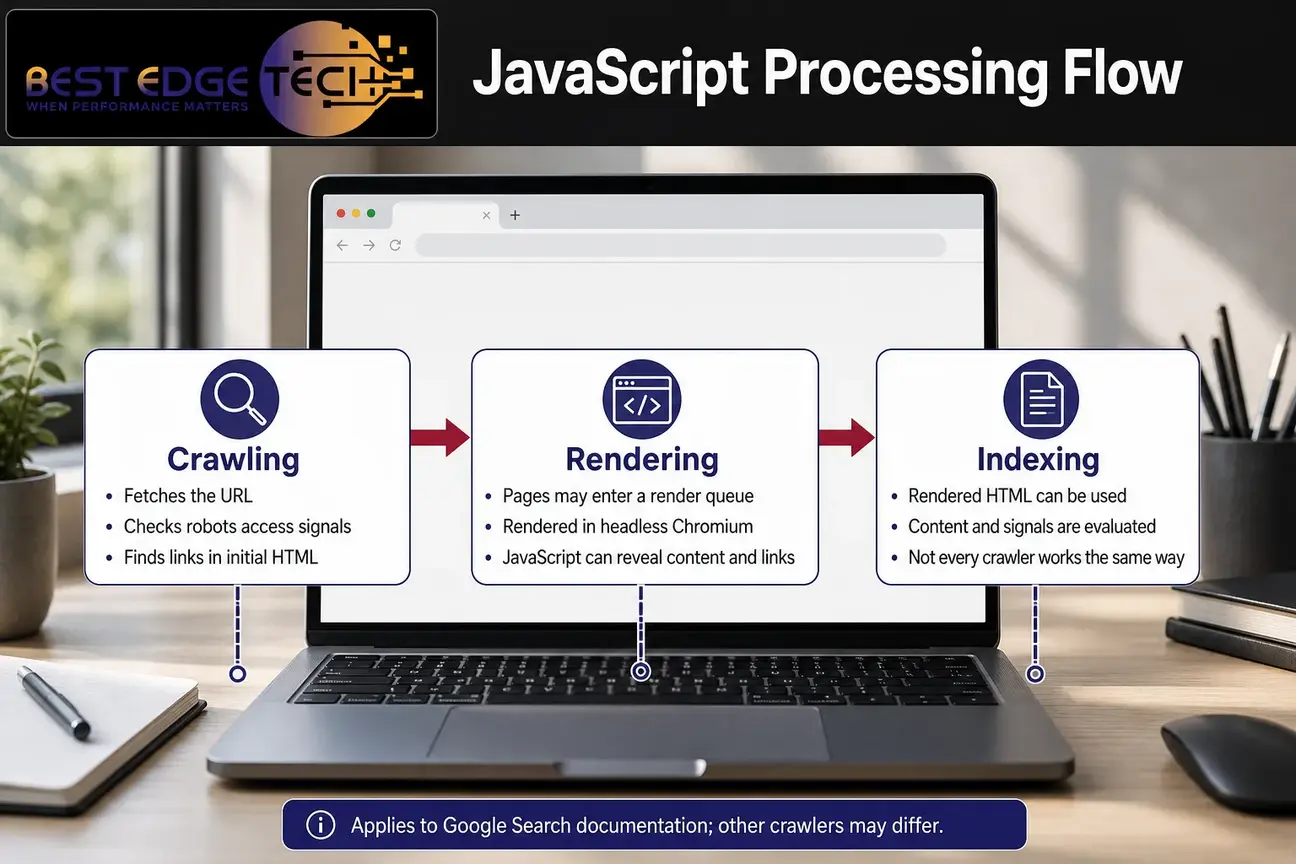
Google describes JavaScript processing in broad phases: crawling, rendering, and indexing. In its JavaScript SEO basics documentation, Google explains that Googlebot crawls pages, places pages in a rendering queue when appropriate, renders them using a headless Chromium environment, and uses rendered HTML for indexing. That documentation applies to Google Search, not necessarily to every search engine, social crawler, AI crawler, accessibility tool, or third-party bot.
During crawling, Googlebot fetches a URL and checks access signals such as robots restrictions. It can find links in the initial HTML response. After rendering, Google may discover more links and page content that JavaScript added to the document.
This is why raw source code alone is not enough for a modern audit. It is also why the browser view alone is not enough. You need both views: what the server sends before JavaScript executes and what exists after JavaScript rendering completes.
As of 2026, Google also notes that “server-side or pre-rendering is still a great idea” because it can make websites faster for users and crawlers, and not all bots can run JavaScript. That does not mean every site must use one architecture. It means teams should make an intentional decision instead of assuming every crawler will process every script exactly as a user’s browser does.
What rendered HTML must show before launch
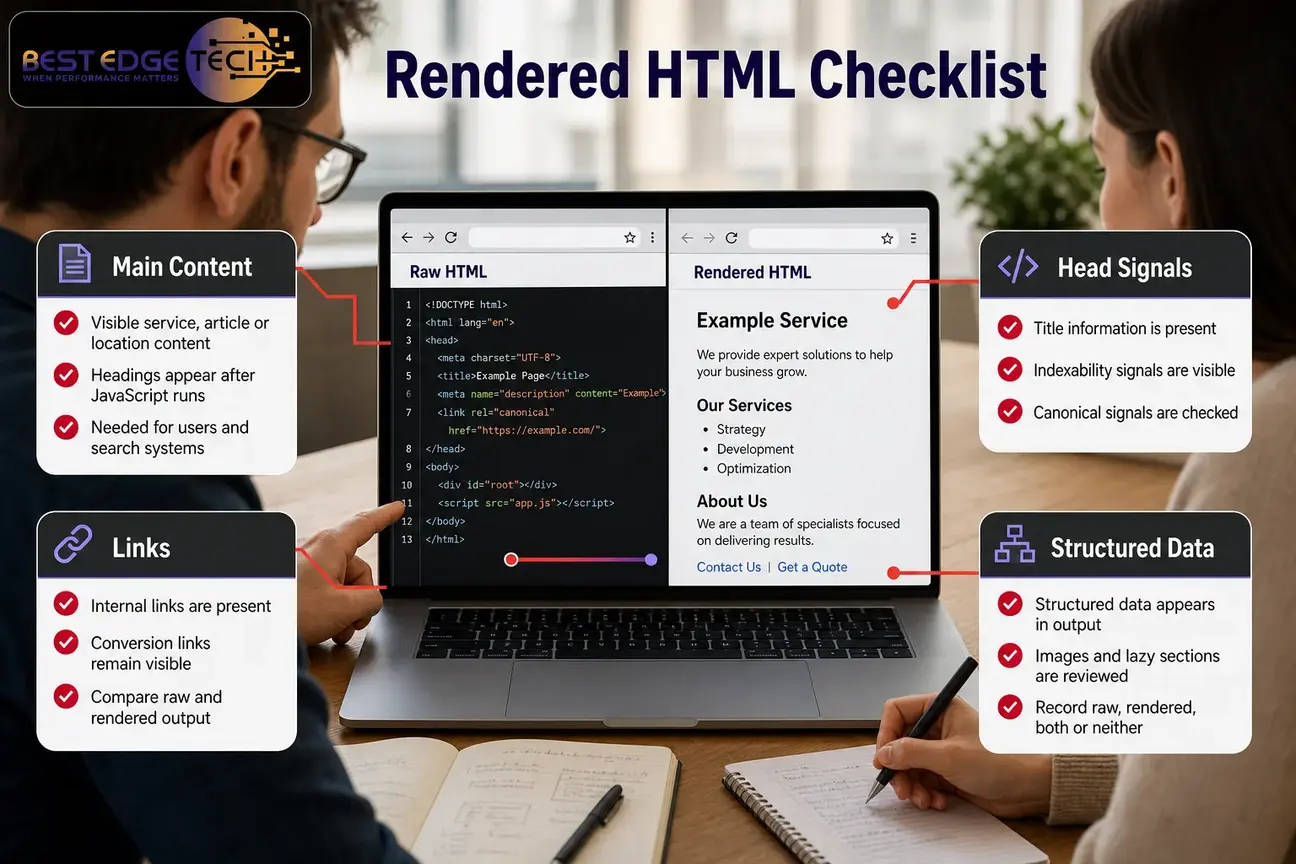
The rendered HTML is the document after JavaScript has run and the page has built or modified the DOM. For SEO purposes, it should contain the information the page needs search systems and users to understand: visible main content, headings, links, title information, indexability signals, canonical signals, structured data, and key conversion paths.
Compare raw and rendered output with a simple template-level checklist. For each representative page, record whether the item appears in raw HTML, rendered HTML, both, or neither.
| Audit item | Raw HTML check | Rendered HTML check | Risk if it differs |
|---|---|---|---|
| Main content | Is the core service, article, or location content present before scripts run? | Does the final DOM include the same meaningful content? | Important copy may be delayed, missing, duplicated, or dependent on failed API calls. |
| Internal links | Are important URLs present in standard links? | Does JavaScript preserve, add, or remove crawlable links? | Key pages may become hard to discover or may rely on interaction-only navigation. |
| Metadata | Does the server send title, description, robots, and canonical signals? | Do scripts change or duplicate those head elements? | Search signals may conflict after hydration or routing changes. |
| Structured data | Is JSON-LD or other markup present and page-relevant? | Does JavaScript create duplicate, stale, or contradictory markup? | Validation may fail or describe content that users cannot see. |
| Lazy-loaded sections | Are key text, links, and images available without waiting for interaction? | Do delayed elements appear in the rendered DOM? | Important information may depend on scroll, click, consent, timing, or API availability. |
Do not treat every difference as a defect. Some differences are expected. JavaScript may add interactive filters, expand menus, load images, or personalize a nonessential feature. The concern is whether the final page that search systems process still contains the content and signals needed for search visibility.
JavaScript rendering workflow for crawl access
A practical JavaScript rendering workflow starts with access. If search engines cannot fetch the URL or essential resources, the rest of the audit becomes speculation.
Check the status code first. A page intended for organic search should not unexpectedly return an error, redirect loop, authentication wall, or soft empty state. Then review robots restrictions, noindex directives, and resource access for JavaScript, CSS, images, and API endpoints that materially affect page content.
Keep crawl access separate from indexing eligibility. A page can be crawlable and still not indexed. A page can be indexable in theory but poorly rendered in practice. Your audit notes should make those distinctions clear so the developer does not receive a vague request such as “Google can’t see the page” when the real issue is a blocked script, missing content after hydration, or a noindex tag inherited from staging.
For important pages, preserve evidence. Save the raw response, rendered HTML, screenshots, console errors, failed network requests, and testing date. If a problem appears only in staging or only after login, note that clearly. Developers can fix issues faster when the SEO finding includes the URL, template, expected behavior, actual behavior, and reproduction steps.
How to audit crawlable navigation and links
Navigation is where many JavaScript redesigns create search problems. Menus, filters, pagination, breadcrumbs, related posts, service links, and calls to action may appear clickable to a user but fail to expose stable URLs in the source or rendered document.
Google’s documentation on crawlable links says Google can follow links when they use an anchor element with an href attribute. For an audit, the safe workflow is to inspect important navigation in both raw and rendered HTML and confirm that priority destinations are represented by stable URLs.
Pay attention to these link patterns:
- Menu items that only trigger JavaScript click handlers.
- Filter controls that update results without exposing a useful URL.
- Pagination that changes application state but not crawlable page destinations.
- Service or location links inserted after a delayed API response.
- Links that point to empty fragments, temporary routes, or staging URLs.
- JavaScript that removes useful links after hydration.
Test no-script and keyboard behavior as resilience checks, not as perfect replicas of Googlebot. If a user or bot cannot reach critical pages without custom interaction, the site may be more fragile than it needs to be. For deeper internal-link diagnostics after a redesign, connect this work with an internal linking audit.
How to audit metadata and canonical URLs
Metadata problems are common when a site moves to a new JavaScript framework or adds client-side routing. The raw HTML may contain one title and canonical, while the rendered page produces another. In worse cases, scripts duplicate head elements, leave default placeholders, or set every route to the same canonical URL.
Compare these elements before and after rendering:
- Title element.
- Meta description.
- Robots directives.
- Canonical URL.
- Relevant language or alternate annotations.
- Open Graph and social sharing metadata, when sharing previews matter.
Search metadata and sharing metadata are not the same thing. A redesign team should check both, but it should not assume every social tag is a direct web-search ranking signal. The immediate SEO priority is whether the title, robots directive, canonical, and visible content align with the URL’s purpose.
Canonical handling deserves special attention. Google’s canonical documentation explains that canonical signals help indicate the preferred version of duplicate or similar URLs, but a canonical is a signal, not a promise that a specific URL will be selected. Google’s JavaScript guidance also states, “The best way to set the canonical URL is to use HTML,” and if JavaScript is used, teams should “make sure that you always set the canonical URL to the same value as the original HTML.”
Check canonical consistency across the page URL, internal links, XML sitemap, redirects, and rendered head. If the raw page says one URL is canonical and the rendered page changes it, treat that as a launch blocker until someone explains why. If the canonical depends on query parameters, logged-in state, geolocation, or application state, involve a developer.
When sitemap signals are also changing, use an XML sitemap audit to confirm that the submitted URLs match the final preferred URLs.
How to audit lazy-loaded content
Lazy loading is not automatically bad. Images and media can be deferred to improve user experience. The risk appears when important content, internal links, reviews, product details, service information, or structured information only appears after scrolling, clicking, waiting, accepting a prompt, or receiving an API response that may fail.
For each page template, identify what loads late. Then ask a practical question: if this delayed element never loaded, would the page still explain its purpose to users and search systems?
Test these cases:
- Primary service content that appears after a script fetches it from an API.
- FAQ or accordion content inserted only after interaction.
- Reviews or testimonials that are loaded from third-party scripts.
- Product or service details that appear only in tabs.
- Internal links that load only when a user scrolls near the footer.
- Images with missing alt text or placeholder-only markup after rendering.
The right fix depends on the implementation. Sometimes the answer is to include important text in the initial HTML. Sometimes it is to ensure the rendered DOM reliably includes the content without user interaction. Sometimes it is to adjust how API failures are handled. The audit should document the behavior and the business impact instead of declaring every lazy-loaded element a defect.
How to test JavaScript-generated structured data
Structured data helps search systems understand eligible page information when implemented correctly, but valid markup does not guarantee a rich result. It also does not replace visible helpful content. In a JavaScript-heavy site, structured data may be generated by the server, by the client, by a tag manager, by a CMS plugin, or by more than one system at the same time.
As of 2026, Google’s structured-data overview says JSON-LD is a recommended format for structured data. Google’s Rich Results Test documentation says to “Validate your code using the Rich Results Test and fix any critical errors.”
During development, test representative templates, not one polished sample page. For example, a healthcare practice, law firm, or service business should test pages that represent the actual template mix: homepage, service page, practitioner or team page if used, article page, location page if used, and contact page. This is marketing and SEO guidance only; regulated businesses should coordinate compliance decisions with their own counsel or compliance team.
For each page, confirm that structured data:
- Describes visible, page-relevant content.
- Does not duplicate conflicting entities after JavaScript rendering.
- Does not describe a different page, location, service, article, or organization.
- Uses required properties for the intended Google feature where applicable.
- Survives the actual deployment process.
- Does not depend on blocked resources or late scripts that fail under load.
After deployment, use Search Console’s URL Inspection workflow to evaluate how Google processed the live URL where that data is available. For a deeper structured-data review, use Best Edge Tech’s schema markup audit guide alongside template testing.
Client-side rendering risks to test, not assume
Client-side rendering means the server returns a relatively sparse HTML shell, and JavaScript builds much of the page in the browser. This can work, but it changes what the audit must prove. If the raw HTML contains little more than an app container, the rendered HTML becomes the primary evidence for content, links, metadata, and structured data.
For client-side rendering, test whether each route returns a meaningful status code and stable URL. A common problem is that every route returns the same shell, including invalid URLs. Users may see a custom “not found” screen, while the server still returns a success status. That can confuse diagnostics and make it harder to separate valid pages from empty application states.
Also check whether title tags, descriptions, canonical URLs, and robots directives update correctly for each route. Client-side rendering can produce good search outcomes when implemented carefully, but the audit should not assume that route-level metadata exists just because users can navigate between screens.
Finally, inspect whether internal links are real links or application-only controls. Client-side rendering often relies on JavaScript routing. The SEO question is whether priority URLs remain discoverable and whether the rendered page gives search systems the same destinations that users can reach.
Server-side rendering, static rendering and hydration
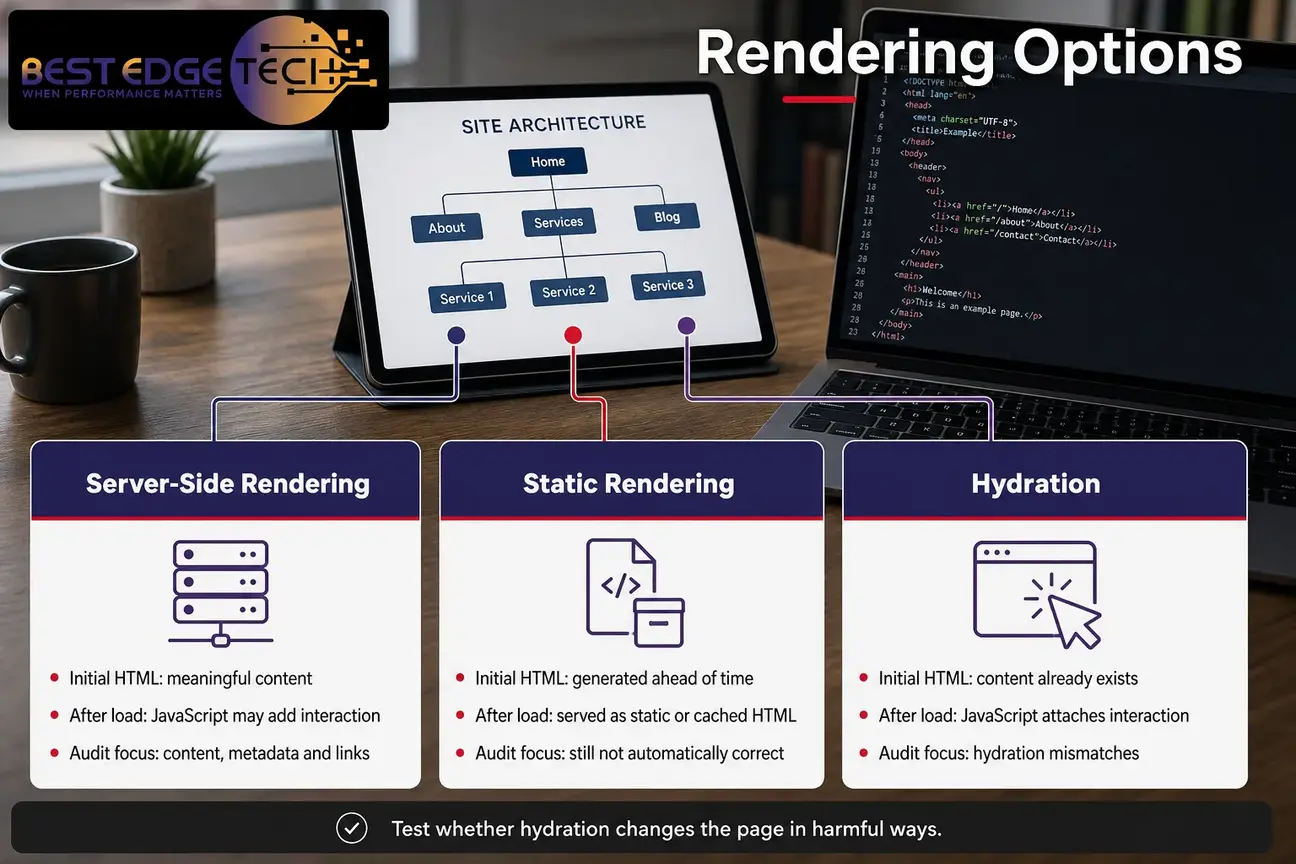
Server-side rendering means the server returns HTML that already contains the page’s meaningful content for a request. JavaScript may still run afterward to add interaction. Static rendering or pre-rendering means pages are generated ahead of time and served as static or cached HTML. Hydration means JavaScript attaches interactivity to HTML that already exists.
Server-side rendering and static rendering often make audits easier because the raw HTML already contains much of the content, metadata, and links. That does not make them automatically correct. You still need to test whether hydration changes the page in harmful ways.
Hydration mismatches deserve attention. A page may load correct HTML at first, then JavaScript replaces it with a different title, removes links, duplicates components, changes canonicals, or swaps visible content based on client state. Those changes can be subtle, especially when the page looks similar to a human reviewer.
For server-side rendering, compare three moments: the raw server response, the rendered DOM after scripts run, and the live URL as tested by Google tools. If all three tell the same story, the implementation is more resilient. If they disagree, document the gap and involve the development team before launch.
URL Inspection and live-page verification as of 2026
URL Inspection is useful because it evaluates a specific URL in Google Search Console. Use it to review page-level Search Console information such as indexing status, selected or declared canonical information where available, page resources, mobile usability signals where reported, and detected structured data.
Google’s Search Console documentation should be treated as the current reference for available reporting behavior. Treat URL Inspection as page-level evidence, not a guarantee. A successful inspection does not mean the page will rank, earn a rich result, keep its current visibility, or produce leads.
URL Inspection works best after you already have a template inventory. Do not inspect only the homepage. Test representative URLs from each major template and compare the findings with your raw and rendered HTML notes.
Record:
- Inspection date.
- Tested URL.
- Indexing status or eligibility message.
- Canonical information shown by the tool.
- Mobile or resource issues reported.
- Structured data detected.
- Whether the result matches the intended template behavior.
After launch, repeat the same tests. If visibility changes later, treat those changes as observations that require investigation. Do not assume one JavaScript change caused every movement in search results.
When developer assistance is appropriate
Some issues can be handled in a CMS. Others require a developer who understands the framework, routing layer, build process, and deployment environment. Involve a developer when the audit finds missing content, missing links, contradictory head elements, hydration mismatches, failed API requests, or JavaScript errors that affect search-critical content.
Developer help is especially important when a redesign changes rendering architecture. Moving from a traditional CMS theme to a JavaScript app, changing frameworks, introducing client-side routes, or replacing templates can affect crawl paths, status codes, internal links, canonicals, structured data, and sitemap consistency.
Bring specific evidence to the conversation. “The service content is missing from rendered HTML on three staging URLs after hydration” is much more useful than “the JavaScript is bad for SEO.” Developers need reproducible conditions, affected templates, expected output, actual output, and business priority.
A developer should also review any problem tied to authentication, consent banners, geolocation, personalization, rate-limited APIs, tag managers, or third-party scripts. Those systems can change what search tools see compared with what a logged-in user or local reviewer sees.
What redesign teams should record before launch
A pre-launch record protects the team from guesswork. Before changing templates or pushing a new framework, create an inventory of the pages and signals that matter.
At minimum, record:
- Representative URLs by template.
- Current status codes and redirect behavior.
- Indexability directives.
- Canonical URLs.
- Title tags and meta descriptions.
- Primary headings and important visible content.
- Priority internal links and conversion links.
- Structured-data types and validation status.
- Raw HTML and rendered HTML comparison notes.
- Known JavaScript errors or failed resource requests.
- Post-launch test plan and owner.
This is also where SEO and design work should meet. A redesign that looks better but removes crawlable navigation, weakens content, or changes templates without redirects can create avoidable risk. Best Edge Tech’s website redesign SEO checklist covers the broader migration workflow, while SEO web design work focuses on building search considerations into the site structure before launch.
How SEO analysis can identify JavaScript risks
An SEO analysis can combine crawl data, rendered-page testing, Search Console evidence, content review, internal-link review, and structured-data checks. The value is not just finding errors; it is prioritizing which issues matter before developers spend time on fixes.
For example, a missing animation script may be low priority. A missing service page body, changed canonical, blocked route, or navigation system that hides key pages is a higher priority. The audit should separate business-critical defects from cosmetic differences.
North Carolina-based Best Edge Tech provides SEO analysis for businesses that need a practical review of technical SEO issues, including crawlability, indexability, content signals, and site-change risk. If your team is planning a redesign, share the website URL, goals, markets served, recent site changes, current traffic or Search Console access if available, and the service you are considering.
You can contact Best Edge Tech or call 252-303-0074 to start a conversation. A quote depends on scope, including site size, competition, number of locations, content volume, technical debt, and integrations.
A practical pre-change checklist
Use this sequence before major website changes:
- Choose representative templates. Include pages that drive leads, explain services, support local visibility, publish articles, or support conversion.
- Capture raw HTML. Save what the server returns before scripts execute.
- Capture rendered HTML. Save the DOM after JavaScript rendering and compare it with the raw response.
- Check crawl access. Review status codes, robots restrictions, resource access, redirects, and authentication barriers.
- Check navigation. Confirm that priority pages are linked with stable URLs in raw or rendered output.
- Check metadata and canonicals. Look for conflicting titles, robots directives, canonical URLs, and duplicated head elements.
- Check lazy-loaded content. Verify that important content does not depend on unsupported interaction or fragile timing.
- Check structured data. Validate representative templates and make sure markup describes visible, relevant content.
- Run live-page verification. Use URL Inspection after deployment to compare Google’s page-level view with your intended output.
- Repeat after launch. Re-test templates, monitor Search Console, review server logs where available, and investigate changes carefully.
The final goal is a site where important content, links, metadata, canonical signals, and structured data remain consistent across the server response, the rendered page, and live verification tools. That is the standard a redesign team can control. Search performance after launch still depends on execution, competition, content quality, authority, and how search systems evaluate the page.
A JavaScript SEO audit is not about rejecting modern frameworks. It is about proving that the implementation supports search visibility before the business relies on the new site. Search engines and AI products change often. Check current platform documentation before acting, and treat any result as dependent on your site, market and competition.
Frequently Asked Questions
Is JavaScript bad for SEO?
No. JavaScript is not automatically bad for SEO. The risk is when important content, links, metadata, canonicals, or structured data depend on scripts that search systems cannot reliably process. The right approach is to test the actual implementation before launch.
What is the difference between raw HTML and rendered HTML?
Raw HTML is the server response before JavaScript runs. Rendered HTML is the document after the browser or testing tool processes JavaScript and updates the page. An SEO audit compares both because important content or signals may appear, disappear, or change after rendering.
Does passing a JavaScript rendering test guarantee indexing?
No. A successful render does not guarantee indexing, ranking, traffic, leads, or rich results. Rendering is only one part of the process. Search systems also evaluate indexability signals, canonical signals, content quality, duplication, relevance, and many other factors.
When is server-side rendering worth considering?
Server-side rendering is worth considering when important content, metadata, or links are missing from the initial HTML, when pages depend heavily on client-side scripts, or when multiple bots and tools need reliable access to content. It is not universally required, and the decision depends on the site, framework, performance goals, and development resources.
Should structured data be in raw HTML or generated by JavaScript?
Structured data can be implemented in different ways, but the audit should verify that the final page contains accurate, non-duplicated, page-relevant markup. It should describe visible content and survive deployment. Valid structured data can support eligibility for search features, but it does not guarantee that a feature will appear.
How many pages should be tested before a redesign?
Test representative templates rather than only one page. Include the homepage, service pages, location pages where applicable, blog posts, listings, contact pages, and any high-value conversion page. If one template powers many URLs, test enough examples to catch variations in content, routing, metadata, and structured data.
When should a developer be involved in the audit?
Bring in a developer when content or links are missing after rendering, JavaScript errors affect page output, API requests fail, canonicals or robots directives change after hydration, client-side routes behave inconsistently, or structured data is duplicated or generated incorrectly.
Sources
- Google Search Central: Understand the JavaScript SEO basics
- Google Search Central: Make your links crawlable
- Google Search Central: How to specify a canonical URL with rel=”canonical” and other methods
- Google Search Central: Validate your structured data
- Google Search Console Help: Search Console documentation