How to Diagnose an AI Visibility Drop in Google AI Search
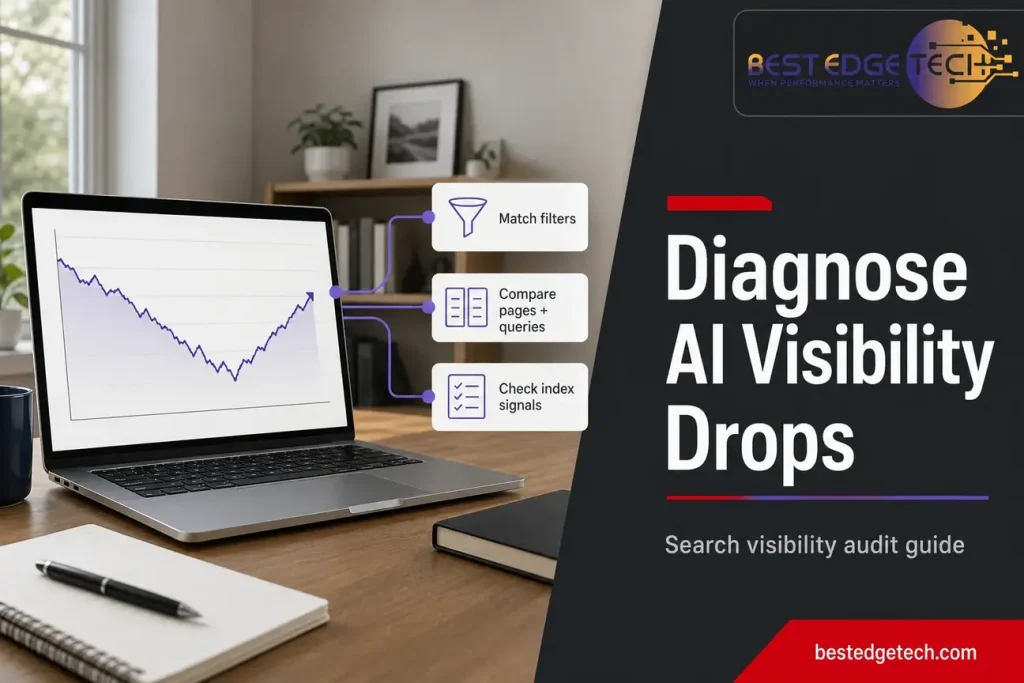
An AI visibility drop should be diagnosed before it is “fixed.” Start by confirming that the decline is real: use matched date ranges, the same Search Console property, the same search type, the same country and device filters, and the same page or query segments. Then compare impressions, clicks, click-through rate, average position, affected pages, and affected queries.
If the pattern holds, move into technical checks: indexing, crawlability, canonicals, redirects, JavaScript-rendered content, internal links, recent content edits, and search-intent alignment. Search Console can show performance and indexing evidence, but it cannot prove the full reason Google selected, changed, or stopped showing a source in an AI answer. Treat the data as evidence for visibility troubleshooting, not as a complete explanation of Google’s AI systems.
[]
Quick answer for business owners and agencies
If your AI search traffic looks lower, resist the urge to rewrite pages immediately. First, confirm whether the change appears in a comparable reporting view. A short dip, a changed filter, a different country selection, or a narrow query sample can make a normal fluctuation look like a strategic problem.
As of 2026, Google Search Central’s guide to optimizing for generative AI features explains how site owners can use Search Console reporting to understand performance in generative AI features. Google also documents guidance for generative AI features, but that documentation does not give site owners a complete formula for why a page is selected, cited, ignored, or replaced in a specific AI answer.
That distinction matters for small businesses, healthcare practices, law firms, and agencies. Search Console diagnosis can show patterns worth investigating. It cannot confirm that Google “lost trust,” that one edit caused the change, or that a specific fix will restore AI Overviews traffic.
Use the first hour to rebuild the report and write down the evidence. That simple Search Console diagnosis step can prevent unnecessary edits, protect useful content, and keep visibility troubleshooting focused on facts instead of assumptions.
Is the AI visibility drop real or a reporting change?
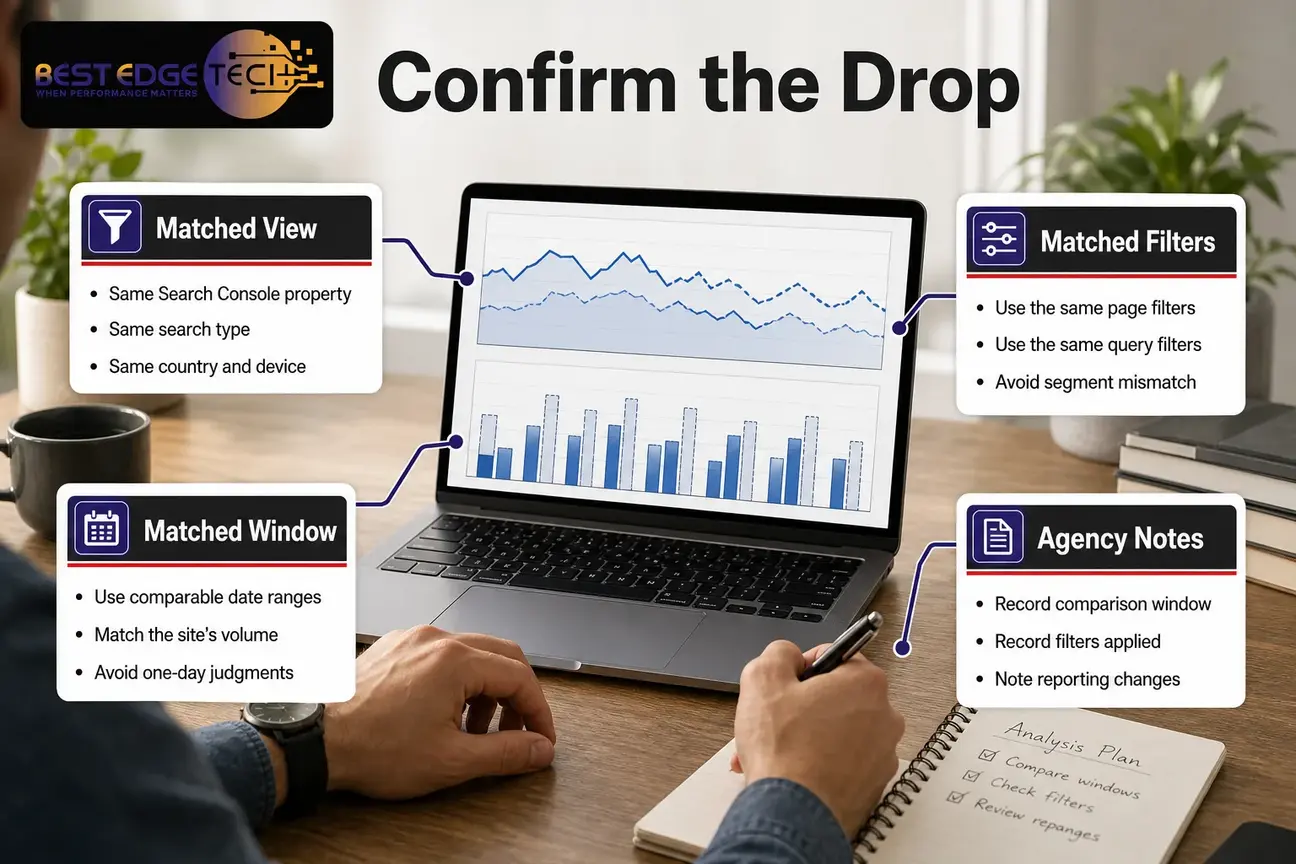
The first diagnostic question is whether the decline exists after you rebuild the comparison correctly. Use the same Search Console property, the same search type, the same country or region filters, the same device filters, and the same page or query filters. If your first view compared different segments, the chart may be showing measurement mismatch rather than a meaningful trend.
Use matched date ranges that make sense for the site’s volume. A small local practice, niche B2B company, or specialty legal service may not have enough daily query volume to judge a one-day or two-day movement. Agencies reviewing client accounts should record the exact comparison window, the filters applied, and the date the issue was first noticed.
Next, compare the generative AI reporting view with ordinary Web Search performance. That report can help isolate the segment, but the result is still reporting evidence, not proof of why Google changed the presentation.
For reliable visibility troubleshooting, document these items before changing pages:
- The first date the decline became visible.
- The exact date ranges being compared.
- The Search Console property used, including protocol and domain property differences.
- Country, device, search type, page, query, and appearance filters.
- Recent site releases, CMS changes, template edits, redirects, tracking changes, or content updates.
- Whether the decline appears across many pages or only a small set of URLs.
- Whether ordinary Web Search metrics moved in the same direction.
This step often separates a real AI search traffic concern from a reporting artifact. It also protects the site from unnecessary edits that could remove useful content or change the page’s purpose without evidence.
Which Search Console diagnosis metrics should you compare?
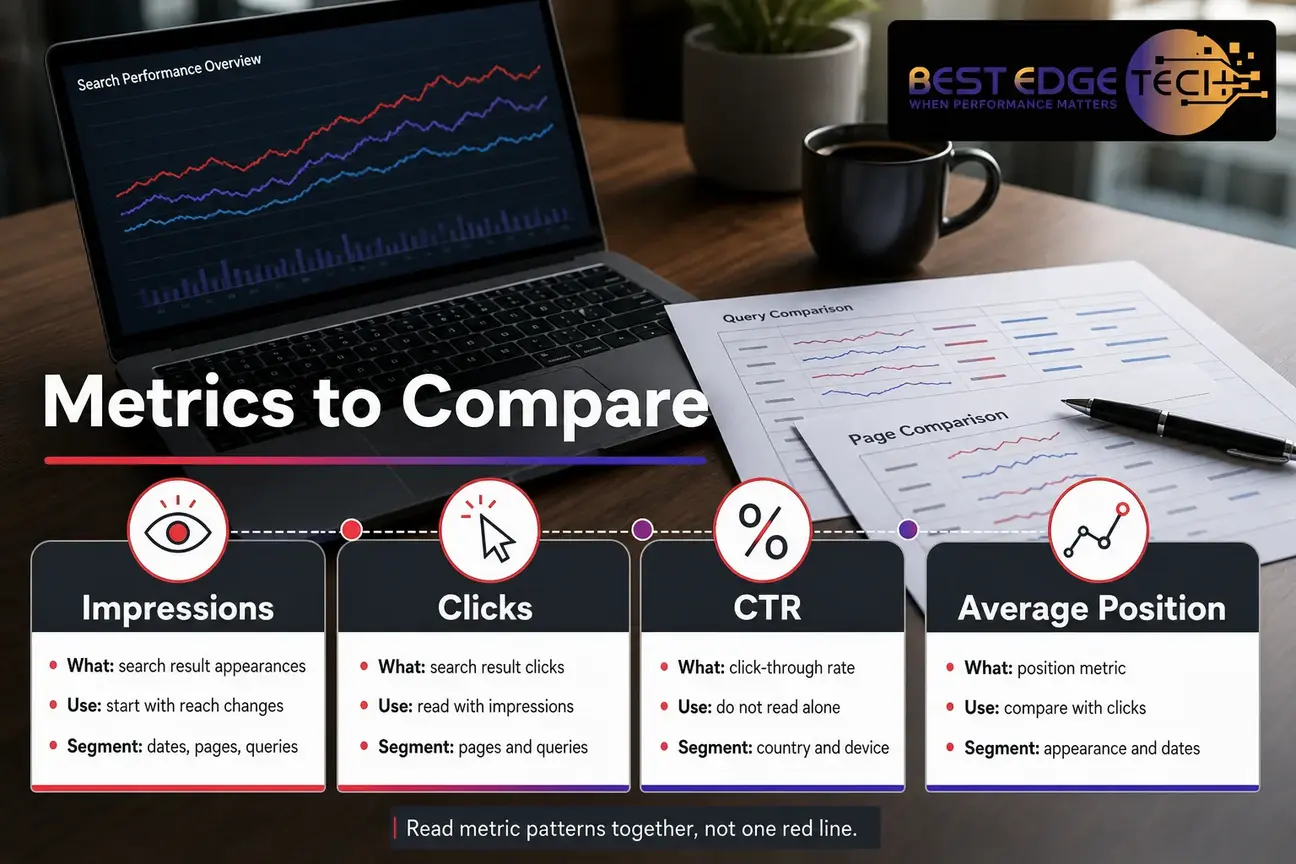
A strong Search Console diagnosis starts with the core metrics: impressions, clicks, click-through rate, average position, affected pages, and affected queries. Do not read any one metric in isolation. The pattern across metrics is more useful than a single red line on a dashboard.
Google’s Search Console performance report documentation explains that site owners can analyze Search performance by dimensions such as queries, pages, countries, devices, search appearance, and dates. For AI-related diagnosis, those dimensions help you determine whether a change is broad, narrow, local, device-specific, page-specific, or query-specific.
Start with impressions because they show how often your result was seen in the measured segment. Then look at clicks and CTR to understand whether visibility translated into traffic. Average position can help identify conventional Search movement, but it should be interpreted carefully because position can vary by query mix, feature type, and search-result layout.
Segment the data into groups that match your business model. A medical practice might compare service pages, condition pages, location pages, and physician or provider pages. A law firm might compare practice-area pages, informational guides, attorney pages, and local pages. An agency might compare blog content, service pages, and client landing pages. AI search traffic can move differently across each group.
| Pattern | Possible explanations to investigate | What it does not prove |
|---|---|---|
| Impressions down, clicks down, CTR stable | Reduced demand, fewer eligible appearances, lower conventional visibility, changed query mix, or reporting difference | It does not prove an AI-specific penalty or source-selection reason |
| Impressions stable, clicks down, CTR down | Changed result presentation, different competing results, altered searcher intent, or changed segment mix | It does not prove the page became technically broken |
| Clicks down while average position is stable | CTR issue, brand versus nonbrand shift, different SERP features, or narrower reported segment | It does not prove rankings caused the traffic loss |
| Average position down with impressions down | Conventional Search visibility issue, indexing concern, content-intent mismatch, or recent site change | It does not prove why an AI answer changed |
| Only a few pages or queries affected | URL-specific technical issue, query-intent change, content edit, or page-level competition | It does not prove a sitewide decline |
Use brand and nonbrand query separation where it makes sense. A brand query decline can reflect demand, reputation, navigation behavior, or reporting differences. A nonbrand decline may point more strongly toward search-intent fit, content depth, internal linking, indexing, or competitive movement. For local businesses, compare local and national query patterns instead of assuming they behave the same way.
Repeat the Search Console diagnosis after each major filter change. If the same AI Overviews traffic decline disappears when you change country, device, or page grouping, your next step is segmentation, not a rewrite.
Separate AI search traffic from broader search movement
AI search traffic should be interpreted alongside ordinary organic performance. If AI-related reporting is down and Web Search is also down across the same page groups, the investigation should broaden beyond AI features. If the generative AI segment changes while broader Web performance stays steady, avoid assuming a technical failure too quickly.
That comparison is especially important for businesses that use search as a lead source. A chart can show reduced visibility, but it does not tell you whether qualified inquiries changed, whether the query mix shifted toward lower-intent searches, or whether the reported segment became less comparable. Visibility is not the same thing as leads.
For a more durable measurement process, connect the current diagnosis to a tracking routine. Best Edge Tech’s guide to AI search visibility tracking explains how to watch AI-related search performance without treating every movement as a confirmed cause-and-effect event.
For agencies, the practical goal is to build a timeline that a client can understand. Show what changed, what did not change, what filters were used, what technical checks were completed, and which conclusions remain hypotheses. That is better than claiming that one report line explains Google’s source selection.
AI search traffic should also be compared with business context. If impressions fell but form inquiries, calls, or qualified conversations stayed steady, the priority may be monitoring. If AI search traffic fell and important nonbrand queries also declined, visibility troubleshooting should move into technical SEO and content review.
[]
What can Search Console show—and what can’t it prove?
Search Console can show aggregate performance trends, query and page patterns, country and device differences, indexing status, URL Inspection information, and certain canonical details. Those signals are valuable. They help you decide whether to monitor, investigate a page group, check a deployment, review a redesign, or run a deeper technical audit.
Search Console cannot prove the complete reason Google selected one source for an AI answer instead of another. It cannot show the full retrieval, ranking, generation, or presentation logic behind an individual AI Overview or AI Mode response. It also cannot promise that a future edit, redirect correction, or structured data change will restore visibility.
This is where many SEO diagnosis mistakes happen. A business sees AI Overviews traffic drop, finds a content edit made around the same time, and assumes the edit caused the decline. That edit may be relevant, but timing alone is not proof. Check the affected queries, compare similar pages that did not decline, and look for technical signals before making a broad conclusion.
For healthcare and legal practices, keep the review focused on marketing and search evidence. Search data can help evaluate whether a page still matches the searcher’s intent, but it is not medical, legal, HIPAA, or regulatory advice. Practices should involve their own counsel or compliance team when page changes touch regulated claims, disclaimers, or professional obligations.
A careful Search Console diagnosis should end with confidence levels. Label each finding as confirmed, likely, possible, or unproven. That keeps visibility troubleshooting honest when the available data does not explain every AI-search presentation change.
Are affected pages still indexed and crawlable?
Once you have confirmed that the AI visibility drop is not just a reporting mismatch, check whether the affected pages are still eligible to appear in Search. Indexing and crawlability do not ensure AI inclusion, but a page that is blocked, noindexed, unavailable, redirected incorrectly, or excluded from the index has a more basic problem.
Use URL Inspection for affected URLs, especially pages tied to lost impressions or lost AI Overviews traffic. Confirm whether Google can access the page, whether the page is indexed, and whether any indexing message changed after a site release. Then compare the affected pages with unaffected pages in the same template or content type.
Check these technical items:
- Robots.txt rules that may block important paths.
- Noindex directives in page templates, plugins, headers, or CMS fields.
- HTTP status codes, including accidental 404, 410, 5xx, or soft-error behavior.
- Server availability, firewall behavior, CDN settings, and uptime incidents.
- XML sitemap inclusion for important canonical URLs.
- Recent hosting, CMS, plugin, theme, or deployment changes.
- Crawl failures or sudden crawl pattern changes.
- Whether affected pages are still reachable from crawlable internal links.
An indexed page can still lose search visibility. Indexing is a prerequisite signal, not a promise of ranking, traffic, or AI-feature inclusion. If sitemap issues appear during the review, compare the current sitemap against your intended URL inventory and consider a deeper XML sitemap audit.
When AI search traffic changes after a release, do not stop at the index status of one URL. Check a sample of affected and unaffected pages so the Search Console diagnosis can reveal whether the issue is page-level, template-level, or sitewide.
Did canonical or redirect signals change?
Canonical and redirect signals are common places to look after a redesign, migration, domain change, URL cleanup, CMS change, or template update. A canonical is a signal that indicates the preferred version of a page when duplicates or near-duplicates exist. A redirect sends users and crawlers from one URL to another. Both can influence which URL Google treats as the main version.
Google’s canonicalization documentation describes methods such as rel=”canonical”, redirects, sitemap signals, and internal linking to help consolidate duplicate URLs. In a diagnosis, compare your intended canonical URL with the Google-selected canonical where that information is available. If they differ, investigate why before assuming the page simply lost AI exposure.
Review these items:
- Self-referential canonical tags on important pages.
- Canonical tags that changed after a plugin, theme, or template update.
- Canonicals pointing to staging, parameterized, redirected, or irrelevant URLs.
- Google-selected canonicals that differ from the intended version.
- Internal links pointing to noncanonical or redirected URLs.
- Old URL inventories after redesigns or migrations.
- Redirect chains, redirect loops, and redirects to non-equivalent destinations.
Redirect implementation is a reasonable technical hypothesis to test when a decline follows URL changes. Google’s redirects documentation explains how server-side redirects can help Google Search understand URL moves. Review whether permanent and temporary redirects are being used intentionally, whether destination pages match the original intent, and whether internal links now point directly to the preferred URLs.
If the timing lines up with a redesign, use a migration-focused checklist rather than guessing. Best Edge Tech’s website redesign SEO checklist can help teams review URL mapping, redirects, internal links, content preservation, and post-launch monitoring.
Could JavaScript or internal links be hiding important content?
JavaScript can create a gap between what users see, what the source HTML contains, and what search systems can discover efficiently. A page may look fine in a browser while important text, links, tabs, FAQs, or product details are injected late, hidden behind interactions, or removed from the initial HTML. That does not automatically explain an AI search traffic decline, but it is worth checking when the affected pages share a template.
Compare the source HTML with the rendered page. Look for missing headings, answer blocks, service explanations, location details, internal links, author or organization information, and structured content. If important content only appears after a click, scroll, filter, or script execution, document it as a possible risk and compare it against unaffected pages.
Google’s crawlable links guidance recommends using crawlable anchor elements with href attributes so Google can discover linked pages. When navigation or in-page links are changed during a redesign, pages can become harder to discover even if they are still technically live.
For visibility troubleshooting, check whether:
- Main navigation changed and removed links to important pages.
- Related articles, service links, or location links were removed.
- Important pages now require search, filters, or scripts to be found.
- Links are implemented as buttons, events, or scripts instead of crawlable links.
- Affected pages are no longer linked from high-context pages.
- Sitemaps and internal links tell a consistent story about preferred URLs.
If internal discoverability changed, a focused internal linking audit can identify orphaned pages, weak hub pages, overlinked low-value pages, and missing contextual links. The purpose is not to force AI citations. The purpose is to make important content easier for users and crawlers to reach.
JavaScript and internal linking checks are also useful when AI Overviews traffic changes only for one template type. If every affected page uses the same accordion, tab system, navigation module, or content block, visibility troubleshooting should include a template comparison.
[]
Did recent content edits change the page’s usefulness?
Content changes can be healthy, harmful, or neutral. The diagnostic question is not “Did the page change?” but “Did the page stop satisfying the same user need?” Review the before-and-after version of each affected page where possible. Compare title tags, H1s, subheadings, opening answer, main explanation, supporting details, calls to action, structured data, and internal links.
For AI-related search experiences, clear and useful content still matters. However, do not treat content refreshes as a dependable recovery tactic. A page can be technically healthy and well written yet receive fewer impressions because query demand, result layout, or competing content changed.
Look for content edits that may have altered intent:
- A direct answer was replaced with a vague introduction.
- A service page became too sales-focused for an informational query.
- An informational guide was expanded with unrelated sections.
- Important qualifications, definitions, or examples were removed.
- Multiple pages were merged and now target too many intents at once.
- Several pages now overlap and compete for the same query set.
- Local, medical, legal, or commercial context was added in a way that changes the audience.
- Structured data changed without matching the visible content.
A schema markup audit can help confirm whether structured data still reflects the visible page, but schema alone should not be treated as an AI visibility switch. Structured data should clarify eligible content types and page meaning, not make claims that the page does not support.
Content review should be tied back to AI search traffic and query intent. If informational queries declined but commercial pages stayed steady, the content response may differ from a sitewide technical response.
AI Overviews traffic patterns and search intent changes
AI Overviews traffic can change even when a page remains indexable, crawlable, and useful. The query mix may shift. Searcher demand may change. Google may present a different result format. A query that once behaved like an informational search may become more commercial, local, or navigational. That can affect clicks and impressions without proving that the page is broken.
Compare affected and unaffected queries by intent. Separate informational, commercial, local, navigational, medical, legal, and brand queries. Then compare those groups to page types. A blog guide may fit broad informational searches but perform poorly for transactional service searches. A service page may fit high-intent commercial searches but be less useful for broad “what is” questions.
Also compare funnel stage. Early-stage searches often produce different AI and organic layouts than high-intent searches. For a healthcare practice, an educational condition page may behave differently from an appointment-focused service page. For a law firm, a general legal topic guide may behave differently from a practice-area page. This is marketing analysis, not professional medical or legal advice.
If the query mix changed, the right response may be patience, monitoring, or selective content adjustment. If the same high-value queries declined across multiple page groups, a broader SEO diagnosis is more appropriate. Either way, keep AI search traffic analysis tied to pages, queries, and business intent instead of reacting to one aggregate chart.
AI Overviews traffic should be reviewed in context with conventional Search movement. A page that lost AI-related impressions but gained relevant organic clicks may not need the same response as a page that lost both visibility and qualified engagement.
A practical visibility troubleshooting decision tree
Visibility troubleshooting works best when each finding leads to a specific next step. Do not combine every possible cause into one vague “SEO issue.” Use the evidence to decide whether to monitor, fix a technical problem, review content, or run a structured audit.
| Finding | Best next step | Decision caution |
|---|---|---|
| Data mismatch between comparisons | Rebuild the comparison with matched filters and date ranges | Do not edit pages based on inconsistent reporting |
| Short-lived or isolated change | Monitor a more representative period | Daily movement may not justify major changes |
| Indexing or crawl problem | Prioritize technical investigation and access checks | Fixing access does not ensure AI inclusion |
| Canonical or redirect conflict | Correct URL consolidation signals and internal links | Canonical correctness is not proof of AI recovery |
| JavaScript or internal-link issue | Restore crawlable content and discoverability | Confirm the issue on affected URLs |
| Content-intent mismatch | Review the page against affected queries and user needs | Do not rewrite without preserving useful information |
| Broad Search decline plus AI decline | Conduct a wider technical and content SEO diagnosis | The issue may not be AI-specific |
| AI-only change with stable Web performance | Track longer and document the change | Avoid assuming a hidden technical failure |
This decision tree is especially useful for agencies and internal teams because it separates evidence from speculation. It also creates a record of what was checked: reporting setup, page groups, query groups, indexing, crawlability, canonicals, redirects, JavaScript, internal links, content edits, and search intent.
For teams that want a broader preflight process, Best Edge Tech’s AI search readiness audit guide covers the kinds of technical, content, entity, and trust-signal checks that support stronger AI-search preparedness. Readiness is not a promise of visibility, but it gives teams a structured way to reduce avoidable weaknesses.
Use the decision tree as a visibility troubleshooting record. If a later report shows the same AI Overviews traffic issue, you can see what was already checked and what still needs evidence.
[]
When is an SEO analysis appropriate?
A structured SEO analysis is appropriate when the evidence points beyond a small fluctuation. If several page groups changed together, a redesign preceded the decline, indexing and canonical signals conflict, or multiple teams changed templates and content at the same time, a documented audit is safer than piecemeal fixes.
It is also appropriate when AI Overviews traffic and conventional Search performance decline together. That pattern suggests the issue may involve technical SEO, content quality, internal linking, site architecture, migration handling, or search-intent alignment rather than only AI-feature presentation.
Best Edge Tech provides SEO analysis and audits for businesses and agencies that need a structured review of performance, technical signals, and search visibility. The useful input for that conversation is not just “traffic dropped.” Share the website URL, business goals, markets served, current Search Console access or exports, recent site changes, affected URLs, affected queries, and the service you are considering.
If AI visibility is part of a larger search strategy, Best Edge Tech also offers AI SEO and GEO services. Generative Engine Optimization, or GEO, focuses on improving how clearly a business, topic, and content entity can be understood across AI-influenced search experiences. It should be approached as evidence-based optimization, not as a promise of AI citations.
To start a conversation, you can contact Best Edge Tech or call 252-303-0074. A useful request includes your site URL, goals, priority markets, recent changes, and whether you need SEO analysis, AI search support, or both.
Final diagnostic checklist before you act
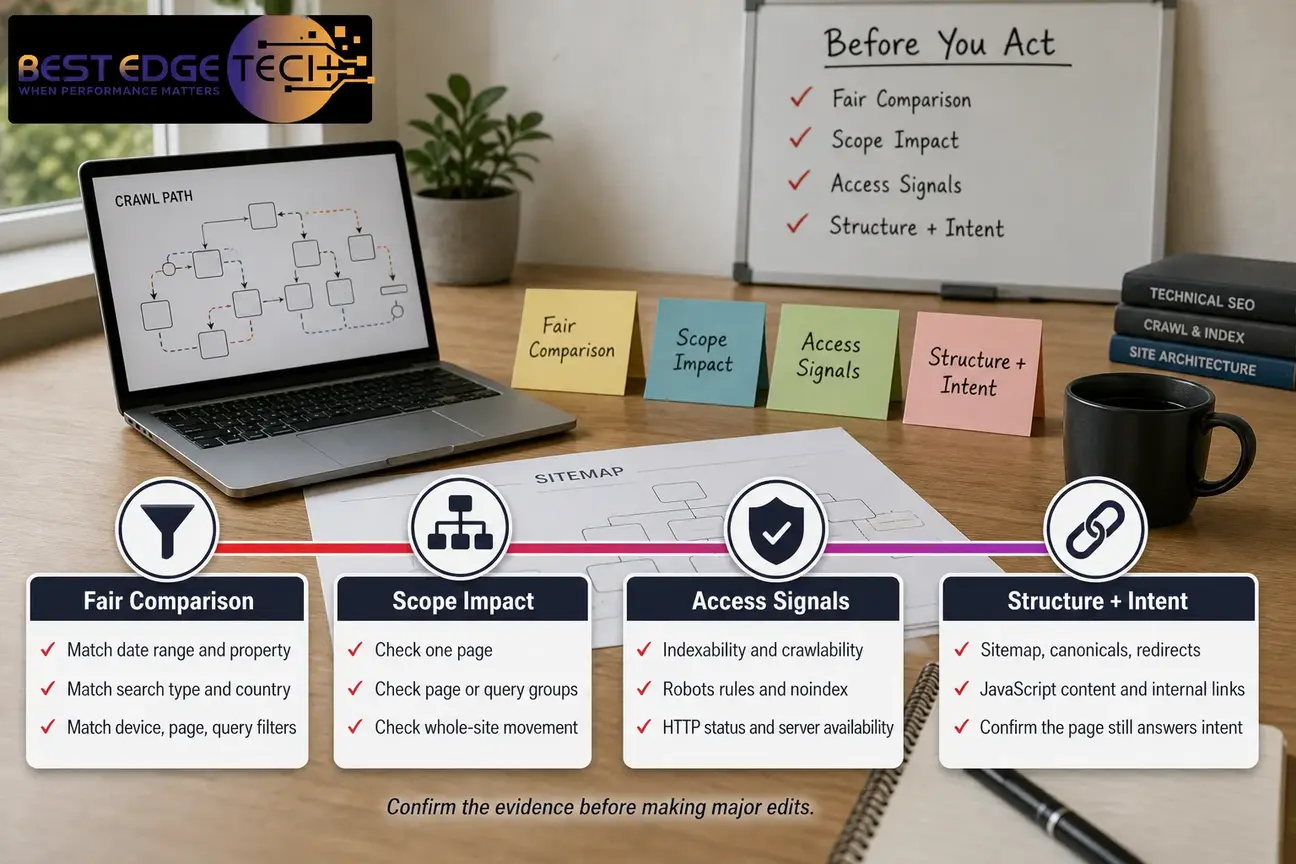
Before making major edits, confirm that the AI visibility drop appears in a fair comparison. Match the date range, property, search type, country, device, page, query, and available appearance filters. Then determine whether the issue affects one page, a page group, a query group, or the whole site.
Next, check the basics: indexability, crawlability, robots rules, noindex directives, HTTP status codes, server availability, sitemap inclusion, canonicals, redirects, JavaScript-rendered content, and internal links. Compare affected pages with similar unaffected pages so you can separate a template issue from a page-specific issue.
Finally, review content and intent. Does the page still answer the query clearly? Did an edit remove useful context? Did the page drift from informational to commercial, or from local to national? Did multiple pages start competing for the same search intent? These questions support practical visibility troubleshooting without pretending that Search Console reveals Google’s complete AI-selection logic.
A measured AI visibility drop response protects the site from overcorrection. Use Search Console diagnosis, technical checks, AI search traffic segmentation, AI Overviews traffic review, and documented visibility troubleshooting before making major SEO changes.
Search engines and AI products change often. Check current platform documentation before acting, and treat any result as dependent on your site, market and competition.
Frequently Asked Questions
Does a drop in the Generative AI report prove that Google stopped trusting my site?
No. It shows a change in the reported performance or visibility segment, but it does not establish Google’s complete reason for selecting or not selecting a source.
Can AI Overviews traffic be separated from ordinary Google Search traffic?
Google says AI-feature appearances are included in the overall Search Console Web search type. Use the relevant available report dimensions and compare them consistently rather than assuming every Web metric is AI-specific.
Does being indexed ensure AI Overviews or AI Mode visibility?
No. Indexing makes a page eligible to be considered, but it does not ensure ranking, inclusion in an AI feature, citation, traffic, or qualified leads.
Should a business immediately rewrite pages after an AI visibility drop?
Not necessarily. First validate the date range and filters, identify the affected pages and queries, and check technical signals. Rewriting without diagnosis can remove useful content or change the page’s search intent.
Can a canonical or redirect error cause an AI visibility decline?
It can affect which URL Google treats as canonical or which page is available for indexing, so it is a reasonable technical hypothesis to investigate. It does not, by itself, prove the reason for an AI-feature change.
How long should a business monitor a possible AI visibility drop?
There is no universal number of days that fits every site. Compare a sufficiently representative period for your traffic and query volume, while documenting major site, content, tracking, and platform changes.
Can an agency promise recovery or AI citations?
No. Rankings, traffic, leads, revenue, and AI citations cannot be promised. Any engagement should be treated as diagnosis and implementation support whose outcome depends on the site, market, competition, platform behavior, and execution.
Sources
- Google Search Central: Google’s Guide to Optimizing for Generative AI Features on Google Search
- Google Search Console Help: Performance report
- Google Search Central: How to Specify a Canonical with rel=”canonical” and Other Methods
- Google Search Central: Redirects and Google Search
- Google Search Central: Make Your Links Crawlable