

How to Audit Search Console AI Visibility by Page
Auditing AI visibility by page means moving past a site-level impression total and asking which specific URLs were linked in Google’s generative AI features, whether those URLs are technically valid, and whether they matter to the business. An AI impression is not proof of a citation, click, lead, case inquiry, appointment, or recommendation. It is a reported link display in a supported Google Search generative AI feature. A useful audit keeps those observations separate: exposure, URL identity, indexability, internal linking, ordinary Search performance, and documented next actions. For owners, marketing leads, healthcare practices, law firms, and agencies, the goal is to identify which pages deserve investigation before anyone rewrites content, changes templates, or reports AI exposure as business success.
Quick answer for marketing leads
Start with the Pages dimension in Google Search Console’s generative AI performance report, export the URLs, and preserve the original file before filtering. Then verify each URL’s final destination, canonical URL, indexability, page intent, template type, internal links, and ordinary Search performance.
Do not treat AI impressions as confirmed citations or outcomes. A defensible page-level audit turns raw exposure into a working list of URLs to investigate, not a list of pages that automatically need rewriting.
What Search Console’s AI report can and cannot tell you
As of 2026, Google says the Generative AI performance report includes impressions for supported generative AI capabilities in Google Search, including AI Overviews and AI Mode, according to Google Search Console Help on the Generative AI performance report. That scope matters because this is a Google Search report, not a cross-platform report for every AI answer system.
Google defines impressions in the report as the number of times links to your site were shown to a user in a generative AI feature on Google Search. That definition is narrow. It does not say that the page was the main answer, read by the searcher, clicked, quoted, trusted by the user, or responsible for a conversion.
The Pages dimension is the key to a page-level review. Google says the dimension groups data by the final URL linked by a generative AI feature after any redirects, and that most performance data in the report is assigned to the page’s canonical URL rather than a duplicate. That means a reported URL should never be interpreted without checking redirects, canonicals, and duplicate versions.
The report can also be segmented by dimensions such as date, country, and device when enough data is available to make segmentation useful. For example, a North Carolina service business might compare in-state exposure against broader national exposure, but only if the data volume supports that view. Do not force a local conclusion from thin data.
The report also has limits. Google says Search Console does not include data from Search Labs experiments. The report does not explain every eligibility condition for an AI-feature impression, does not prove visibility in other AI products, and does not show whether a link was prominent enough to influence a user. Treat the report as an observation layer, not a full explanation of how AI answers selected or displayed a page.
Why AI visibility by page needs a URL-first workflow
AI visibility by page is different from a brand-level AI visibility review. A brand-level review may ask whether your company, practice, agency, or topic appears across AI products. A URL-first workflow asks a narrower question: which pages received reported exposure in Google’s supported generative AI features, and what technical and search context surrounds those pages?
That distinction protects you from two common mistakes. The first is celebrating site-level AI impressions without knowing whether they landed on useful pages. A blog post with broad informational exposure may be valuable, but it is not the same as exposure for a service page, location page, practice-area page, or lead-generation page.
The second mistake is rewriting content just because a page has low reported AI exposure. Low exposure may reflect the query set, the page’s intent, the date range, a canonical issue, a lack of internal links, or simply limited data. It does not automatically mean the content is poor.
For a deeper readiness review that goes beyond URL-level reporting, Best Edge Tech also maintains an AI search readiness audit. Use that broader audit when you need to examine entity clarity, content coverage, structured data, and site-wide trust signals. Use this workflow when the immediate question is page-level Search Console evidence.
Start with Search Console AI pages export
Your first job is to create a clean export of Search Console AI pages before any interpretation begins. Do not start by sorting only the highest impression pages and deleting the rest. Preserve the unedited export, record the date range, and document which filters were active when the data was pulled.
A clean Search Console AI pages export should capture the reported URL, AI impressions, date range, country, device, and any relevant filters. If the report allows practical segmentation for the property, export the main view first, then create filtered versions for country or device. Keep those files separate so later analysis does not mix filtered and unfiltered data.
The export is only the starting point. Add columns for final URL, canonical URL, redirect status, page title, page type, primary intent, ordinary Search impressions, ordinary Search clicks, click-through rate, average position where useful, indexability status, internal-link notes, last known meaningful change, analyst notes, and next action.
This structure makes Search Console AI pages useful for a business discussion. A marketing lead can see whether exposure is tied to informational content, service pages, location pages, comparison content, or conversion pages. An agency can also reuse the same structure across client accounts without changing the meaning of each column.
When reviewing Search Console AI pages, keep the raw export separate from the working worksheet. The raw file preserves what was reported. The worksheet explains what the URL is, how it behaves, and what should be checked next.
Qualify AI impression pages without treating impressions as citations
AI impression pages are URLs with reported exposure, not URLs with proven citations or results. The phrase is useful as an internal audit label, but it should not be used as a performance claim. A page can have AI impressions without a click, and a page can be commercially important without yet having much reported AI exposure.
Google’s documentation does not provide a universal threshold for “meaningful” page-level exposure. That means your team should define a working classification before making decisions. The threshold for a small local service page may differ from the threshold for a national informational guide, a healthcare practice page, or a law firm practice-area page.
A practical classification model might include these groups:
- Repeated and relevant exposure: recurring impressions on a page aligned with a meaningful search intent or business goal.
- Low-volume but strategically important exposure: limited impressions on a high-value service, location, clinic, or practice-area page.
- Incidental exposure: isolated or weakly relevant impressions without useful ordinary Search context.
- Unclear exposure: pages requiring canonical, redirect, duplication, or page-identity investigation.
- Not actionable yet: URLs with too little data to support a technical, structural, or editorial change.
This classification keeps AI impression pages from being overreported. A page with a high impression count may be low priority if the intent is irrelevant. A page with modest exposure may deserve attention if it supports a profitable service, a core medical specialty, a legal practice area, or a key local market.
The classification should be written in the audit notes, not kept in someone’s head. If a stakeholder later asks why a page was edited, left alone, or moved to a technical queue, the notes should show the evidence behind the decision.
Some AI impression pages will need no immediate action. Others will need a technical check before an editorial review. The point is to qualify the page before assigning work.
Group URLs by intent and template before comparing them
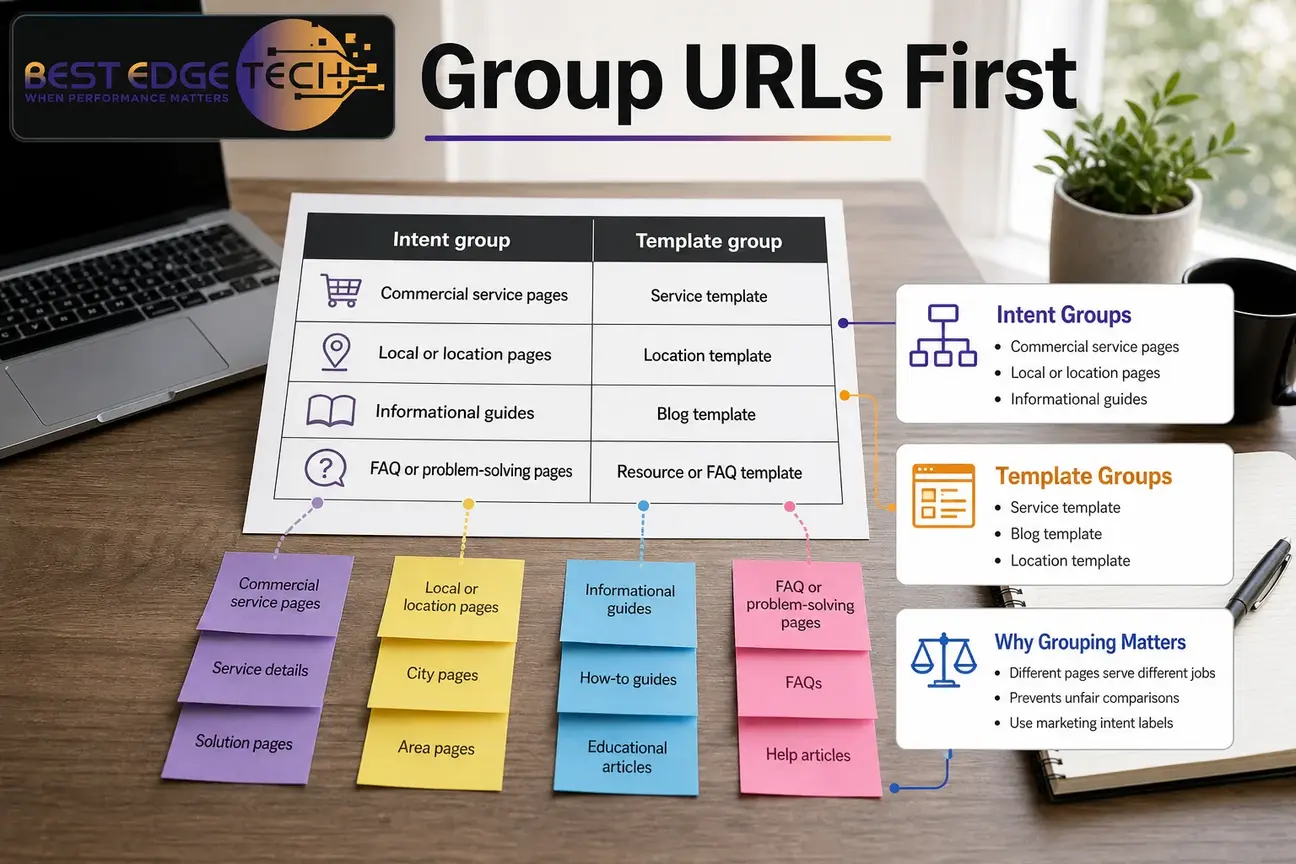
Raw page lists are hard to interpret because different pages serve different jobs. Grouping prevents unfair comparisons. A long informational guide, a short appointment page, a local landing page, and a legal service page should not be judged by the same expectations.
Start with intent groups. Common groups include commercial service pages, local or location pages, informational guides, comparison or evaluation pages, FAQ or problem-solving pages, contact or booking pages, and supporting resources. For healthcare and legal sites, keep the labels tied to marketing intent, not clinical or legal advice.
Then group by template. Common template groups include service template, blog template, location template, product or solution template where applicable, profile template, and conversion template. Template grouping helps you see whether exposure is concentrated in one page design or spread across multiple page types.
Grouping also protects against single-URL tunnel vision. If multiple pages using the same template have thin internal linking, unclear headings, or duplicated page structures, the issue may be structural. Rewriting one URL may miss the real pattern.
This is where a URL visibility audit becomes more useful than a simple performance export. You are not only asking “which page has impressions?” You are asking “what kind of page is this, what job should it perform, and is it comparable to the other pages in its group?”
A URL visibility audit should keep intent and template labels consistent. Consistent labels make it easier to compare service pages with service pages, guides with guides, and conversion pages with conversion pages.
Check indexability and URL identity before editing content
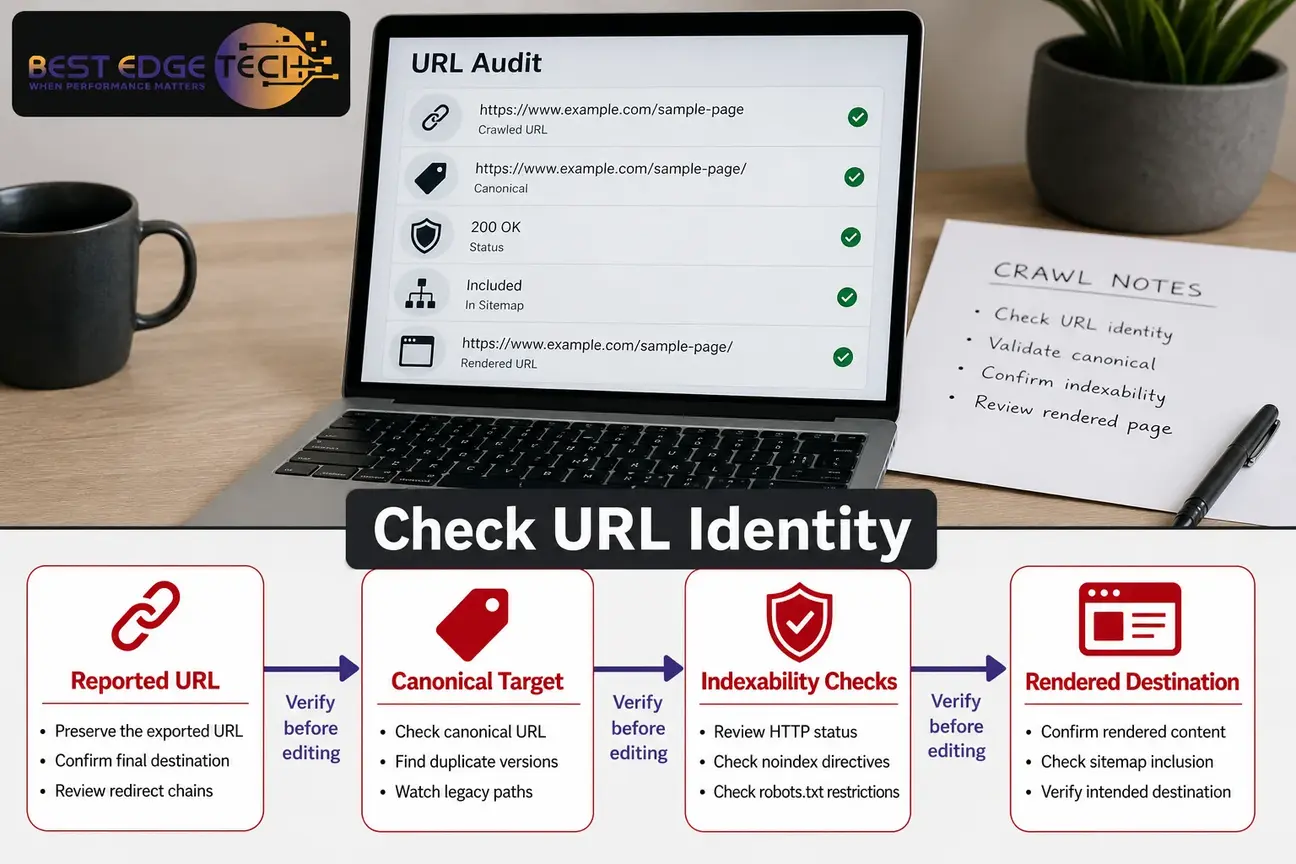
Before editing copy, check whether the URL in the report is the right URL. Because Google’s report can group data by final URL and assign most performance data to canonical URLs, URL identity is not a minor detail. A reported URL may reflect a redirect, canonical target, duplicate page, legacy path, parameterized URL, or another version of the page.
For each selected URL, review the HTTP status, redirect chain, canonical target, noindex directives, robots.txt restrictions, sitemap inclusion where relevant, rendered content availability, duplicate or near-duplicate versions, and whether the page remains the intended destination. Google’s guidance on duplicate consolidation explains canonicalization as a way to indicate the representative URL among duplicate pages, as described in Google Search Central’s duplicate URL consolidation documentation.
Do not overstate what these checks prove. A canonical issue might explain confusing page data, but it does not prove why a page appeared or did not appear in a generative AI feature. The correct conclusion is usually narrower: “This URL identity issue must be resolved or accounted for before interpreting the page’s AI exposure.”
Sitemaps can also support discovery and auditing, especially on larger sites or recently changed sites. Google’s sitemap documentation says sitemaps can help Google discover URLs and understand information about them, and its guidance on building and submitting a sitemap explains the requirements for sitemap files. Sitemap inclusion is not a promise of indexing or AI exposure, but missing or stale sitemap signals can be part of a technical review.
For businesses that recently redesigned a website, changed URL structures, merged content, or moved service pages, this step is especially important. AI-feature page data can be misread when old redirects, changed canonicals, or repurposed URLs are not documented.
During this step, mark which Search Console AI pages are technically clean and which pages need investigation. That separation keeps technical uncertainty from being confused with content quality.
Review internal links and page relationships
Internal links help search engines and users understand how pages relate to each other. In a page-level audit, review whether important URLs are linked from navigation, hub pages, category pages, related articles, service pages, and location pages where appropriate.
Google’s documentation on links says Google can generally crawl links if they use an HTML anchor element with an href attribute, and its crawlable links guidance explains how link format affects crawlability. For an audit, that means you should check both the presence of internal links and whether those links point to the canonical URL rather than a redirecting, duplicated, or parameterized version.
Review anchor text as well. Anchor text should describe the destination accurately. If a medical service page, law firm practice page, or local service page is linked with vague wording, the relationship between pages may be less clear to users and crawlers. Avoid forcing exact-match anchors everywhere; clarity is the point.
Also look for isolated pages. A commercially important page with little or no contextual support may deserve structural attention even if the content itself is accurate. On the other hand, a highly linked informational page may receive more reported exposure than a service page simply because it answers broader questions.
If internal linking is a suspected issue, use a dedicated internal linking audit rather than guessing from one export. Do not claim that a specific number of internal links will produce AI visibility. The practical question is whether the page’s role, relationships, and canonical destination are clear.
Internal linking notes are especially useful when evaluating AI page performance. A page may be strong on its own but weakly connected to the service, topic, or location cluster it supports.
Compare AI page performance with ordinary Search performance
AI page performance should be compared with ordinary Search performance, but the two should not be merged into one success score. Build a comparison view with AI impressions, ordinary Search impressions, ordinary Search clicks, click-through rate, average position where useful, page intent, template, country, and device.
This comparison helps identify patterns. One page may have both AI exposure and ordinary Search activity. Another may show AI exposure with little ordinary Search activity. A third may perform well in ordinary Search but have little reported AI exposure. Each pattern is a prompt for investigation, not a verdict.
When AI page performance and ordinary Search performance both appear strong, look at whether the page intent aligns with a business goal. If the page is informational, it may support awareness or trust rather than immediate lead generation. If it is a service page, the next question is whether it is technically sound, internally supported, and clear about the need it serves.
When AI page performance appears without much ordinary Search activity, check the URL identity first. Is the page canonical? Is it a redirected destination? Is the reported page actually a current page? Then review the page’s intent and content. It may answer a specific question that appears in generative features but does not drive many ordinary clicks.
When ordinary Search activity is present but reported AI exposure is limited, avoid calling that a failure. Google’s documentation does not establish that strong ordinary Search performance ensures generative AI exposure. It may simply mean the page’s queries, topic, format, or user context did not produce many reportable generative feature link displays during the selected period.
This is also where AI impression pages should be discussed carefully with executives or clients. The phrase can help identify the audit set, but it should not become a claim that Google endorsed the content or that the page influenced a lead.
Use AI page performance as a comparison lens, not as a standalone score. The strongest analysis comes from comparing AI exposure, ordinary Search behavior, page intent, and technical validity together.
Build a URL visibility audit worksheet
A strong URL visibility audit worksheet makes the analysis repeatable. It also keeps stakeholders from debating impressions without knowing what the URL represents. The worksheet should preserve raw data, technical checks, classification notes, and the hypothesis behind any proposed action.
| Field | Purpose |
|---|---|
| Reported URL | Preserve the Search Console value exactly as exported. |
| Final URL | Confirm the destination after redirects. |
| Canonical URL | Check page identity and duplicate handling. |
| AI impressions | Record reported exposure without treating it as a citation. |
| Date range | Make comparisons reproducible. |
| Country and device | Add context where the data supports segmentation. |
| Intent | Classify the page’s purpose. |
| Template | Compare similar pages fairly. |
| Search impressions and clicks | Add ordinary Search context. |
| Indexability | Identify technical eligibility issues. |
| Internal links | Check discoverability and relationship signals. |
| Recent changes | Avoid confusing cause and effect. |
| Audit finding | State the observed issue in plain language. |
| Action hypothesis | Explain what a change is intended to test. |
| Review date | Preserve measurement discipline. |
A URL visibility audit should also include a notes column for uncertainty. If a page’s exposure is unclear because the canonical changed, the template changed, or a redirect was recently added, write that down. Decision-makers need to know which findings are solid and which require more data.
For agencies and white-label teams, consistent worksheet labels matter. If one analyst uses “service,” another uses “commercial,” and another uses “money page” for the same type of URL, cross-account reporting becomes messy. Define the labels once and reuse them.
The URL visibility audit worksheet should also include a decision status, such as monitor, investigate, fix technical issue, improve internal links, update content, or defer. Simple labels make follow-up easier.
Document evidence before changing a page
Content should not be rewritten merely because AI impression pages have low exposure. First document the current state. Capture the export date, reporting period, original URL, final URL, canonical URL, current title, major headings, intent classification, AI metrics, ordinary Search metrics, indexability findings, internal-link findings, structured data where relevant, and recent changes.
Also capture the specific hypothesis. For example: “This service page is indexable and canonical, but it has few contextual links from related guides. We expect stronger internal relationships to clarify the page’s role.” That is more useful than “improve AI visibility.” It states what is being changed and why.
Google’s AI optimization guidance emphasizes creating helpful, reliable content for people rather than special content just for AI features, as covered in Google Search Central’s AI optimization guide. In audit terms, that means editorial updates should improve usefulness, clarity, accuracy, and completeness for real users, not simply add buzzwords or chase AI-feature appearances.
For healthcare practices and law firms, this documentation discipline is especially important. Marketing teams should avoid implying that AI exposure validates medical, legal, or professional claims. If professional, legal, clinical, or compliance review is required for content changes, involve the appropriate internal team or counsel.
Keep a rollback or comparison plan when changes are material. If the page is commercially important, note what changed, when it changed, and what measurement window will be used before drawing conclusions. Search visibility changes depend on competition, site history, execution, and platform behavior; they should not be reported as promised outcomes.
Documenting AI page performance before changes also protects the team from false cause-and-effect claims. If the page changes, the worksheet should show what changed and what remained unknown.
Choose the next action: technical, structural, intent, editorial, or measurement
Once the evidence is documented, assign the next action type. A disciplined workflow prevents every issue from becoming a content rewrite.
- Technical: resolve indexability, canonical, redirect, rendering, sitemap, or duplicate URL issues.
- Structural: improve internal links, navigation, hub relationships, or template clarity.
- Intent: clarify the question, need, service, location, or audience the page serves.
- Editorial: improve accuracy, completeness, readability, examples, headings, or helpfulness.
- Measurement: collect more data before changing the page.
Some pages will need multiple action types. For example, a service page may need canonical cleanup, stronger links from related guides, and clearer copy. But order matters. Fix URL identity and indexability before judging the writing. Improve structure before assuming a single paragraph is the problem.
The action type should connect back to the URL visibility audit. If the finding is a redirect problem, the next action is technical. If the finding is weak page relationships, the next action is structural. If the finding is unclear user intent, the next action may be editorial only after the intent is defined.
This is where an outside audit can help if your team is too close to the site. Best Edge Tech provides SEO analysis for businesses that need a practical review of technical SEO, page-level performance, and search visibility without turning every data point into a promise.
Keep page audits separate from broad AI search measurement
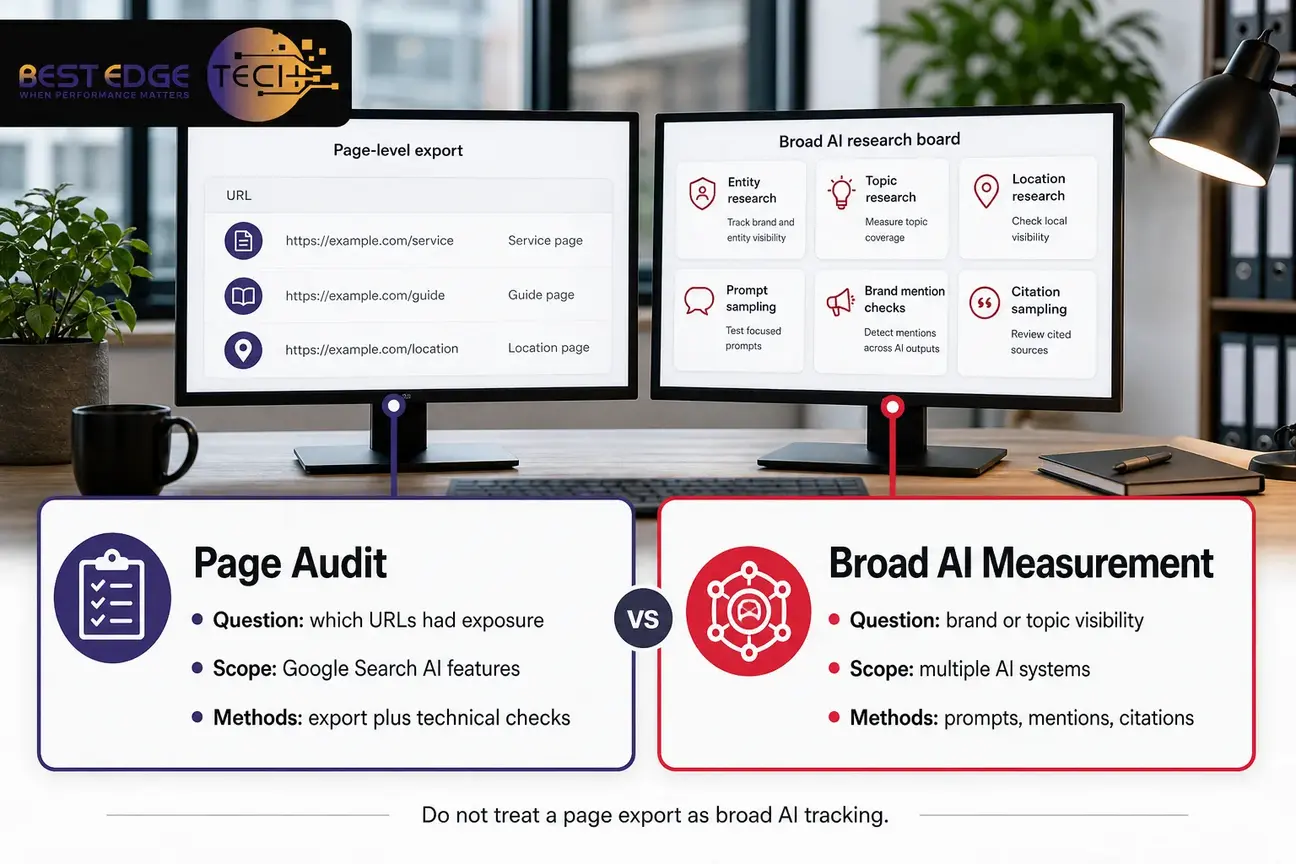
A page audit and broad AI visibility measurement answer different questions. The page audit asks: which URLs received reported exposure in Google Search’s supported generative AI features, what are their technical and ordinary Search contexts, and what should be investigated next?
Broad AI measurement asks a wider question: how visible is a brand, entity, topic, location, or service across multiple AI systems and query sets? That may involve manual prompt sampling, entity monitoring, brand mention checks, citation sampling, and platform-specific review. Those methods can be useful, but they are not the same as a Search Console page export.
If your team needs broader tracking, compare this workflow with AI search visibility tracking. If you need implementation help across AI search, Answer Engine Optimization, and Generative Engine Optimization, review Best Edge Tech’s AI SEO and GEO services. No agency can promise AI citations or rankings, so the work should stay grounded in technical quality, helpful content, entity clarity, and measurement discipline.
This separation also keeps Search Console AI pages from being used as proof of visibility in unrelated AI systems. A Google Search Console export should stay tied to the report it came from.
Practical review cadence for AI visibility by page
For most small and mid-sized businesses, AI visibility by page should be reviewed on a recurring schedule that matches the pace of the site. A site with frequent publishing, service-page updates, or redesign work may need more frequent review than a stable site with limited content changes.
The cadence should be long enough to avoid overreacting to thin data. Short reporting windows can be useful for spotting changes after a migration or major update, but they can also exaggerate noise. Longer windows can show recurring exposure patterns but may hide recent technical problems. Record the date range every time.
Use the same worksheet structure each cycle. Keep old exports. Record changes before they happen. If a page moves from “unclear exposure” to “repeated and relevant exposure,” you should be able to see whether the shift followed a technical fix, internal-link change, content update, template change, or no known change at all.
If you are preparing to discuss a page-level AI report with leadership, separate the findings into three buckets: what the data directly shows, what the audit suggests investigating, and what remains unknown. That framing is more credible than claiming that every impression is an AI citation or that every missing impression is a content failure.
A recurring review can also show whether AI page performance is concentrated in a few informational resources or spread across important service and conversion pages. That pattern can guide investigation without implying a specific outcome.
How Best Edge Tech approaches a defensible audit
Best Edge Tech is a North Carolina-based digital marketing agency serving businesses in North Carolina and across the United States. For this kind of audit, the practical work is not about hype. It is about verifying the page data, understanding URL identity, checking technical SEO, reviewing internal relationships, and documenting a clear action hypothesis.
If you want help turning Search Console AI pages into a page-level action plan, you can contact Best Edge Tech or call 252-303-0074. Share your website URL, goals, markets served, current Search Console access or exports, recent site changes, and the service you are considering. A form submission or call starts a conversation; results depend on your site, market, competition, and execution.
Search engines and AI products change often. Check current platform documentation before acting, and treat any result as dependent on your site, market and competition.
Frequently Asked Questions
Does an AI impression prove that Google cited my page?
No. An AI impression in this context means a link to your site was shown in a supported Google Search generative AI feature. It does not prove prominence, readership, click-through, influence, recommendation, or a business result.
Does Search Console show every AI answer where my business appears?
No. The report concerns supported generative AI capabilities in Google Search. It should not be treated as coverage for every AI product, every experiment, every brand mention, or every possible answer where your business may appear.
Which URL should I audit when Search Console reports a redirected page?
Start with the URL shown in the report, then verify the final destination, redirect path, and canonical URL. Record all three so you do not make decisions based on a legacy, duplicate, or redirected version of the page.
How should AI impressions be compared with ordinary Search clicks?
Compare them as separate observations. AI impressions show reported link exposure in supported generative AI features, while ordinary Search clicks show visits from standard Search results. One does not automatically explain the other.
Should a page with no AI impressions be rewritten?
Not automatically. First check the date range, page intent, indexability, canonical status, template, internal links, ordinary Search performance, and whether the page is important to the business. Low or absent exposure alone is not a rewrite brief.
Why group URLs by template?
Template grouping helps you compare similar pages fairly. It can show whether exposure or technical issues are concentrated in service pages, blog posts, location pages, conversion pages, or another repeated page type.
What should be recorded before changing a page?
Record the export date, reporting period, reported URL, final URL, canonical URL, current title, major headings, AI metrics, ordinary Search metrics, indexability findings, internal-link findings, recent changes, action hypothesis, and planned review date.
Is this the same as measuring visibility in ChatGPT or other AI tools?
No. This workflow is for page-level reporting in Google Search Console’s generative AI performance report. Other AI systems require separate measurement methods and should not be treated as covered by this report.