

How to Audit SEO After a Website Redesign
An SEO redesign audit should start by comparing representative old and new pages, then validating crawl access, rendered content, title links, canonicals, structured data, internal links, XML sitemaps, and Search Console indexing. The goal is not to assume the redesign caused every traffic change. The goal is to collect URL-level evidence that shows whether templates, content changes, internal links, indexability, or technical implementation created a search visibility problem after launch. If your team is still planning a migration, use a prelaunch resource such as the website redesign SEO checklist. If the new site is already live, use this guide as a post-launch validation process.
Quick Answer
A post-launch audit should separate crawling, rendering, indexing, search appearance, and performance. Crawling asks whether search engines can request a URL; rendering asks whether the browser-like rendered page contains the expected content and links; indexing asks whether the page is eligible and which canonical Google selected; search appearance reviews elements such as title links; performance compares clicks, impressions, leads, and conversions after launch.
Use seven core checks: pre- and post-launch URL comparison, template review, rendered content review, canonical and indexability testing, internal-link validation, structured data review, and sitemap/Search Console validation. This process helps separate redesign SEO issues from unrelated demand changes, and it gives a website launch audit enough evidence to identify redesign indexing problems without guessing.
Redesign SEO issues that usually cause trouble
Most redesign SEO issues fall into a few repeatable categories. A redesign can look successful to users while removing internal links, changing title elements, hiding content behind JavaScript, altering structured data, or sending search engines mixed canonical signals. A visual review is useful, but it is not enough for post-launch validation.
For business owners, healthcare practices, clinics, law firms, and agencies, the risk is usually not one isolated tag. The risk is that one template change affects dozens or hundreds of important pages. A service page, location page, attorney profile, provider profile, or high-performing article may keep the same URL but change enough signals that search systems interpret it differently.
Use five diagnostic buckets when documenting redesign SEO issues:
- Template problems: missing title elements, duplicate headings, removed navigation, broken breadcrumbs, poor mobile rendering, or template-wide schema changes.
- Content changes: reduced copy, removed FAQs, weaker service descriptions, missing entity information, or changed page intent.
- Internal-link changes: links to old paths, JavaScript-only links, orphaned priority pages, or anchor text that no longer describes the destination.
- Indexability and canonical issues: accidental noindex directives, incorrect canonical targets, blocked resources, or sitemap URLs that do not match the live canonical set.
- Technical implementation failures: redirect loops, soft 404s, server errors, rendering failures, analytics changes, or crawl barriers introduced by the new stack.
A decline in traffic, impressions, or leads is a signal to investigate, not a diagnosis by itself. Seasonality, demand changes, competitor activity, platform updates, tracking changes, and unrelated site incidents can overlap with a redesign. A reliable audit connects redesign SEO issues to specific URLs, crawl responses, rendered output, Search Console evidence, or documented content changes.
Post redesign SEO comparison set
A practical post redesign SEO review begins with a sample. Do not start with every URL unless the site is small. Start with the pages that matter most to search visibility and qualified leads, then add a small control group of lower-traffic pages so you can tell whether the problem is isolated or template-wide.
Include these URL groups in the post redesign SEO sample:
- High-impression pages from Search Console.
- Pages that historically generated qualified leads or meaningful conversions.
- Important service, product, provider, attorney, practice-area, or location pages.
- Blog or resource pages that brought organic traffic.
- Pages that lost visibility after launch.
- A small set of low-traffic control pages using the same templates.
For each URL, preserve the old and new state as evidence. If you have a prelaunch crawl, analytics export, or staging QA sheet, keep it with the audit. If not, use available backups, CMS revision history, archived internal documentation, or a pre-redesign crawl from your agency or developer. Post redesign SEO work is stronger when it shows exactly what changed instead of saying the page “looks different.”
At minimum, compare the following:
- URL, status code, and redirect behavior.
- HTTP-to-HTTPS and host behavior.
- Title element and visible main heading.
- Main body copy, key entities, and topic coverage.
- Internal links, navigation, footer links, and breadcrumbs.
- Canonical declaration and robots directives.
- Structured data type, properties, and entity references.
- Images, meaningful alt text, and media loading behavior.
- JavaScript-dependent content and interactive elements.
- Conversion elements such as forms, phone links, and calls to action.
If your team needs a deeper diagnostic process after this initial sample, Best Edge Tech’s SEO audit services focus on evidence-based audits rather than assumptions about why rankings or leads changed.
SEO redesign audit checks for templates and search signals
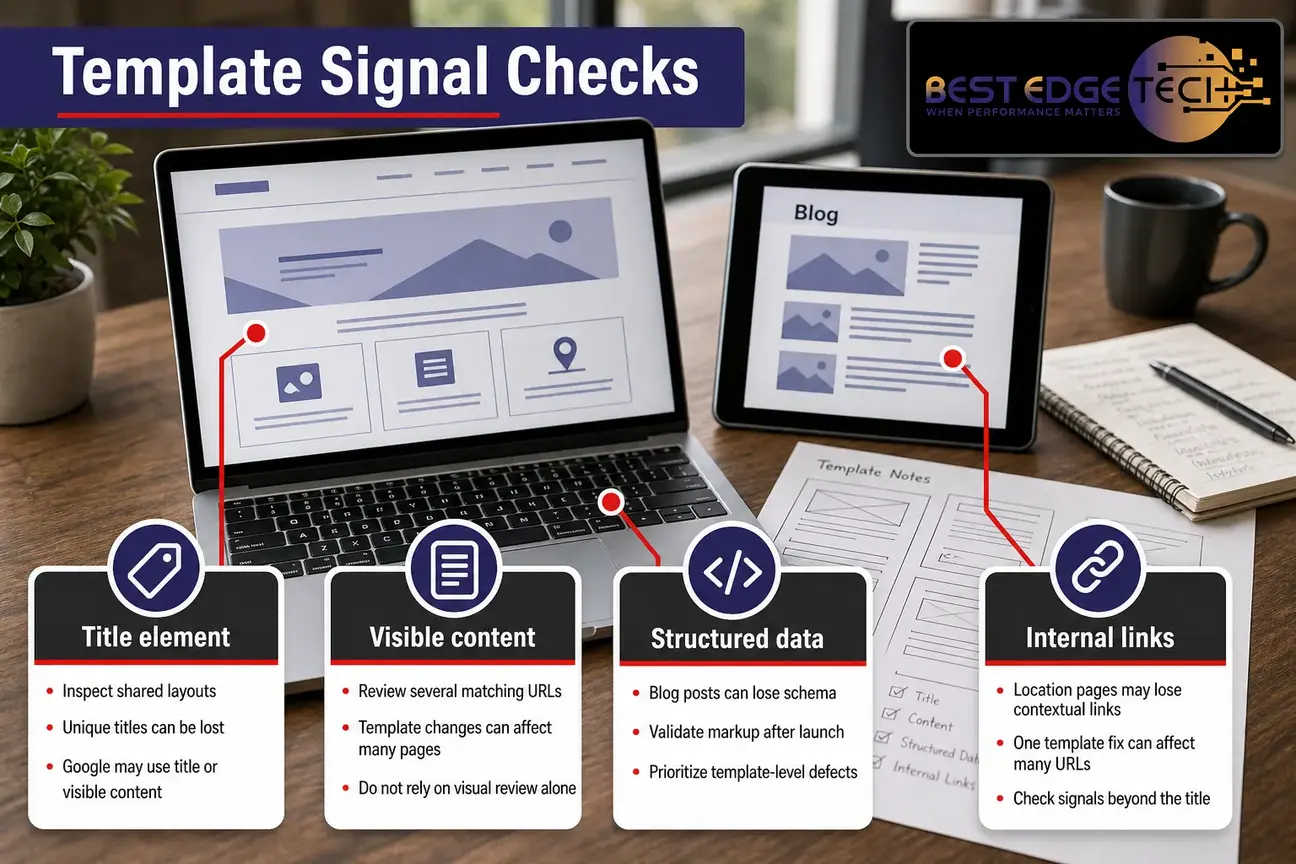
The fastest way to identify template-driven redesign SEO issues is to inspect several URLs that share the same layout. If every redesigned service page lost a unique title, every blog post lost schema, or every location page removed contextual links, the issue is probably template-level. Template-level defects should usually be prioritized before isolated page edits because one fix can affect many URLs.
Start with the title element, but do not stop there. As of 2026, Google’s title link documentation says to “Make sure every page on your site has a title specified in the <title> element,” and Google may use multiple sources to generate title links, including the title element and visible page content according to Google Search Central’s title links documentation. That means your audit should compare both the title tag and the title shown in search results when available.
Check for these title and heading problems:
- Missing, empty, or duplicated title elements.
- Template-generated prefixes or suffixes that changed the page topic.
- Titles that no longer match the visible main heading.
- Titles that describe the brand but not the service, location, article, or offer.
- Visible headings that changed from specific to generic.
- Search result title links that no longer reflect the intended page topic.
Next, inspect template-controlled search signals. Look for robots meta tags, canonical tags, structured data, breadcrumbs, navigation, pagination, and internal links. A redesign can accidentally apply a development or staging rule to production, especially if templates were copied from a test environment.
Also review template content blocks. Some redesigns move key service copy into tabs, accordions, sliders, or dynamically injected sections. Interactive presentation is not automatically a problem, but the audit must confirm that the important content is present in the rendered page and can be reached by users. For healthcare and legal practices, keep the review focused on marketing visibility and page accuracy; clinical, legal, HIPAA, or regulatory questions should go to the appropriate counsel or compliance team.
Website launch audit checks for rendered content
A modern website launch audit should inspect both source HTML and rendered output. Source HTML is the server response. Rendered output is what the browser constructs after scripts, styles, and client-side application code run. A redesign can leave content visible to users but absent from initial source, or present in source but removed, replaced, or hidden after rendering.
As of 2026, Google’s JavaScript SEO guidance explains that Google renders pages and uses rendered HTML for indexing, so rendered-page validation matters for JavaScript-heavy redesigns, as described in Google Search Central’s JavaScript SEO basics. Use source inspection, a browser DOM view, a crawler with rendering enabled, and Search Console URL Inspection where appropriate. Do not rely on one tool alone, because crawler settings and browser behavior can differ.
Compare the source and rendered page for the website launch audit:
- Main body content and headings.
- Navigation links and footer links.
- Canonical and robots directives.
- Structured data and entity references.
- Lazy-loaded service descriptions, reviews, images, videos, or FAQs.
- Content that appears only after clicking, filtering, or scrolling.
- Error states that appear only after JavaScript execution.
- Forms, phone links, and conversion elements.
Rendered content checks are especially important when the redesigned site uses client-side routing, hydration, infinite scroll, tabbed sections, third-party scripts, or personalization. The issue is not that JavaScript is automatically bad for SEO. The issue is that the website launch audit needs proof that essential content, links, and directives remain accessible in the rendered page.
For agencies handling post redesign SEO validation for clients, record screenshots or exports from each evidence source. A client, developer, or internal stakeholder can act faster when the issue is shown with the affected URL, the old state, the new state, and the exact rendered difference.
Redesign indexing problems: canonicals, robots, and crawl responses
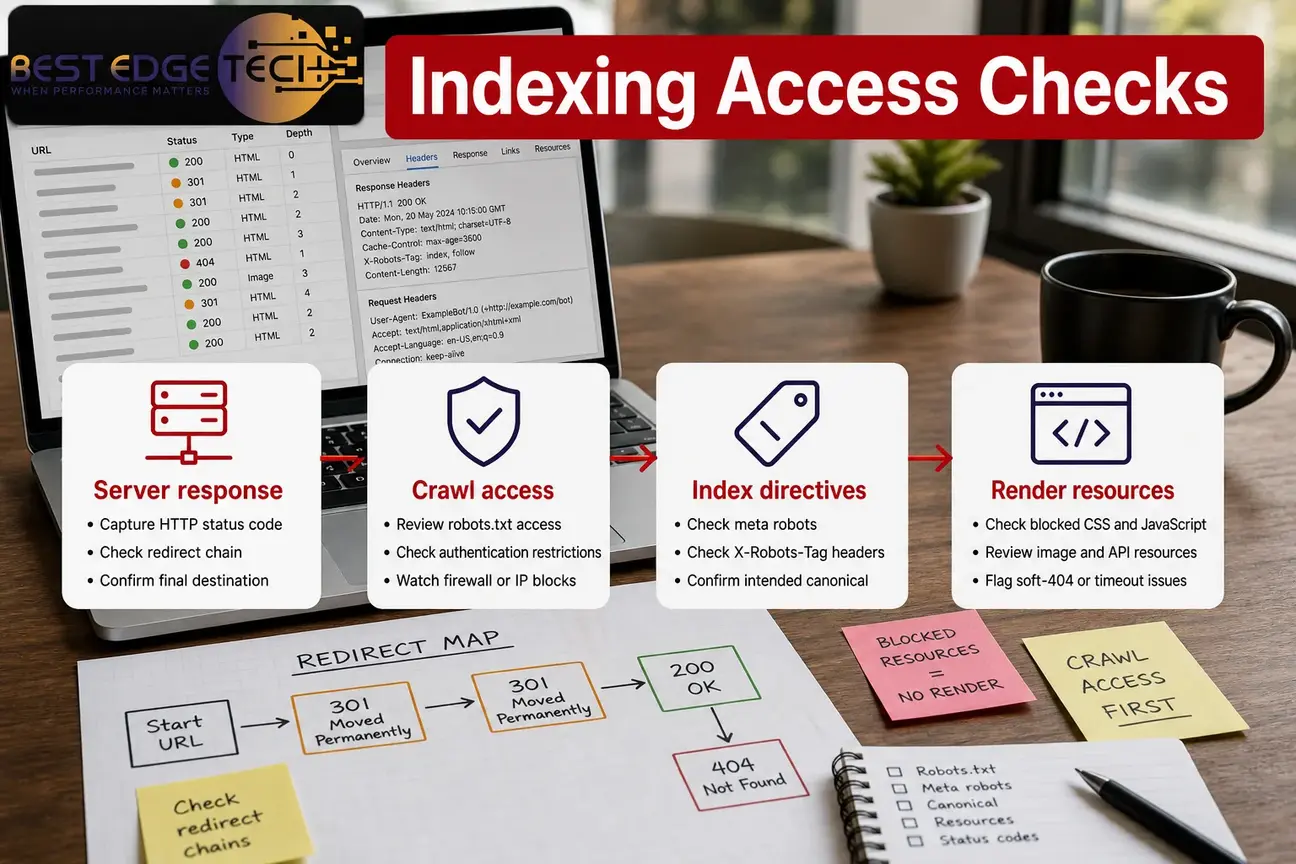
Many redesign indexing problems start with simple access issues. A page cannot perform in organic search if the intended URL is blocked, redirected incorrectly, marked noindex, canonicalized to the wrong page, returning a server error, or not rendering the expected content. This section is where the audit moves from “the site changed” to “this URL has a measurable implementation problem.”
For each representative URL, capture:
- HTTP status code.
- Redirect chain and final destination.
- Robots.txt access.
- Meta robots directives.
- X-Robots-Tag headers.
- Authentication, firewall, or IP restrictions.
- Blocked CSS, JavaScript, image, or API resources.
- Soft-404 behavior.
- Intermittent 5xx errors or timeouts.
- Declared canonical URL.
- Google-selected canonical from Search Console when available.
Do not treat a robots.txt block as the same thing as noindex. Google’s documentation says robots.txt can stop Google from crawling pages, but it may not always prevent indexing; noindex is the directive intended to prevent indexing. That distinction matters after a redesign because a blocked URL may still appear in confusing ways, while a noindex directive tells search engines not to index the page when they can crawl and see it.
Canonical checks need the same level of discipline. Canonicalization is how Google selects a representative URL for duplicate or substantially similar pages. A self-referencing canonical is helpful only if the rest of the signals agree. Compare the declared canonical, redirect destination, sitemap URL, internal-link target, HTTPS/host version, and the Google-selected canonical. Google’s canonicalization guidance specifically recommends using URL Inspection to check which page Google considers to be the canonical page.
Common redesign indexing problems include canonical tags pointing to staging URLs, old domains, HTTP versions, homepage fallbacks, filtered URLs, or near-duplicate pages. Another common issue is template logic that creates the same canonical across an entire page type. Those problems can affect many pages quickly and should be treated as higher severity than isolated metadata cleanup.
If the audit finds widespread crawl or indexability issues, group the redesign indexing problems by template, URL pattern, evidence source, and likely owner. That makes the next development sprint more actionable than a disconnected list of individual warnings.
Audit internal links and orphaned pages
Internal links help users and search engines discover important pages. After a redesign, internal linking often changes because navigation, footer modules, related content blocks, breadcrumbs, and page templates are rebuilt. Redesign SEO issues frequently appear when important pages remain live but are no longer linked from meaningful parts of the site.
Inspect the redesigned site for:
- Links pointing to old URL paths.
- Links returning 3xx, 4xx, or 5xx responses.
- Navigation links removed from templates.
- Priority pages that became orphaned or nearly orphaned.
- JavaScript-only links that are not standard crawlable links.
- Invalid destinations, empty href values, or links triggered only by scripts.
- Breadcrumb links that no longer match the site hierarchy.
- Footer links removed from important page types.
- Contextual links and anchor text that no longer describe the destination.
Google’s site move documentation includes the simple instruction to “Update internal links,” and that applies beyond full domain moves. If the redesign changed URL paths, templates, breadcrumbs, or navigation, compare internal links to the new canonical URLs. Use the crawl export to find links that still point to redirected URLs, old slugs, staging paths, or deleted pages.
Do not confuse deliberate redirects with healthy internal linking. A 301 redirect may be appropriate for users and search engines, but the redesigned site should not permanently rely on old internal links when the new canonical URL is known. Internal links should generally point to the destination you want users and crawlers to reach.
For deeper link-path evaluation, an internal linking audit can help identify orphaned pages, overlinked low-value pages, broken paths, and weak contextual linking patterns. This is especially useful when post redesign SEO work reveals that the new navigation structure removed important contextual paths.
Review structured data after the redesign
Structured data should be audited as an accuracy and implementation issue, not as a shortcut to traffic. It can help search systems understand page information, but it does not guarantee rankings, rich-result display, qualified leads, or AI citations. The post-launch question is narrower: did the redesign remove, break, duplicate, or misrepresent structured data?
Google’s structured data introduction explains that structured data is a standardized format for providing information about a page and classifying the page content. Review the redesigned pages against Google Search Central’s structured data guidance, and validate the markup against the visible page rather than treating tool validation alone as proof of quality.
Check whether:
- Markup exists on the intended page.
- The structured data describes the visible page content.
- The relevant type, properties, and URLs are still accurate.
- Entity references point to the right organization, service, article, person profile, location page, or breadcrumb.
- Required or recommended properties changed during the redesign.
- Duplicate schema nodes conflict with each other.
- Incorrect names, dates, images, or URLs were introduced.
- Markup is injected only after a script that may fail.
- The redesign changed or removed schema types across a template.
For example, a clinic page should not inherit generic organization markup that describes the wrong entity, and a law firm practice-area page should not carry article metadata that no longer matches the visible content. Those are marketing-visibility and content-accuracy checks, not legal or medical advice.
If structured data changed across many templates, document the old type, the new type, the affected URL group, validation messages, and whether the markup matches visible content. A separate schema markup audit is useful when the site has multiple page types, nested entities, or competing plugins injecting markup.
Check XML sitemaps and Search Console indexing
A sitemap is not proof of indexing. It is a discovery and submission signal. In a website launch audit, the sitemap should be compared against the site’s live canonical set, crawl inventory, and Search Console reports. If the sitemap lists redirected, blocked, noindex, duplicate, or obsolete URLs, it can send conflicting signals after the redesign.
Google’s Search Central documentation describes sitemaps as files that tell Google which pages are important and can include information about new or updated pages. For a redesign or site move, Google also says to submit the new sitemap in Search Console, as shown in Google’s site move documentation. The website launch audit should confirm that the submitted sitemap matches the intended post-launch URL set.
Check whether the sitemap contains:
- Canonical, indexable URLs.
- The correct HTTPS and host version.
- Current URL paths.
- URLs returning successful HTTP responses.
- No pages marked noindex.
- No redirected URLs.
- No duplicate URL variants.
- Accurate last-modified values where used.
- All relevant sitemap files in the sitemap index.
Then compare sitemap data with Search Console. Use the Sitemaps report, Page Indexing report, Performance report, URL Inspection, and enhancement reports where applicable. If the redesign changed protocol, host, subdomain, or directory structure, make sure the relevant properties are verified so you are not looking at partial data.
Search Console is a primary evidence source for post redesign SEO because it can show page-level clicks, impressions, average position, indexing status, crawl information, selected canonical, and sitemap processing. However, do not overread one inspection. Use a sample of important URLs and compare groups of pages. If a template affected all service pages, a single URL may show the pattern, but the audit should still confirm the scope.
An XML sitemap audit can help when sitemap indexes, CMS plugins, multilingual sections, location pages, or blog archives are generating more submitted URLs than the business actually wants indexed. It can also help separate sitemap cleanup from deeper redesign indexing problems.
Use performance data without jumping to the wrong cause
Performance data matters, but it should be interpreted carefully. A redesign can coincide with demand changes, tracking changes, algorithm updates, offline marketing, paid campaign changes, or seasonality. A reliable website launch audit records the launch date, then compares performance by URL group, query group, template, and device type where possible.
Collect:
- Launch date and major deployment notes.
- Search Console clicks, impressions, CTR, and average position before and after launch.
- Analytics sessions, conversions, and lead quality indicators where tracking is reliable.
- Page Indexing changes by URL group.
- Queries that changed for priority pages.
- Template groups with similar changes.
- Annotations for fixes made after launch.
Look for patterns. If all pages using the new service template lost impressions and also lost internal links and structured data, that is stronger evidence than a single keyword movement. If only one blog post changed, the issue may be page-level content, cannibalization, internal linking, or query demand rather than the redesign itself.
For content-heavy sites, also compare changed pages against a content decay audit process. Sometimes a redesign exposes an older issue: pages were already losing relevance, and the launch simply drew attention to the trend.
How should you prioritize findings?
Not every issue deserves the same urgency. A missing alt attribute on a low-traffic image is not the same as a noindex directive on every service page. Use a simple scoring model so the team can fix what affects search visibility, users, and qualified leads first.
Score each finding by:
- Impact: Does the issue affect a revenue page, many URLs, a key template, or a high-impression section?
- Severity: Does it block crawling, indexing, rendering, canonical selection, or user access?
- Confidence: Is the issue confirmed by multiple sources, such as a crawl, rendered inspection, Search Console, and server response?
- Remediation effort: Can the fix be made safely, tested quickly, and rolled back if needed?
| Priority | Use this band when | Examples |
|---|---|---|
| P0 | The issue affects crawling, indexing, rendering, or access across the site or high-value pages. | Sitewide noindex, widespread 5xx errors, blocked priority templates, incorrect canonicals across major URL groups. |
| P1 | The issue affects important templates or many business-critical URLs. | Removed navigation links, missing title elements, broken rendered content, invalid sitemap patterns, template-wide schema loss. |
| P2 | The issue is meaningful but limited to specific pages or smaller URL groups. | Page-level metadata inconsistencies, broken contextual links, isolated schema errors, missing content sections. |
| P3 | The issue is low impact or lacks evidence of search or user harm. | Cosmetic adjustments, minor wording cleanup, low-priority enhancements that can wait. |
This framework helps avoid panic. It also helps agencies, developers, and business owners speak the same language. A finding should move up only when the evidence supports higher impact, higher severity, or broader scope. That discipline keeps redesign SEO issues, website launch audit findings, and redesign indexing problems from being mixed together without priority.
What should the audit deliver?
A useful SEO redesign audit deliverable is not a long list of warnings pasted from a crawler. It is an evidence record that a developer, content lead, owner, or agency partner can act on. Each finding should explain what changed, how it was verified, why it matters, and how the team will confirm the fix.
| Field | Why it matters |
|---|---|
| URL | Identifies the affected page and prevents vague discussion. |
| Template or page type | Shows whether the issue is isolated or template-wide. |
| Old-state observation | Documents what existed before launch when evidence is available. |
| New-state observation | Shows the current problem or changed implementation. |
| Source or report | Connects the finding to crawl data, rendered output, Search Console, logs, or manual inspection. |
| Severity and confidence | Helps prioritize work without exaggerating uncertain findings. |
| Recommended owner | Routes the task to development, content, analytics, design, or SEO. |
| Retest date and validation result | Confirms whether the fix worked after deployment. |
For agencies managing post redesign SEO work on behalf of clients, the deliverable should also separate “confirmed issue,” “needs investigation,” and “monitor.” This prevents a medium-confidence crawler warning from being treated as a confirmed search problem. It also gives the website launch audit a clear retesting path after fixes are deployed.
When should a site owner involve an SEO specialist?
A site owner can handle basic validation when the site is small, URLs did not change, and the redesign only touched a few templates. An SEO specialist becomes more useful when the problem crosses technical, content, analytics, and development boundaries.
Consider outside help when:
- Many templates changed at once.
- Organic traffic, qualified leads, or important conversions changed materially after launch.
- Important pages are not indexed or are excluded unexpectedly.
- Canonicals disagree with intended URLs.
- JavaScript rendering is central to the site.
- Multiple properties, subdomains, or hostnames are involved.
- The team lacks crawl, server, or Search Console access.
- An agency needs a documented white-label audit for a client.
Best Edge Tech is a North Carolina-based digital marketing agency that works on SEO-focused site strategy, SEO web design, SEO audit services, and search visibility work for businesses and agencies. If you need help turning redesign indexing problems, post redesign SEO findings, and launch evidence into an action plan, you can contact Best Edge Tech or call 252-303-0074. Share your website URL, goals, markets served, current traffic or Search Console access, recent site changes, and the service you are considering.
Final validation checklist
Before closing the audit, confirm that each finding has been tested after the fix. A fix is not complete just because a ticket was marked done. It should be re-crawled, rendered, inspected, and compared against the expected state.
- Priority URLs return the expected status code.
- Redirects resolve cleanly to the intended canonical URLs.
- No important page is unintentionally blocked or marked noindex.
- Rendered content contains the expected copy, links, metadata, and structured data.
- Title elements and visible headings identify the page accurately.
- Declared canonicals, sitemap URLs, redirects, and internal links agree.
- Structured data matches visible page content.
- Internal links point to current destinations.
- Sitemaps contain canonical, indexable, current URLs.
- Search Console annotations and reports are reviewed after fixes are deployed.
Use this final pass to confirm that redesign SEO issues were fixed, that website launch audit evidence was retested, and that redesign indexing problems no longer affect the intended URL set.
A redesign can improve usability, brand presentation, and conversion paths, but no redesign can promise rankings, traffic, leads, or AI citations. A disciplined SEO redesign audit keeps the conversation grounded in evidence: what changed, what search systems can access, what users can see, and what should be fixed first.
Search engines and AI products change often. Check current platform documentation before acting, and treat any result as dependent on your site, market and competition.
Frequently Asked Questions
How soon should an SEO redesign audit happen?
Begin validation as soon as the redesigned site is live and accessible. Use the launch date as an annotation, then continue checking crawl, indexing, and performance data as Google processes the updated pages. Avoid expecting a fixed timeline for outcomes.
What is the first thing to check after a redesign?
Check whether priority URLs return the expected status, remain accessible to crawlers, are not unintentionally marked noindex, and contain the intended canonical. Then inspect the rendered page and Search Console URL Inspection results.
Can a redesign hurt SEO without changing URLs?
Yes. A redesign can change templates, visible content, internal links, metadata, structured data, JavaScript behavior, crawl access, or indexability even when URL paths remain the same. The audit should identify the changed implementation rather than assume URL stability means SEO stability.
How do you know whether a page is indexed?
Use Search Console’s URL Inspection tool and the Page Indexing report. Treat site-search results or a manual Google query as supplementary observations, not definitive indexing evidence.
Why does the title tag differ from the title shown in Google?
Google can use multiple sources when generating title links, including the title element, visible page content, and structured data. Compare the displayed title link with the page’s title element, main heading, and visible topic.
Does a sitemap guarantee indexing?
No. A sitemap helps communicate URLs that matter to the site, but inclusion in a sitemap does not prove that a URL is indexed or that Google will select it as canonical.
Can structured data restore traffic after a redesign?
Structured data can help search systems interpret page information, but it does not guarantee rankings, rich-result display, traffic, leads, or AI citations. Validate it for accuracy and consistency with visible content.