
How to Separate Branded and Non-Branded AI Visibility
Branded AI visibility should tell you whether your AI-search exposure is mostly coming from people who already know your business or from people discovering you through service, problem, category, or local searches. The practical way to separate the two is to build a repeatable brand-term rule, export the unfiltered Search Console baseline, filter and export branded query views, then compare them with filtered non-branded query views across impressions, clicks, CTR, pages, countries, and date ranges. This is not an official universal AI-visibility score. It is an analyst-defined segmentation method for reading available query data more carefully, especially when AI answers, AI Overviews, and standard search results are changing how users encounter brands.
Quick Answer
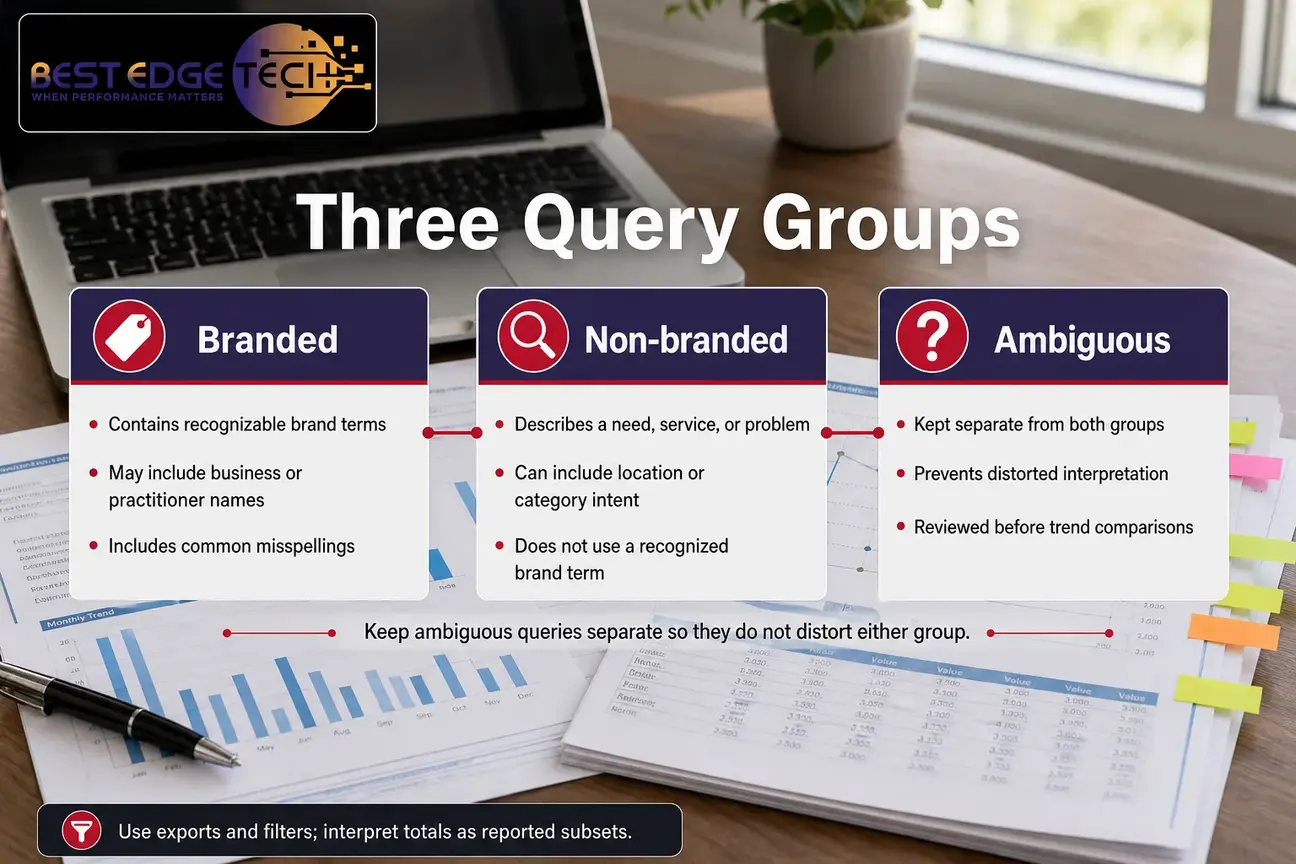
Separate AI-search visibility by classifying queries into three groups: branded, non-branded, and ambiguous. Branded queries contain recognizable brand terms, business names, practitioner names that function as brand terms, distinctive product or service names, or common misspellings. Non-branded queries describe a need, service, location, problem, audience, or category without using a recognized brand term. Keep ambiguous queries separate so they do not distort either group.
Use Google Search Console exports and filters as the working dataset, but interpret the totals as reported subsets, not complete demand. As of 2026, Google documents a Generative AI performance report in Search Console that shows performance in generative AI features on Google Search and supports exporting chart and table data. That makes the report useful for analysis, but it does not remove privacy limits, omitted rows, or the need to validate whether visibility becomes qualified leads.
Why Branded and Non-Branded AI Visibility Need Separate Views
A single AI-search visibility total can hide two very different stories. One story is existing demand: people search for your business, clinic, law firm, product, practitioner, or agency by name. The other story is discovery: people describe a need before they know who they want to hire. Those two patterns should not be blended if you are trying to understand growth.
For a business owner, branded exposure may show that existing reputation, referrals, offline marketing, email, repeat customers, or word of mouth is carrying part of search demand. Non-branded exposure may suggest that pages are appearing for broader topics, services, problems, or locations. That is often the more useful view when you want to know whether content and technical SEO are helping unfamiliar audiences find you.
This matters even more in AI-influenced search. AI answers and AI Overviews can compress the research journey. A user may see summarized information before clicking, compare providers earlier, or refine the query differently. Google’s documentation describes reports and data dimensions, but it does not define a universal branded/non-branded AI score. That means your segmentation rule must be explicit, documented, and stable over time.
Do not treat impressions as qualified leads. Impressions indicate reported visibility opportunity in the search context. Clicks indicate recorded visits from reported search interactions. Neither metric proves that a visitor was qualified, submitted a form, called, booked, or became a client. For healthcare practices, clinics, law firms, and agencies, the visibility analysis should stay in the marketing-measurement lane and be connected carefully to business records where appropriate.
If you need a broader measurement framework before building this split, Best Edge Tech’s guide to AI search visibility tracking is a useful companion. This article stays narrower: it focuses on branded versus non-branded query analysis, not every Search Console setup or reporting option.
A Practical Branded AI Visibility Workflow
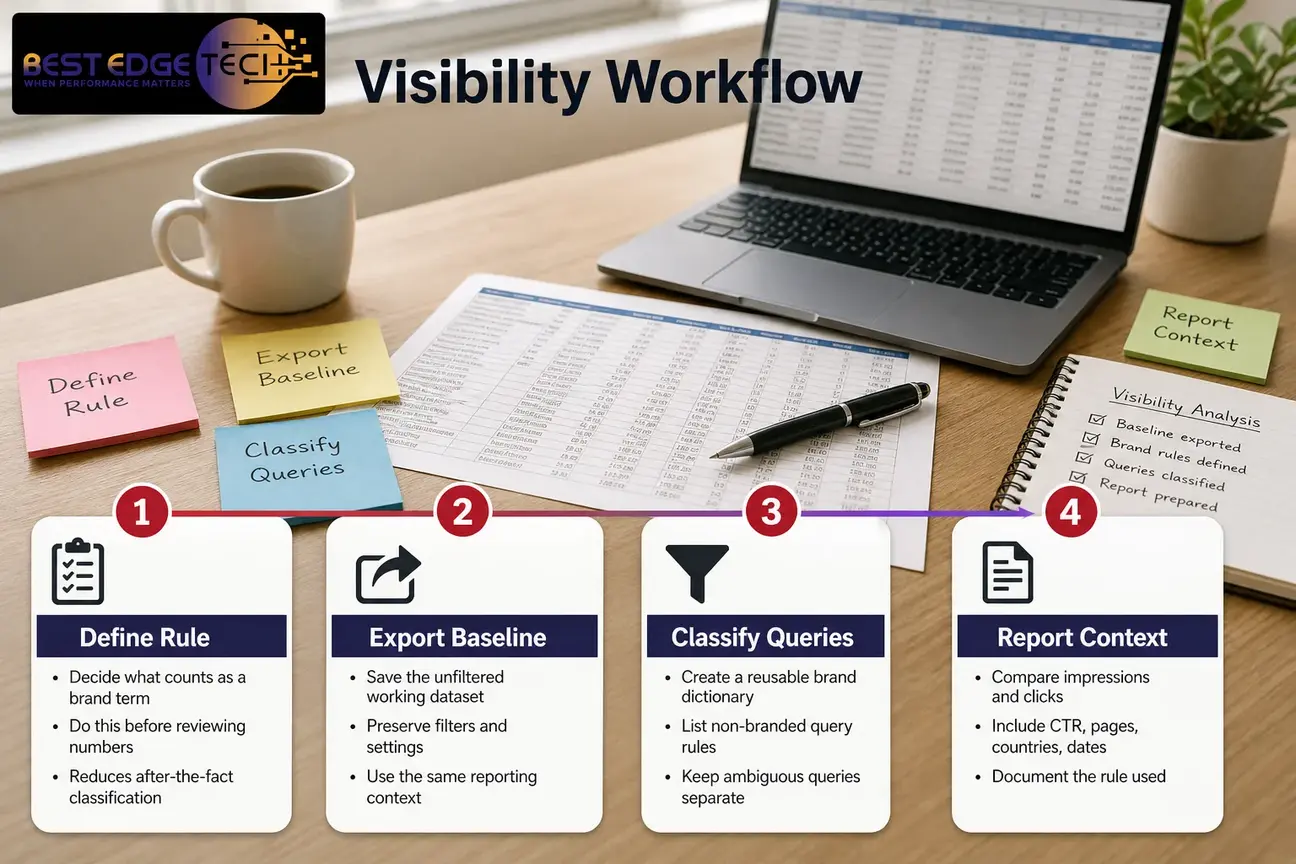
A practical branded AI visibility workflow starts with a rule, not a dashboard. Decide what counts as a brand term before you look at the numbers. Then export the baseline, apply the filter, and preserve the settings. That order matters because it reduces the temptation to classify queries after you already know which interpretation looks better.
For most small and mid-sized businesses, the workflow has four working outputs:
- A reusable brand dictionary for branded search data.
- A list of non-branded queries and the rule used to identify them.
- A separate ambiguous-query list that is not forced into either group.
- A reporting file that compares impressions, clicks, CTR, pages, countries, and date ranges for the visible filtered subsets.
The purpose is not to make the data look cleaner than it is. The purpose is to make the assumptions visible. When the rule is written down, a future report can use the same logic and show whether the demand mix changed, rather than whether the analyst changed the definitions.
A written method note should name the brand dictionary, the non-brand rule, the ambiguous bucket, and the exact Search Console filters used. That short note makes AI visibility tracking easier to audit later and keeps branded search data from being interpreted differently by each stakeholder.
What Counts as a Branded Query?
A branded query contains a recognizable term that identifies your business, organization, product, service, practitioner, founder, or distinctive offering. For a clinic, that may include the practice name and a provider name if patients commonly use that name to find the practice. For a law firm, it may include the firm name, attorney names that function as public brand terms, and distinctive practice-group names. For an agency, it may include the agency name, shorthand names, and common misspellings.
Build the branded list from terms that a reasonable searcher would use when they already know, or think they know, the organization. That includes spelling variants, punctuation variants, abbreviations, old brand variants if still searched, and common errors. branded search data becomes more reliable when those variants are handled consistently instead of being rediscovered every month.
Do not include every service you sell. “SEO consulting” is not branded by itself. “Urgent care Raleigh” is not branded by itself. “Family lawyer near me” is not branded by itself. A service, city, or category becomes branded only when it is combined with a recognized brand term or a distinctive branded phrase.
Also be careful with people’s names. A practitioner, attorney, physician, founder, or consultant name may function as a brand term when the public uses it to find the organization. But a common name can also produce unrelated searches. If the query could reasonably refer to someone else or to a broader topic, classify it as ambiguous until you have enough context from pages, countries, or repeated patterns.
Review branded search data at the page level as well as the query level. If a supposed brand term sends traffic to an unrelated educational page, that may be a warning that the term is ambiguous, the page is matching a different intent, or the filter is too broad.
What Counts as Non-Branded Queries?
Non-branded queries describe the need, not the known provider. They can include service-plus-location searches, informational searches, problem-based searches, audience-specific searches, and category searches. These are the queries that often matter most when you want to understand discovery by new audiences.
Examples for a local service business might include “roof repair estimate,” “emergency plumber near me,” or “commercial HVAC maintenance.” Examples for a healthcare practice might include “physical therapy for knee pain” or “dentist accepting new patients,” keeping the analysis strictly at a marketing level. Examples for a law firm might include “estate planning attorney” or “what to do after a car accident,” without treating the query itself as legal advice. Examples for agencies might include “technical SEO audit,” “AI SEO services,” or “content strategy for service business.”
Local modifiers do not automatically make a query branded. A city, region, neighborhood, or “near me” modifier usually describes location intent, not brand awareness. A search such as “SEO consultant Raleigh” remains non-branded unless it also includes a recognizable business or practitioner name. That distinction is important for North Carolina-based businesses that want to know whether local visibility is coming from demand for their name or demand for their service.
For discovery analysis, non-branded queries should also be grouped by intent. A high-level informational query may bring awareness but weak lead quality. A service query may be closer to action. A comparison or cost query may show commercial evaluation. Grouping all non-brand terms together can help at the top level, but the useful work often happens when you subdivide the group after the first pass.
Use the same categories for non-branded queries each time you report: informational, service, local, comparison, problem-based, and audience-specific are common starting buckets. Stable categories help AI visibility tracking show whether discovery is improving for meaningful searches, not just for any visible phrase.
How to Build a Consistent Query Classification Rule
Your classification rule should be simple enough to reuse and detailed enough to survive edge cases. The best starting point is a brand dictionary. This is a living list of terms that count as branded for reporting purposes. It should include the business name, known variants, common misspellings, abbreviations, old names if still relevant, practitioner or founder names when they function as brand terms, and distinctive branded service or product names.
Beside that dictionary, maintain an exclusion list. Exclusions are terms that look branded but are too broad, ambiguous, or misleading. A location name alone belongs here. A generic service name belongs here. A common surname may belong here unless paired with the organization, practice area, or page behavior that clearly identifies the business.
Use three buckets rather than two:
- Branded: contains a recognized brand term from the dictionary.
- Non-branded: describes a service, problem, topic, audience, or location without a brand term.
- Ambiguous: could reasonably refer to the business or something else.
The ambiguous bucket protects the report. If you force uncertain terms into branded or non-branded views, you can manufacture a trend that is really a classification error. This is especially important for branded search data when a business has a common name, a founder with a common name, or services with words that overlap with the brand.
Record changes. If you add a misspelling, retire an old brand variant, or move a query from ambiguous to branded, note the date and reason. That way, a change in the branded share does not get mistaken for a market shift when it came from a reporting-rule change.
Keep one tab or worksheet for the rule itself. Label the version, the date, the person or team applying it, the brand terms, the excluded terms, the ambiguous terms, and the Search Console filters used. This keeps branded search data and non-branded queries comparable across months.
How to Use Search Console Filters Without Overreading Them
Search Console filters are useful because they let you isolate query groups, pages, countries, dates, and search types. They are not perfect because the visible data is limited by privacy and reporting rules. The right posture is practical: use the filters, export the data, document the limits, and avoid treating the filtered totals as a complete partition of all search activity.
Google’s standard performance documentation explains that Search Console Performance reports support tasks such as choosing date ranges, filtering data, and exporting report data in many contexts through the interface. Use the Search Console Performance report documentation as the baseline for understanding report controls before you compare query groups.
A defensible workflow looks like this:
- Select the correct Search Console property.
- Open the relevant report, such as the Generative AI performance report when available for the property and analysis question.
- Set a documented date range before exporting anything.
- Choose the applicable search type or report configuration.
- Export the unfiltered baseline first.
- Apply the branded query filter based on your brand dictionary.
- Record impressions, clicks, CTR, and any available appearance or position context.
- Export the branded view.
- Replace the filter with the non-branded rule and export that view.
- Save the filter definitions, property, report, date range, search type, and export date with the files.
Google documents report filtering and query performance behavior in Search Console. Query filters can help with segmentation, but they do not solve spelling variants, punctuation differences, abbreviations, or alternate names. For query-specific reporting controls, refer to Google’s Search Console Performance report documentation.
Use Search Console filters consistently across periods. If one month uses “contains brand” and the next month uses a broader regular-expression-style rule or a longer variant list, the two months may not be comparable. Consistency matters more than complexity.
When the visible query set is small, Search Console filters should be treated as directional, not definitive. A few queries can move the percentages sharply, especially when branded search data is concentrated on one page or non-branded queries are spread across many pages.
How to Compare Non-Branded Queries Against Branded Demand
Once the exports are saved, the analysis should compare groups across the same reporting context. Do not compare branded data from one date range with non-branded data from another, or one country with another, unless that difference is the explicit purpose of the analysis. Keep the property, report, Search Console filters, and date range aligned.
Start with a simple side-by-side table for branded search data, non-branded queries, and ambiguous queries. Then add page, country, and date-range context so AI visibility tracking reflects the way people actually discovered or looked up the business.
Impressions and Clicks
Impressions show reported visibility opportunity. They do not prove that a user noticed the brand, preferred the business, or was ready to inquire. A large impression count for non-branded queries can suggest that pages are appearing for broader discovery searches, but it still needs page-level and lead-quality validation.
Clicks show recorded visits attributed to reported search interactions. A branded click may come from someone who already intended to contact the business. A non-branded click may be a new discovery visit, a research visit, or a weak-fit visit. Read clicks as traffic behavior, not as proof of qualified demand.
If clicks rise for non-branded queries while branded search data stays flat, investigate whether the new visits are reaching pages with clear service fit and next steps. If branded clicks rise while non-brand clicks fall, investigate whether broader discovery pages lost visibility, changed intent, or were affected by technical changes.
CTR and AI Visibility Tracking
CTR is clicks divided by impressions. It is useful only when the comparison is fair. Compare CTR within the same report type, date range, market, device context if available, and query group logic. A branded query often has different intent from a broad informational query, so a higher branded CTR does not automatically mean the non-branded page is underperforming.
AI visibility tracking should also account for how AI-search surfaces can change click behavior. A user may receive enough information in the search experience to delay or avoid a click. That does not mean the impression has no value, and it also does not mean it produced a lead. Treat CTR as one signal in a broader measurement set.
Use AI visibility tracking to ask better questions, not to declare a win from one chart. A lower CTR for non-branded queries may be normal when the query is broad, while a low CTR on branded search data may signal a title, snippet, page relevance, or trust issue worth reviewing.
Pages and Branded Search Data
Page distribution is where branded search data becomes more actionable. Branded exposure often concentrates on the homepage, contact page, about page, location page, or high-trust service pages. If branded clicks go mostly to the homepage, that may fit a user who already knows the business and wants contact information, directions, or validation.
Non-branded exposure may land on educational content, service pages, local pages, comparison pages, or problem-focused resources. If discovery traffic lands on pages that do not clearly explain the next step, the visibility may not translate into useful inquiries. That is where SEO analysis, content strategy, and conversion-path review need to meet.
If page distribution raises technical questions, a structured SEO analysis can help identify whether crawlability, indexation, page targeting, internal links, or content gaps are limiting discovery visibility.
For AI visibility tracking, page distribution can show whether non-branded queries are landing on the pages designed to answer them. It can also show whether branded search data is leaking into pages that should not be the primary trust or conversion path.
Country
Country comparisons can be helpful, but they are easy to misread. A healthcare practice, law firm, service business, or agency may serve a defined market even when the site receives impressions elsewhere. Demand, language, location intent, and sample size can vary widely across countries.
Separate countries before interpreting totals. If branded demand is concentrated in one country and non-branded impressions appear in another, the combined report may make visibility look broader than the business opportunity actually is. For regional businesses, country is often too broad on its own; use it as a first filter, then review pages and query intent.
Apply Search Console filters for country only when the business question requires it. If the goal is to understand one service area, country-level data may still be too broad, and the report should say so.
Date Range
Use matched date ranges whenever possible. Compare month to month, quarter to quarter, or year over year only when the periods make business sense. Annotate site migrations, redesigns, rebrands, major content updates, analytics changes, market seasonality, and changes in service focus.
If a site recently changed its navigation, page titles, internal links, structured data, or service pages, the branded and non-branded mix may shift for reasons unrelated to AI-search behavior. Teams planning major changes should connect this analysis with an AI search readiness audit before and after launch so the data has context.
Keep date ranges identical when comparing non-branded queries with branded search data. Otherwise, seasonality, site changes, and reporting changes can look like visibility changes when they are really comparison errors.
How to Interpret the Difference
The difference between branded and non-branded exposure should be read as a diagnostic signal, not a verdict. High branded and low non-branded visibility may indicate that existing demand is stronger than discovery. That can happen when referrals, offline reputation, repeat customers, or name recognition are doing the heavy lifting while service and educational pages are not yet earning much broader exposure.
Low branded and rising non-branded visibility may suggest that the site is appearing more often for category, service, or need-based searches. That can be encouraging, but it still does not prove lead quality. Review pages, query intent, inquiry paths, and downstream records before calling it business growth.
High impressions with low clicks can suggest several possibilities. The query may be too informational. The visible result may not look compelling. The search experience may answer part of the question before the click. The page may not match intent. Or the data may be too thin to support a strong conclusion. Investigate before rewriting strategy around one number.
Similar clicks with very different CTR should prompt a query-mix review. Branded terms often have clearer intent. Broad informational terms often have wider exposure and lower click rates. Instead of treating CTR as a standalone score, compare the query group, page type, country, and time period.
A useful calculated metric is reported branded-share estimate:
Reported branded-share estimate = branded impressions ÷ (branded impressions + non-branded impressions)
This formula is useful only for the visible filtered subsets. Because anonymized and omitted rows may not appear in either group, do not call it total brand demand or total AI-search share. Label it clearly as a reported branded-share estimate.
In a leadership report, describe the pattern in plain language. For example, say that branded search data shows known-demand behavior, non-branded queries show discovery behavior, and AI visibility tracking is being used to compare those reported subsets with stated limitations.
What Search Console Cannot Tell You
Search Console is valuable, but it does not reveal every query. Google explains in its Performance report documentation that some queries are anonymized to protect user privacy. For this limitation, use Google’s Search Console Performance report documentation as a reference when explaining why filtered totals may not match the unfiltered total.
This is the most common reporting mistake: analysts export a branded filter, export a non-branded filter, add them together, and assume the sum should equal all visibility. That is not reliable. When query filters are applied, anonymized query behavior and omitted rows can mean the filtered groups are not a complete partition of the baseline.
Google also documents query-related behavior in Search Console, including privacy and reporting considerations. Its Performance report documentation is useful for understanding how query data can be represented in reports. The practical takeaway is simple: describe branded and non-branded totals as reported subsets, not the complete universe.
Search Console filters also cannot tell you whether the user was qualified. They cannot confirm whether a form submission came from a particular query unless you have separate, privacy-conscious analytics and business records that support that conclusion. They cannot tell you whether an AI answer changed perception if the platform does not document that behavior in the report.
For AI-search behavior that is not documented by the platform, use observation-based language. Say “may indicate,” “can suggest,” or “is worth investigating.” Do not turn an observed pattern into a claim about how Google, AI Overviews, or any AI product must be ranking, citing, or selecting sources.
Search Console filters are strongest when they support a documented question. They are weaker when they are used to create a complete story from incomplete data. That is why non-branded queries, branded search data, and ambiguous terms should remain separate in the working file.
How to Connect Visibility With Qualified Leads
The next step is to connect query groups with business outcomes without overstating causation. Start by mapping branded and non-branded query groups to landing pages. Then compare those pages with engagement signals and inquiry actions that your organization can measure appropriately, such as form submissions, phone calls, booked consultations, qualified inquiries, or CRM stages.
For a clinic, that may mean comparing non-branded service-page discovery with appointment request behavior, while staying within marketing measurement and not treating the report as medical or regulatory advice. For a law firm, it may mean distinguishing informational visits from consultation inquiries, while relying on appropriate legal and compliance guidance outside the SEO report. For an agency, it may mean separating broad research traffic from prospects who request a quote or discuss a defined project.
Use call tracking, analytics, CRM records, and internal reporting carefully. A non-branded click and a qualified lead in the same week do not prove causation. The stronger analysis asks whether the landing page, query intent, source record, form path, call notes, and sales qualification all point in the same direction.
If you need help turning these observations into a practical search plan, Best Edge Tech offers AI SEO and GEO services focused on AI-search visibility, structured data, entity signals, helpful content, and technical SEO foundations. Results depend on competition, site history, execution, and market conditions; no agency can promise rankings, traffic, leads, or AI citations.
When lead quality is the question, AI visibility tracking should be paired with landing-page review. Non-branded queries may show discovery, but the page still has to explain fit, next steps, service scope, and trust signals clearly enough for the right visitor to act.
A Practical Reporting Template for AI Visibility Tracking
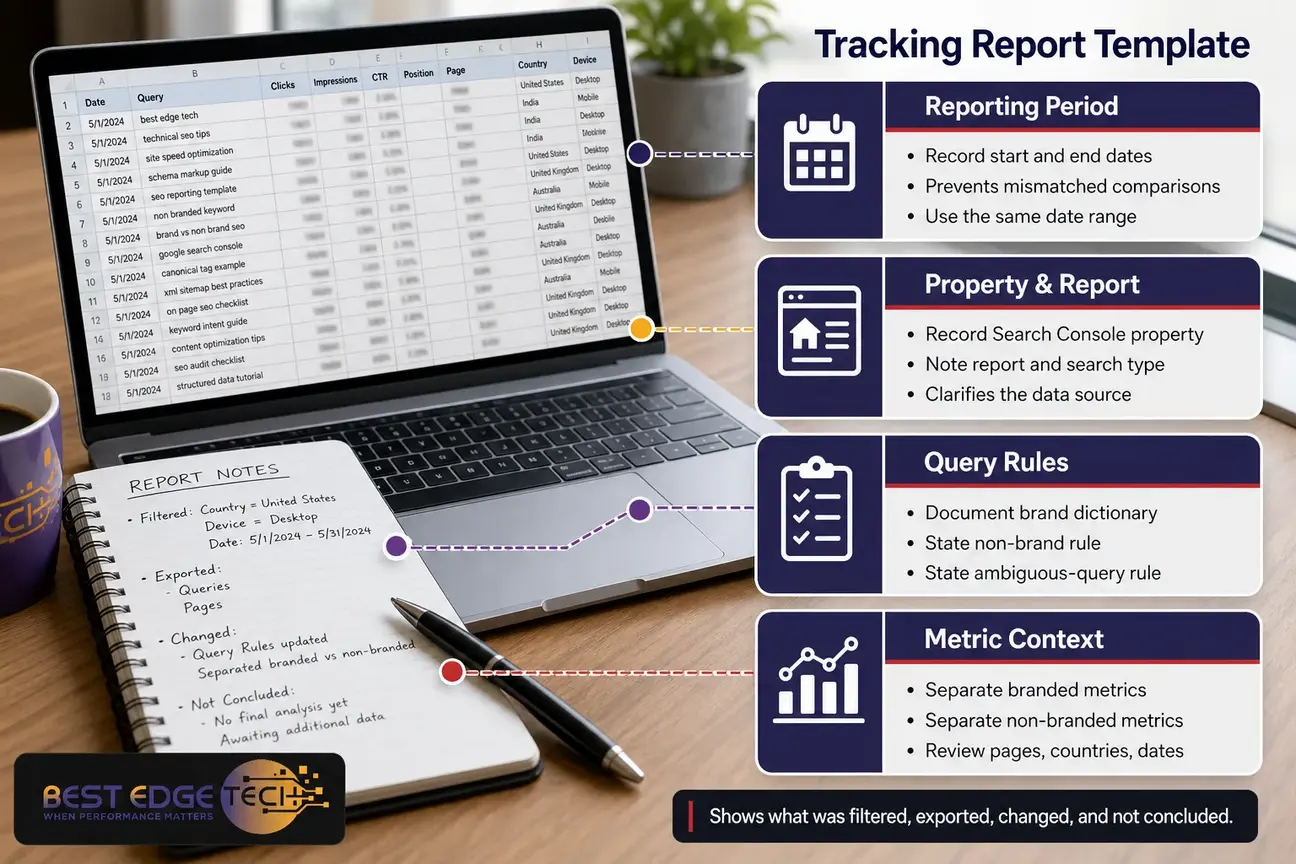
A consistent template makes AI visibility tracking easier to explain to owners, partners, practice managers, attorneys, marketing leads, and agency clients. Keep it plain. The report should show what was filtered, what was exported, what changed, and what cannot be concluded.
| Field | What to record | Why it matters |
|---|---|---|
| Reporting period | Start and end dates | Prevents mismatched comparisons |
| Property and report | Search Console property, report, and search type | Clarifies the data source |
| Query-group rule | Brand dictionary, non-brand rule, and ambiguous-query rule | Makes the classification repeatable |
| Branded metrics | Impressions, clicks, CTR, pages, countries | Shows known-demand behavior |
| Non-branded metrics | Impressions, clicks, CTR, pages, countries | Shows discovery behavior |
| Notable changes | Content updates, redesigns, migrations, tracking changes, seasonality | Adds context before conclusions |
| Data limitations | Anonymized queries, omitted rows, small samples, filter changes | Prevents overstatement |
| Lead-quality reference | Forms, calls, CRM notes, qualified inquiries where available | Connects visibility to business evidence |
The table should also include a note when the ambiguous bucket is large. A large ambiguous group may mean the brand dictionary is incomplete, the business name overlaps with generic terms, or the visible query data is too limited for a confident split.
Add a short methodology box to every report. It should list the Search Console filters, the brand dictionary version, the non-branded queries rule, the branded search data rule, the ambiguous-query rule, the export date, and any known reporting limits. This gives AI visibility tracking a repeatable foundation instead of a one-time interpretation.
For agency teams, the same template can be used in client reporting, but the language should stay cautious. If you support other agencies and need implementation capacity, Best Edge Tech provides white-label SEO for agencies as a confirmed service. The reporting still needs the client’s actual query data, business context, and lead-quality definitions.
When This Analysis Is Useful—and When It Is Not
This analysis is useful when you need to understand the mix between existing brand demand and new-audience discovery. It helps diagnose whether content is attracting broader service or problem searches, whether branded exposure is concentrated on the homepage, whether a market is behaving differently, and whether a site’s AI-search reporting is being interpreted too broadly.
It is less useful when sample sizes are tiny, date ranges are too short, the site recently migrated, tracking changed, the brand recently rebranded, or the query data is heavily anonymized. In those cases, the report may still be worth saving, but the conclusion should be limited.
It is also not a substitute for lead-quality analysis. A visibility report can guide questions, but it cannot answer every business question. Owners and marketing leads still need to know whether inquiries are relevant, whether calls are from the right market, whether prospects can afford or use the service, and whether the business can connect source records to outcomes responsibly.
Use the split as a decision tool. If branded exposure is high and discovery is weak, review non-brand content coverage, internal links, technical SEO, structured data, and service-page clarity. If non-brand exposure is rising but leads are weak, review intent, page messaging, calls to action, and qualification paths. If both are weak, a broader SEO consulting conversation may help prioritize the next audit steps.
The method is especially useful when non-branded queries are tied to specific content improvements. It is less useful when AI visibility tracking is isolated from the actual pages, offers, trust signals, and inquiry paths that turn visibility into a business conversation.
Common Mistakes to Avoid
The first mistake is treating every location query as branded. A city or region can signal local intent, but it does not prove brand awareness. “Service plus city” usually belongs with non-brand discovery unless the query also contains the business or practitioner name.
The second mistake is changing the brand dictionary every reporting period without notes. That makes trends unreliable. If you add a misspelling or old name, record the change. Otherwise, branded search data may look like it grew simply because the filter became broader.
The third mistake is ignoring ambiguous terms. Ambiguous terms are uncomfortable because they do not fit cleanly into a chart. Keep them separate anyway. A smaller but cleaner report is better than a larger report built on assumptions.
The fourth mistake is presenting filtered totals as complete. Because of anonymized queries and reporting limits, the branded and non-branded filtered totals may not add to the unfiltered baseline. Treat the remainder as not fully observable, not as a hidden category you can confidently name.
The fifth mistake is calling this an official AI score. It is not. It is a practical segmentation method using available reports, exports, and rules. That makes it useful, but only when the report states what the method can and cannot prove.
The sixth mistake is using Search Console filters differently for different stakeholders. If the owner receives one branded search data definition and the marketing team uses another, the same trend can produce different decisions. Keep one rule and document exceptions.
The seventh mistake is celebrating non-branded queries without checking intent. Discovery visibility is useful only when the search intent and landing page align with the business’s actual services, market, and qualification criteria.
How Best Edge Tech Approaches This Type of Analysis
Best Edge Tech is a North Carolina-based SEO and AI search optimization agency serving businesses in North Carolina and across the United States. For this kind of analysis, the practical work is not just pulling exports. It is defining the query rule, checking the data limits, mapping pages to intent, and connecting visibility to the business’s real lead-quality questions.
If you want help reviewing your branded and non-branded split, you can contact Best Edge Tech or call 252-303-0074. Share your website URL, goals, markets served, current traffic or Search Console access if available, recent site changes, and whether you are considering AI SEO, SEO analysis, consulting, content, or website strategy. A quote request starts a conversation; pricing and scope depend on factors such as site size, competition, number of locations, content volume, technical debt, and integrations.
Search engines and AI products change often. Check current platform documentation before acting, and treat any result as dependent on your site, market and competition.
Bottom Line
Branded AI visibility is useful only when it is separated from discovery demand and interpreted with limits. Build a clear brand dictionary, classify non-brand and ambiguous terms consistently, export the unfiltered baseline, use Search Console filters carefully, and compare impressions, clicks, CTR, pages, countries, and date ranges in context.
The strongest reports do not pretend that visibility equals qualified leads. They show what the search data can support, what it cannot show, and what business evidence is needed next. That keeps AI-search reporting practical, honest, and useful for decisions. It also keeps non-branded queries, AI visibility tracking, Search Console filters, and branded search data grounded in a repeatable method instead of a one-time dashboard reading.
Frequently Asked Questions
What is branded AI visibility?
Branded AI visibility is the reported visibility associated with AI-search or search queries containing recognizable terms for a business, product, service, practitioner, or organization. The classification is a practical analysis rule, not an official Google score.
What is non-branded AI visibility?
Non-branded AI visibility is the reported visibility associated with queries describing a service, problem, category, audience, or location without using a recognizable brand term.
Can branded and non-branded Search Console totals be added together?
Not reliably. Google explains that anonymized queries are included in chart totals but omitted when query filters are applied, so filtered totals can differ from the unfiltered total.
Does high non-branded visibility prove that a business is gaining qualified leads?
No. Impressions and clicks describe reported search performance. Qualified leads require additional evidence from site actions, calls, CRM records, or another appropriate business measurement system.
Why do Search Console query totals sometimes look incomplete?
Google states that some queries are anonymized to protect privacy and that internal limitations mean not all query rows are stored or shown.
Should local searches be classified as branded?
Not automatically. A service-plus-location query is generally non-branded unless it also contains a recognizable business or practitioner name.
Is branded versus non-branded analysis an official AI-visibility score?
No. It is a practical segmentation method built from available query filters and exports. Google documents reports, dimensions, and privacy limitations, but the cited documentation does not define a universal branded/non-branded AI-visibility score.