

How to Do a Core Web Vitals Audit Before a Website Redesign
A Core Web Vitals audit before a redesign is a baseline-and-risk review. Capture how key templates perform now, identify the changes most likely to slow loading, delay interactions, or shift layouts, then validate the new design before and after launch.
Do not test only the homepage. Audit representative templates, mobile layouts, important forms, third-party scripts, image handling, staging differences, and post-launch comparisons. Use field data where it is available, and use lab testing for controlled diagnosis. Passing these metrics can support a better user experience, but it does not promise rankings, leads, conversions, or identical speed for every visitor. For a broader pre-launch SEO view, pair this process with a website redesign SEO checklist that also covers crawlability, redirects, content, internal links, and conversion paths.
Quick answer for redesign teams
Before redesign work changes templates, scripts, media, fonts, hosting, or content management settings, document current performance by page type. Then test the planned design against the same page types under consistent conditions, especially on mobile. The goal is not to chase a single score. The goal is to find repeatable risks that can affect many pages at once.
Core Web Vitals are Google-defined user-experience metrics for loading performance, interaction responsiveness, and visual stability. Google Search Central’s Core Web Vitals documentation frames Largest Contentful Paint, Interaction to Next Paint, and Cumulative Layout Shift as experience metrics with “good” targets. Treat those targets as useful thresholds, not as promises of business outcomes.
Why performance should be audited before design decisions lock in
A redesign can improve navigation, messaging, conversion paths, and visual polish. It can also introduce heavier hero sections, more JavaScript, larger images, additional fonts, new tracking tags, embedded tools, or a different hosting setup. Once those decisions are built into templates, fixing performance issues usually becomes harder because the problem is no longer isolated to one page.
The practical reason to audit early is separation of causes. If the current site already has slow service pages, unstable embedded forms, or a script-heavy contact page, the redesign team should know that before launch. Otherwise, inherited problems and redesign-related regressions get mixed together.
Performance also belongs in the same conversation as technical SEO. A fast page that blocks important content from crawlers, removes valuable copy, breaks internal links, or mishandles redirects can still lose search visibility. Best Edge Tech’s SEO web design work treats template structure, content discoverability, search intent, and performance as connected decisions rather than separate handoffs.
Core Web Vitals audit process for LCP, INP, and CLS
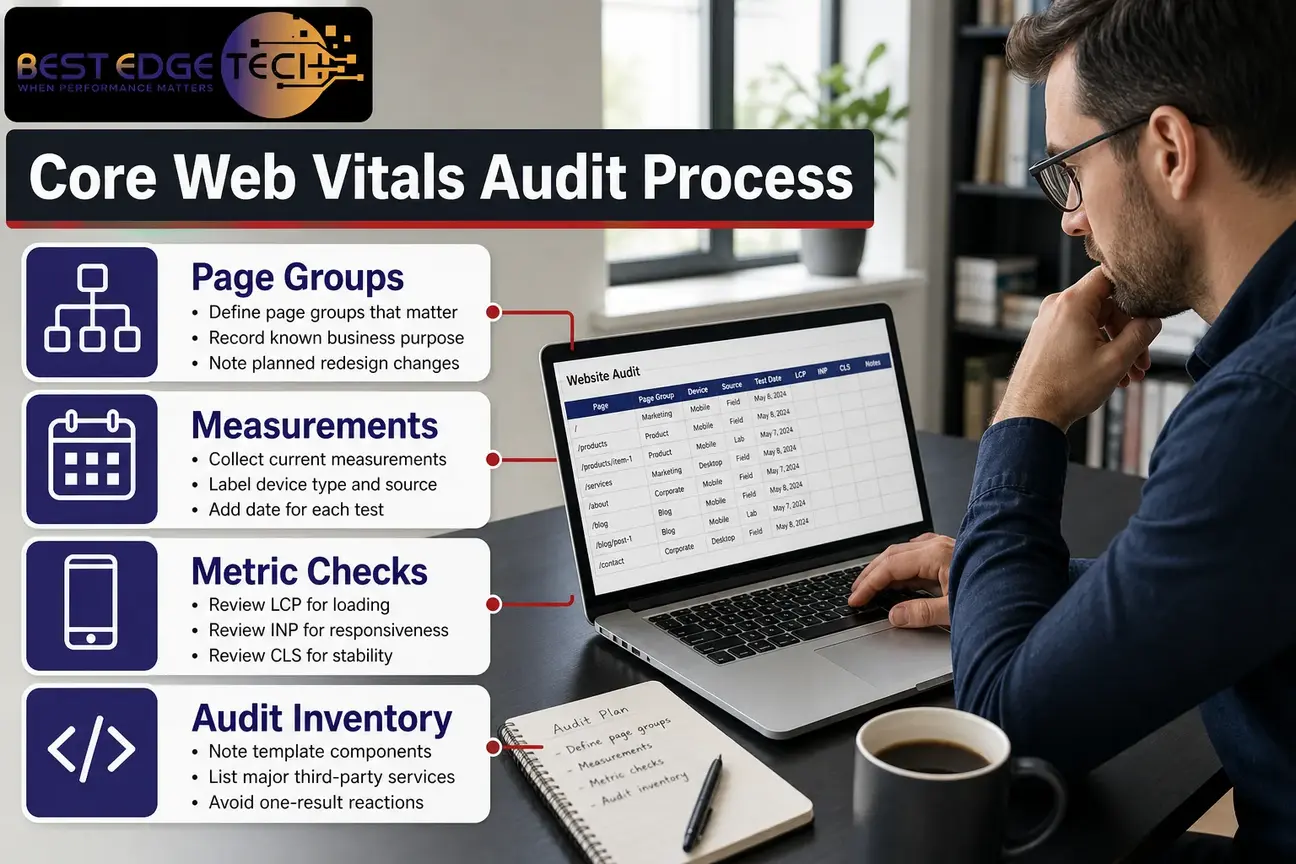
A useful process starts by defining the page groups that matter, collecting current measurements, and identifying the most likely redesign changes for each group. Then the team investigates each metric separately because the causes are different. Loading performance, interaction responsiveness, and layout stability can fail for different reasons on the same URL.
Use a simple inventory. For each template, record the URL tested, device type, measurement source, date, main template components, major third-party services, known business purpose, and any planned redesign changes. This helps the web team make decisions from evidence instead of reacting to a single test result.
LCP audit: loading performance and the largest visible element
An LCP audit asks what the largest visible content element is and why it becomes visible when it does. Largest Contentful Paint often points to a hero image, large heading block, video poster, featured service section, or another above-the-fold element. The specific element matters because the right fix depends on what the browser is waiting for.
Google’s stated wording is specific: “To provide a good user experience, strive to have LCP occur within the first 2.5 seconds of the page starting to load.” That should be presented as a user-experience target, not as a universal requirement or ranking promise.
For each important template, document the LCP element and the loading sequence. Ask whether the initial HTML is delayed, whether the LCP resource is discovered early, whether CSS or JavaScript blocks rendering, whether fonts delay visible text, and whether the image delivery path matches the production setup.
If the redesign adds a carousel, background video, animation, personalization block, or oversized hero image, test that component before it becomes the standard template. This is where an LCP audit protects repeated layouts, not just one page.
An LCP audit should avoid one-size-fits-all fixes. Preloading the wrong file, compressing an already acceptable image too aggressively, or lazy-loading a critical above-the-fold image can create new problems. The fix should match the measured LCP element, the template, and the intended production delivery path.
Document the LCP audit outcome in plain language: the element, the suspected bottleneck, the template affected, and the next technical decision. That format helps owners and developers agree on whether the issue is a content, design, hosting, script, image, or rendering problem.
INP audit: responsiveness after users interact
An INP audit is about what happens after a visitor tries to use the page. Interaction to Next Paint looks at responsiveness after interactions, so the audit should test menus, filters, accordions, tabs, forms, appointment widgets, search boxes, and lead-generation elements. A page can appear visually loaded and still feel delayed when someone taps a button.
Google’s wording for the target is also qualified: “To provide a good user experience, strive to have an INP of less than 200 milliseconds.” Keep that wording in context. It is a user-experience target, not a promise that every device, network, or interaction will behave the same way.
The most common investigation areas are long-running JavaScript tasks, large framework bundles, event handlers attached to important controls, client-side rendering, and third-party scripts that execute during or shortly after interaction. Consent tools, chat widgets, analytics, personalization, embedded booking systems, and marketing tags can all affect responsiveness depending on implementation.
An INP audit should include mobile interaction testing. A menu that feels instant on a developer’s desktop may feel delayed on a midrange phone. For a healthcare practice, law firm, local service company, or agency client, the most important interaction is often the one tied to a form, call action, scheduling flow, or inquiry path.
Run the INP audit against the interactions people actually use. If the redesign changes the main navigation, lead form, filter interface, or scheduling flow, retest those elements before launch and again after launch under comparable conditions.
CLS audit: visual stability while the page loads and changes
A CLS audit looks for layout movement that happens after content starts rendering. Cumulative Layout Shift is not only a design issue; it is often a template and component issue. Images without dimensions, embeds without reserved space, late-loading banners, font swaps, injected forms, and expanding widgets can all move content around.
Google’s stated wording is: “To provide a good user experience, strive to have a CLS score of less than 0.1.” Again, this should be treated as a target for measured visual stability, not a promise that the page has no usability problems.
Test layout stability during realistic use, not just in a static screenshot. Scroll, open menus, accept or reject consent notices, expand accordions, interact with forms, and watch mobile sticky elements. A CLS audit should document whether shifts happen on initial load, after a script runs, after a font loads, after an embed appears, or after a user interaction.
A CLS audit is especially important when the redesign introduces new cards, banners, sticky calls to action, maps, video embeds, or dynamic review sections. Reserve space for components before they load, and confirm that mobile breakpoints do not create movement that desktop testing misses.
Build the website performance audit baseline
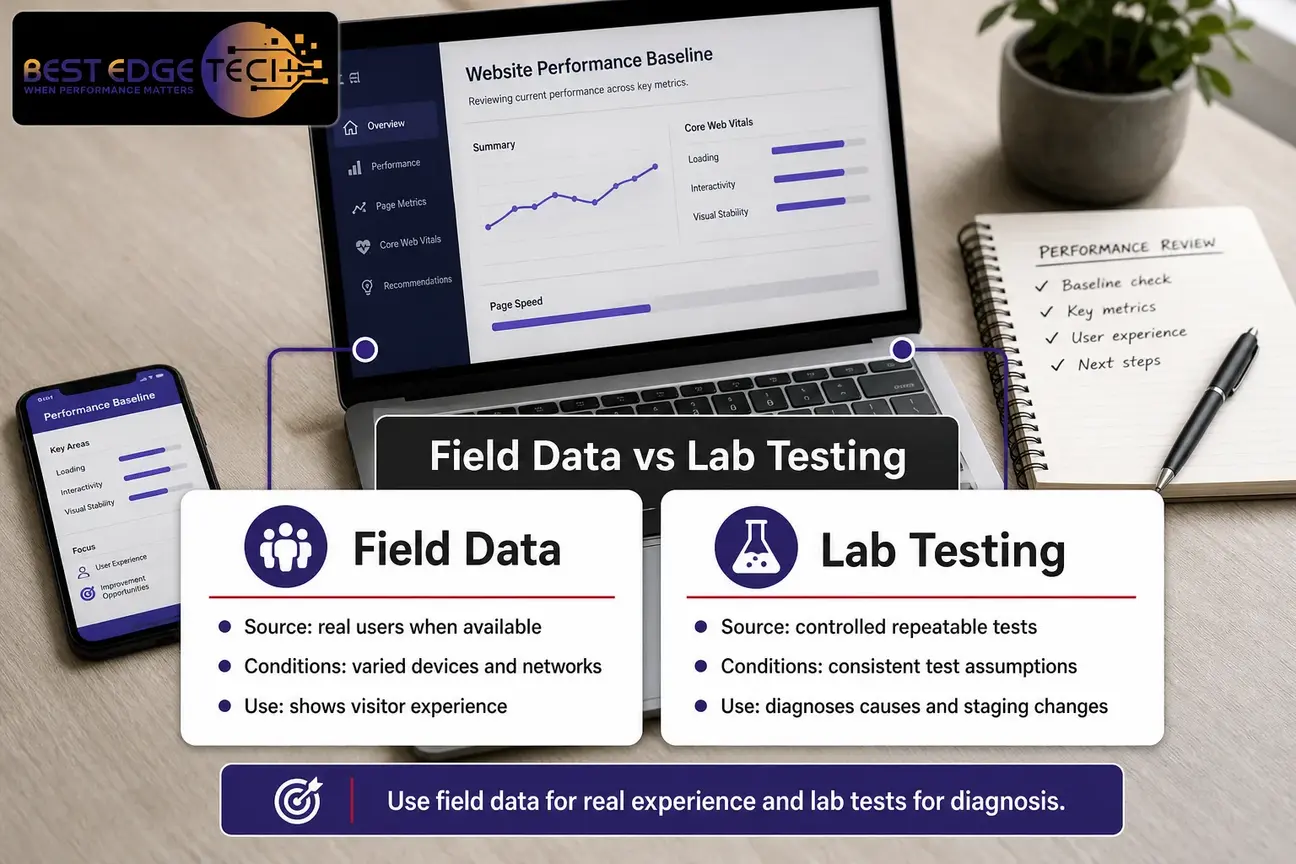
A website performance audit baseline is the record you will compare against later. It should be simple enough for owners and marketing leads to understand, but detailed enough for developers to reproduce. The baseline should distinguish field data from lab testing, and it should label each result with date, page type, device type, and tool or data source.
Field data reflects real users under varied conditions when enough eligible data is available. It can show how visitors experience pages across different devices, networks, locations, and usage patterns. Lab testing is controlled and repeatable. It helps diagnose causes, compare versions, and test staging changes, but one lab run should not be treated as a complete description of every visitor’s experience.
The web.dev guidance on Web Vitals explains Core Web Vitals as a subset of Web Vitals that apply to all web pages and should be measured by all site owners. For redesign planning, that means the metrics are useful across templates, but the audit still needs judgment about business importance and technical risk.
A website performance audit should also record the current business role of each template. A slow page that supports a key inquiry path may deserve more attention than a rarely used page with a similar score. This keeps the website performance audit tied to practical decisions.
| Audit record | Why it matters before redesign | What to compare after launch |
|---|---|---|
| Template or URL group | Shows whether the issue affects one page or many pages | Same or equivalent template in the new design |
| LCP element | Identifies the visible element that drives loading perception | New LCP element and loading sequence |
| Main interactions | Connects INP investigation to real user actions | Same menu, form, booking, filter, or lead action |
| Layout-shift sources | Finds unstable components before they are reused | Whether the redesigned component still shifts |
| Third-party scripts | Prevents unnecessary tags from being carried forward | Production script list and loading behavior |
Select representative templates instead of only testing the homepage
The homepage matters, but it rarely represents the whole site. A redesign usually changes repeated templates: service pages, location pages, articles, category pages, contact pages, forms, listings, and special landing pages. If a template-level issue exists, one implementation can affect many URLs.
Start with page groups that drive business value or search visibility. For a service business, that may include the homepage, main service pages, location pages where applicable, contact pages, lead forms, and educational articles. For a healthcare practice or law firm, include appointment or inquiry paths, but keep the audit focused on marketing performance and user experience rather than clinical, legal, or compliance advice.
Also include pages with unusual components. Video, maps, review embeds, chat, scheduling tools, sliders, personalization, and large image galleries can behave differently from standard content templates. A website performance audit that ignores those pages may miss the exact components most likely to create launch problems.
Prioritize repeated defects. If every service page has an oversized hero component or a layout shift from the same embedded form, that deserves earlier attention than a low-traffic page with an isolated issue. If a high-value contact page has a serious interaction delay, it may deserve priority even if only one URL is affected.
Use the page inventory to decide where each LCP audit, INP audit, and CLS audit belongs. Some templates may need all three reviews, while others may only need targeted testing for a known component or script change.
Test mobile conditions as their own workflow
Mobile testing is not a checkbox after desktop testing. Mobile pages may load different image sizes, use different navigation, display sticky buttons, trigger different scripts, or shift layout at different breakpoints. Network conditions and device hardware can also change the practical experience.
For each page group, test the mobile version separately. Open the navigation, interact with forms, use filters or accordions, trigger scheduling or contact components, and observe sticky bars, banners, and consent notices. If the design uses hidden desktop elements and separate mobile components, confirm that duplicate media or duplicate scripts are not being loaded unnecessarily.
Keep before-and-after testing consistent. Use the same or clearly documented device class, network assumptions, viewport, test URL, and template group. Label whether each result is field data or a controlled lab result. This makes the post-launch conversation more useful because the team can compare similar conditions instead of arguing over mismatched screenshots.
Mobile testing can change the findings from an LCP audit because the largest visible element may be different from desktop. It can also change an INP audit because mobile navigation and touch interactions often rely on different scripts. Mobile should be documented as its own evidence set.
Document third-party scripts before they move into the new design
Third-party scripts are often inherited without a clear owner. Before a redesign, list every analytics tag, tag-management container, advertising or remarketing script, consent platform, chat widget, scheduling tool, map, video player, social feed, A/B testing tool, CRM integration, and personalization script. The audit should ask whether each script is still needed.
For each script, document its business purpose, owner, template coverage, loading timing, dependencies, and interaction risk. If nobody owns a tag or can explain its purpose, do not assume it must be carried forward. Removing, deferring, replacing, or limiting a script should be a business and technical decision, not a guess.
Third-party scripts can affect all three metrics. They may delay rendering and influence an LCP audit. They may run JavaScript during user input and influence an INP audit. They may inject banners, forms, or embeds and influence a CLS audit. The redesign plan should specify which scripts load globally and which load only on templates that need them.
Script decisions should be part of the website performance audit record. A clean baseline is less useful if the production launch later adds global tags that were never tested on important templates.
Audit images, fonts, and media before templates are rebuilt
Images and media deserve early attention because redesigns often introduce larger visual areas. A new hero section, background image, gallery, embedded video, or card grid can change both loading behavior and visual stability. The issue is not simply “compress every image.” The issue is whether the right asset is delivered at the right size, at the right time, with the right space reserved.
For above-the-fold images, identify whether the image is an LCP candidate. Confirm that the file is appropriately sized for the layout, that responsive image markup is working, and that the production image service or CDN will behave the same way as staging. If the hero image is critical visible content, do not treat it like below-the-fold media.
For below-the-fold media, lazy loading can be useful when implemented appropriately, but it should not delay important visible content or create layout movement. Reserve dimensions for images, videos, iframes, maps, and embeds. Check whether the CMS generates oversized assets or whether the new component loads duplicate images for desktop and mobile.
Fonts also need review. New brand typography can improve design, but font loading can affect visible text and layout stability. Document font files, weights, rendering behavior, and whether fallback fonts cause noticeable movement. A CLS audit should include typography changes, not just images and banners.
Validate staging without pretending it proves production outcomes

Staging is valuable because it allows controlled comparison before launch. Re-test equivalent templates, compare markup, review CSS and JavaScript bundles, inspect image requests, check font loading, inventory third-party requests, and interact with key page elements. If the staging site already shows obvious regressions, fix them before production.
Staging also has limits. It may use different hosting, caching, CDN rules, authentication, traffic levels, personalization, consent behavior, or third-party settings. Those differences can make staging faster or slower than production in ways that do not reflect real users. Document those differences in the audit notes.
When redesign work includes URL changes, do not separate performance testing from migration planning. Google’s documentation on site moves with URL changes addresses search migration considerations, and a performance baseline should sit beside redirect, indexing, internal linking, and content checks. A technically fast redesign can still create search problems if the migration is mishandled.
Repeat the LCP audit, INP audit, and CLS audit on staging where the environment is close enough to be useful. Note any differences between staging and production so the post-launch website performance audit does not compare mismatched conditions without context.
Compare after launch with like-for-like evidence
After launch, compare the new site against the pre-launch baseline. Use the same or equivalent templates, similar device and network assumptions, comparable URL groups, and the same definitions. Separate immediate lab regression checks from field-data monitoring. Field data may take time to reflect the new implementation and the current visitor mix.
Review what changed, not only whether a score moved. Did the LCP element change from a text block to a large image? Did a new booking tool introduce interaction delay? Did a consent banner or embedded map create layout movement? Did a global script load on templates that do not need it? These questions help the team fix causes instead of chasing symptoms.
A broader SEO analysis can connect performance findings with crawlability, content structure, indexation, internal links, structured data, and conversion paths. If leadership needs help deciding which fixes matter most, SEO consulting can help translate the audit into a practical priority list without treating any metric as a promised outcome.
The post-launch comparison should preserve the same terminology used before launch. If the baseline included an LCP audit for service pages, compare the redesigned service-page LCP behavior. If the baseline included an INP audit for forms, retest those same form interactions. If the baseline included a CLS audit for embedded components, watch those components again after production scripts are active.
What passing the metrics does and does not mean
Passing Core Web Vitals means the measured experiences meet Google’s stated “good” thresholds for the relevant metric and data set. That is useful. It can indicate that loading, responsiveness, and visual stability are within a better range for the measured conditions.
It does not mean every visitor will have the same experience. It does not promise rankings, traffic, conversions, leads, or AI visibility. It also does not prove that the page has strong content, accessible design, clear calls to action, clean internal links, correct redirects, or an effective local trust profile. Performance is one part of a larger search and user-experience system.
Use the metrics as decision support. If a template fails, investigate the cause. If a template passes, still check whether it supports the business goal and search intent. A page can be technically fast and still be unhelpful, confusing, thin, or poorly connected to the rest of the site.
Practical pre-redesign checklist
The checklist below is meant for owners, marketing leads, web teams, and agencies that need a clear starting point. It is not a substitute for engineering review, but it will make the redesign conversation much more specific.
- Define representative templates: homepage, service or product pages, location pages where applicable, blog articles, forms, contact pages, listings, and special landing pages.
- Capture baseline field data: record available real-user performance by page group and date, with notes on data limitations.
- Run repeatable lab tests: use consistent URLs, device assumptions, and test conditions for before-and-after comparison.
- Complete an LCP audit: identify the largest visible element, resource discovery path, server delays, render-blocking files, image delivery, and hero-section changes.
- Complete an INP audit: test important interactions, menus, forms, widgets, filters, accordions, and JavaScript-heavy components on mobile.
- Complete a CLS audit: check images, embeds, banners, consent tools, fonts, dynamic components, and responsive breakpoints for layout movement.
- Inventory third-party scripts: document purpose, owner, loading behavior, dependencies, templates affected, and keep/remove/defer decisions.
- Review images and media: verify responsive sizing, dimensions, formats, quality, lazy-loading behavior, and CDN or image-service differences.
- Validate staging carefully: compare templates, bundles, requests, fonts, media, scripts, interactions, caching, and environment differences.
- Plan post-launch monitoring: compare equivalent templates, investigate changed elements, and separate lab regression checks from field-data trends.
When to bring in outside help
If your redesign affects high-value lead pages, multiple locations, a large content library, complex scripts, or a CMS migration, it may be worth getting outside SEO and performance input before development is complete. The earlier the review happens, the easier it is to adjust templates, media rules, and script decisions.
Best Edge Tech is a North Carolina-based digital marketing agency serving businesses across North Carolina and the United States. If you want help planning a redesign with search visibility, technical SEO, and user experience in mind, you can contact Best Edge Tech or call 252-303-0074. Share your website URL, goals, markets served, current traffic or Search Console access if available, recent site changes, and the service you are considering.
Final takeaway
A Core Web Vitals audit is most useful before design choices become expensive to change. Build a baseline, test representative templates, separate field data from lab diagnostics, prioritize mobile, document third-party scripts, validate staging, and compare carefully after launch. That process will not promise rankings or leads, but it can reduce avoidable performance risk during a redesign.
Search engines and AI products change often. Check current platform documentation before acting, and treat any result as dependent on your site, market and competition.
Frequently Asked Questions
What is a Core Web Vitals audit?
A Core Web Vitals audit is a structured review of loading performance, interaction responsiveness, and visual stability using LCP, INP, and CLS. Before a redesign, it establishes a baseline and identifies template, script, media, and hosting risks.
Should a Core Web Vitals audit use field data or lab testing?
It should use both where available. Field data reflects real-user conditions, while lab testing provides controlled, repeatable diagnostics. Neither alone describes every visitor’s experience.
What pages should be tested before a redesign?
Test representative templates, including the homepage, major service or product pages, articles, location pages, forms, contact pages, listings, and pages with unusual media or integrations. Prioritize templates that affect many URLs or support important business actions.
Are Core Web Vitals a ranking promise?
No. Meeting Google’s stated “good” targets does not promise rankings, traffic, conversions, or leads. Core Web Vitals should be evaluated with other technical, content, usability, and search considerations.
Why should mobile be tested separately?
Mobile devices, networks, layouts, scripts, and interactions can differ from desktop conditions. A desktop result should not be treated as evidence of equivalent mobile performance.
Can a staging site prove that the redesign will be faster?
No. Staging can support controlled comparisons and identify regressions, but production hosting, caching, CDN behavior, traffic, personalization, and third-party services may differ.
What should be compared after launch?
Compare equivalent templates and URLs against the pre-launch baseline, using the same or clearly documented measurement methods. Review field data separately from repeatable lab results and allow enough observation time for real-user data to reflect the new implementation.